EasyManua.ls Logo

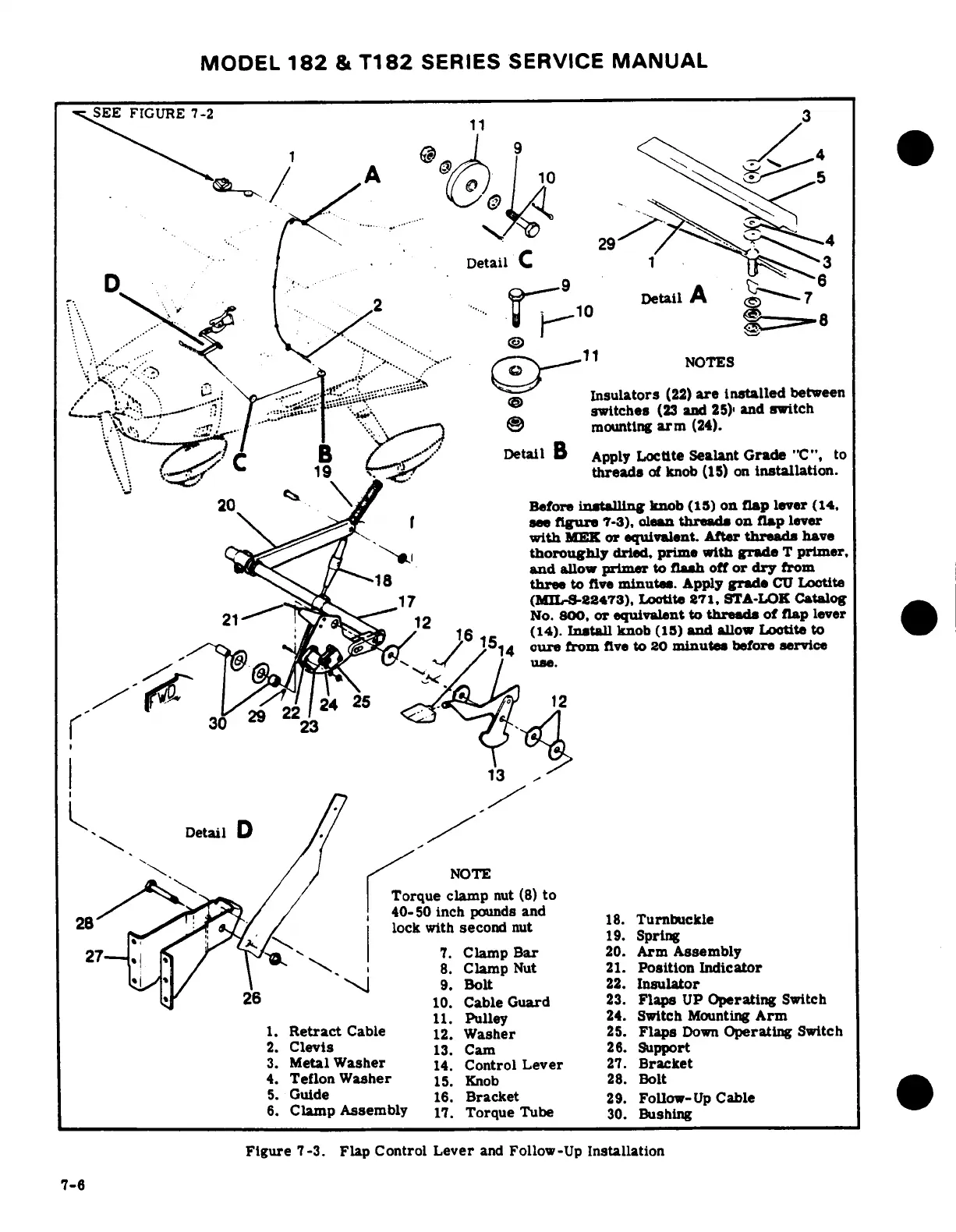
Cessna 182 1978 - Flap Control Lever and Follow-Up Installation

Cessna 182 1978
680 pages
Print Icon
To Next Page IconTo Next Page
To Previous Page IconTo Previous Page
Loading...
MODEL
182
&
T182
SERIES
SERVICE
MANUAL
SEE
FIGURE
7-2
".
" ..
Detail
C
1
A
D
2
Detail
A
6
/V--. , .
1
:?
i,..
>""
rV
-11
NOTES
j ;;\. i>S-,: \
..
;
-
;;:.-
H
^ 7
Insulators
(22)
are
installed
between
^. --
:
; „.d---
. :
/
^3!
*~-"s
.n
switches
(23
and
25),
and
switch
-..-
*";S.M."
f''"
''**-''*^^^}
.
mounting
arm
(24).
B*:.
/- .,Detail
B
Apply
Loctite
Sealant
Grade
"C",
to
'19
threads
of
knob
(15)
on
installation.
20
Before
installing
knob
(15)
on
flap
lever
(14,
\ _r t
bsee
figure
7-3),
olean
threads
on
flap
lever
with
MEK
or
equivalent.
After
threads
have
thoroughly
dried,
prime
with
grade
T
primer,
18< \1 a
~
and
allow
primer
to
flash
off
or
dry
from
^^s/y
18 'three
to
five
minutes.
Apply
grade
CU
Loctite
_I
4
17
(MIL-S-22473),
Lootite
871,
STA-LOK
Catalog
21
-'"
I
'
mS^
^
12
0
No.
800.
or
equivalent
to
threads
of
flap
lever
16
e
(14).
Install
knob
(15)
and
allow
Lootito
to
/ C */
/154
cure
from
five
to
20
minutes
before
service
30
29
2224
25
<3
l
'
r
13
L
Detail
D
NOTE
Torque
clamp
nut
(8)
to
O2~B""
^^
*>»^Sit
j
/40-50
inch
pounds
and
18
Turbuckle
lock
with
second
nut
19.
Spring
\^
^^
'i^U</\
19.
Sprlng
27
7.
Clamp
Bar
20.
Arm
Assembly
/
\ \
8.
Clamp
Nut
21.
Position
Indicator
./
I
9.
Bolt
22.
Insulator
·
-
26
10.
Cable
Guard
23.
Flaps
UP
Operating
Switch
11.
Pulley
24.
Switch
Mounting
Arm
1.
Retract
Cable
12.
Washer
25.
Flaps
Down
Operating
Switch
2.
Clevis
13.
Cam
26.
Support
3.
Metal
Washer
14.
Control
Lever
27.
Bracket
4.
Teflon
Washer
15.
Knob
28.
Bolt
5.
Guide
16.
Bracket
29.
Follow-Up
Cable
6.
Clamp
Assembly
17.
Torque
Tube
30.
Bushing
Figure
7-3.
Flap
Control
Lever
and
Follow-Up
Installation
7-6

Table of Contents

Related product manuals