EasyManua.ls Logo

Cessna 182 1978 - Removal and Installation of Battery Pack

Cessna 182 1978
680 pages
Print Icon
To Next Page IconTo Next Page
To Previous Page IconTo Previous Page
Loading...
MODEL
182
&
T182
SERIES
SERVICE
MANUAL
16-115.
REMOVAL
AND
INSTALLATION
OF
ANTEN-
g.
Stamp
the
new
replacement
date
on
the
outside
NA.
(See
figure
16-18.)
of
the
ELT.
The
date
should
be
noted
on
the
switch-
a.
Disconnect
co-axial
cable
from
base
of
antenna.
ing
nameplate
on
the
side
of
the
unit
as
well
as
on
b.
Remove
the
nut
and
lockwasher
attaching
the
the
instruction
nameplate
on
top
of
the
unit.
antenna
base
to the
fuselage
and
the
antenna
will
be
free
for
removal.
c.
To
reinstall
the
antenna.
reverse
the
preceding
steps.
The
battery-pack
has
pressurized
contents.
Do
not
recharge,
short
circuit or
dispose
of
in
fire.
The
C589511-0111
and
C589511-0119
co-
axial
cable
must
be
installed
as
indicated---
on
the
cable
sleeve.
Cable
end
marked
Be
sure
to
enter
the
new
battery-pack
ex-
"TO
ANT"
must
be
connected
to
the
ELT
piration
date
in
the
aircraft
records.
It
is
antenna,
and
the
end
marked
"TO
ELT"
also
recommended
this
date
be
placed
in
must
be
connected
to
the
C589511-0113/
your
ELT
Owner's
Manual
for
quick
refer-
-0117
and
C589511-0103/-0104
transmit-
ence.
ters.
NOTE
Upon
reinstallation
of
antenna,
cement
rubber
boot
(14)
using
RTV102,
General
Electric
Co.
or
equivalent,
to
antenna
whip
only;
do
not
apply
adhesive
to
fuse-
lage
skin
or
damage
to
paint
may
result.
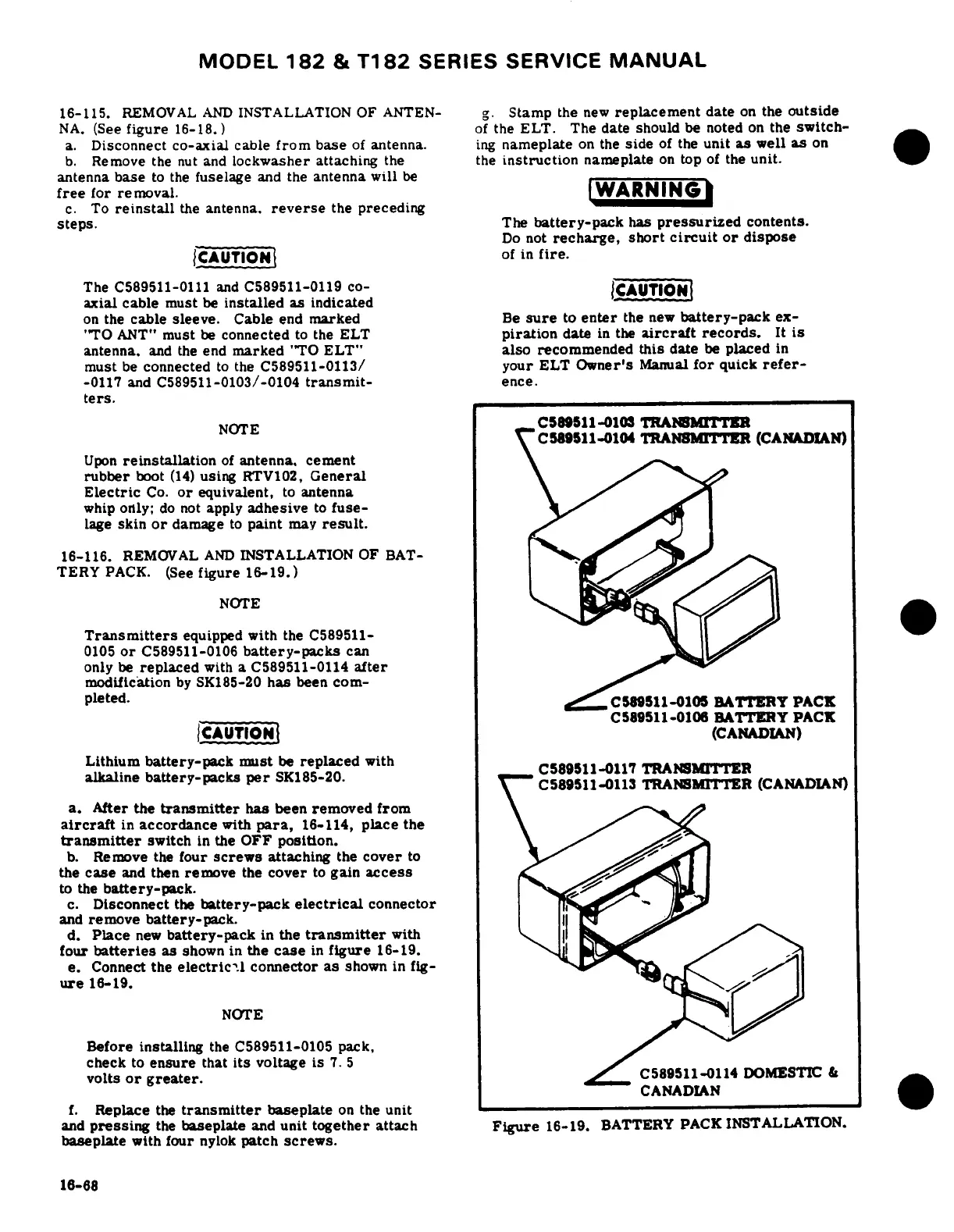
16-116.
REMOVAL
AND
INSTALLATION
OF
BAT-
TERY
PACK.
(See
figure
16-19.)
NOTE
Transmitters
equipped
with
the
C589511-
0105
or
C589511-0106
battery-packs
can
only
be
replaced
with
a
C589511-0114
after
modification
by
SK185-20
has
been
com-
pleted.
C58511-0105
BATTERY
PACK
C589511-0106
BATTERY
PACK
i
CAUTION
(CANADIAN)
Lithium
battery-pack
must
be
replaced
with
C589511-117
TRANSM
ER
alkaline
battery-packs
per
SK185-20.
C589S110113
TRANSMTTER
(CANADIN)
a.
After
the
transmitter
has
been
removed
from
aircraft
in
accordance
with
para,
16-114,
place
the
transmitter
switch
in
the
OFF
position.
b.
Remove
the
four
screws
attaching
the
cover
to
the
case
and
then
remove
the
cover
to
gain
access
to
the
battery-pack.
c.
Disconnect
the
battery-pack
electrical
connector
and
remove
battery-pack.
d.
Place
new
battery-pack
in
the
transmitter
with
four
batteries
as
shown
in
the
case
in
figure
16-19.
e.
Connect
the
electrical
connector
as
shown
in
fig-
ure
16-19.
NOTE
Before
installing
the
C589511-0105
pack,
check
to
ensure
that
its
voltage
is
7.
5
volts
or
greater.
C589511-0114
DOMESTIC
&
CANADIAN
f.
Replace
the
transmitter
baseplate
on
the
unit
_v
and
pressing
the
baseplate
and
unit
together
attach
Figure
16-19.
BATTERY
PACK
INSTALLATION.
baseplate
with
four
nylok
patch
screws.
16-68

Table of Contents

Related product manuals