User's Manual
252
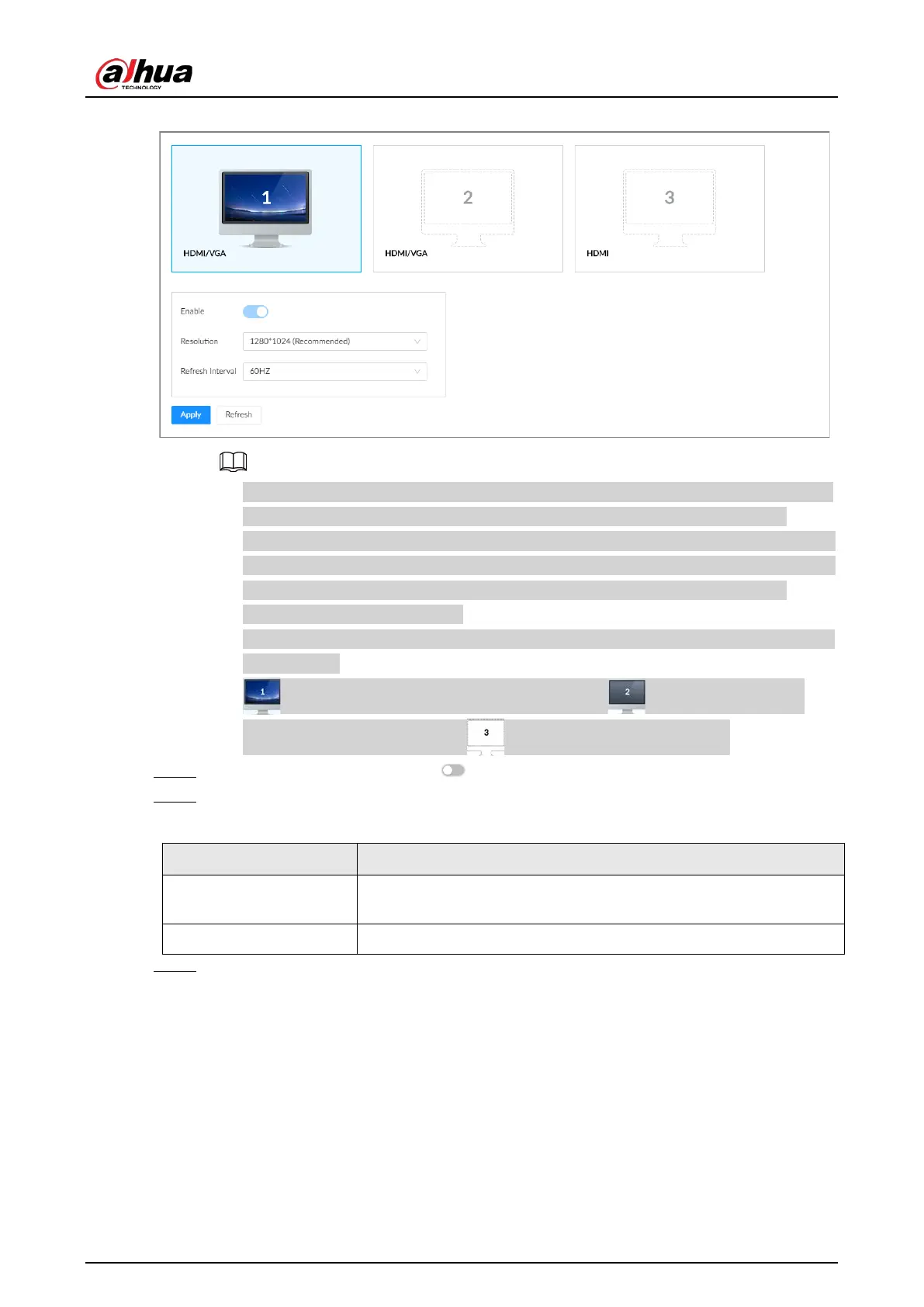
Figure 8-83 Display
●
SN 1–3 refers HDMI 1–HDMI 3. Among which, HDMI/VGA is the main display, while the
VGA and HDMI 1 outputs the same video. The 1–3 monitors represent monitors
connected to HDMI 1–HDMI 3. The main screen refers to the monitor connected to VGA
or HDMI 1 port. The monitors connected to the HDMI 2 and HDMI 3 are the sub screens.
The main screen and sub screen display different content and support different
resolutions and refresh intervals.
●
VGA and HDMI 1 output the same video source. The 3 HDMI ports can output different
video sources.
●
means the monitor is connected and enabled. means the monitor is
connected but has not enabled. means no monitor is connected.
Step 4 Select a monitor, and then click to enable the selected monitor.
Step 5 Set parameters.
Table 8-36 Display parameters description
Parameter Description
Resolution
Set the resolution of the monitors. Different monitors support
different resolutions.
Refresh Interval Set refresh rate of the display.
Step 6 Click
Apply
.
8.7.4 Schedule
Configure schedules. When you are configuring alarm, recording and other settings, you can use the
schedule to define the validity periods. The system only triggers the corresponding operations
during the specified schedule.


 To Next Page
 Loading...

