V1108, 8.12
the next start action, the stock counting value is reset to its original value.
When up counting is selected, the counter is increment after each press cycle.
Down counting can be useful if a pre-planned quota must be produced. Up counting
could be used to give a report on production progress.
Press the key to select the required setting.
Auto bend change mode step . . . . . . . . . . . . . . . . . . . . . . . . . . . . . . .CS
This parameter can be used to have automatic step change in the bending process with
the "step by step"-mode. To be programmed 0 or 1.
When programmed 0:
No automatic step change (next bending parameters active) will take place. To perform
the next bending you must select the new bending and press the start button.
When programmed 1:
The next bending parameters are loaded automatically but the axes will start positioning
after the start button has been pressed.
Parallelism offset . . . . . . . . . . . . . . . . . . . . . . . . . . . . . . . . . . . . . . . . .PO
An overall parallelism, valid for the complete Y-axis stroke, can be programmed with this
parameter. The programmed value will be checked against the maximum allowed value
during production. The parallelism which can be programmed for each bending (Y2) is
only active below the clamping point. The parallelism below the clamping point is the
sum of the two parameters (Y2 + Par. offset).
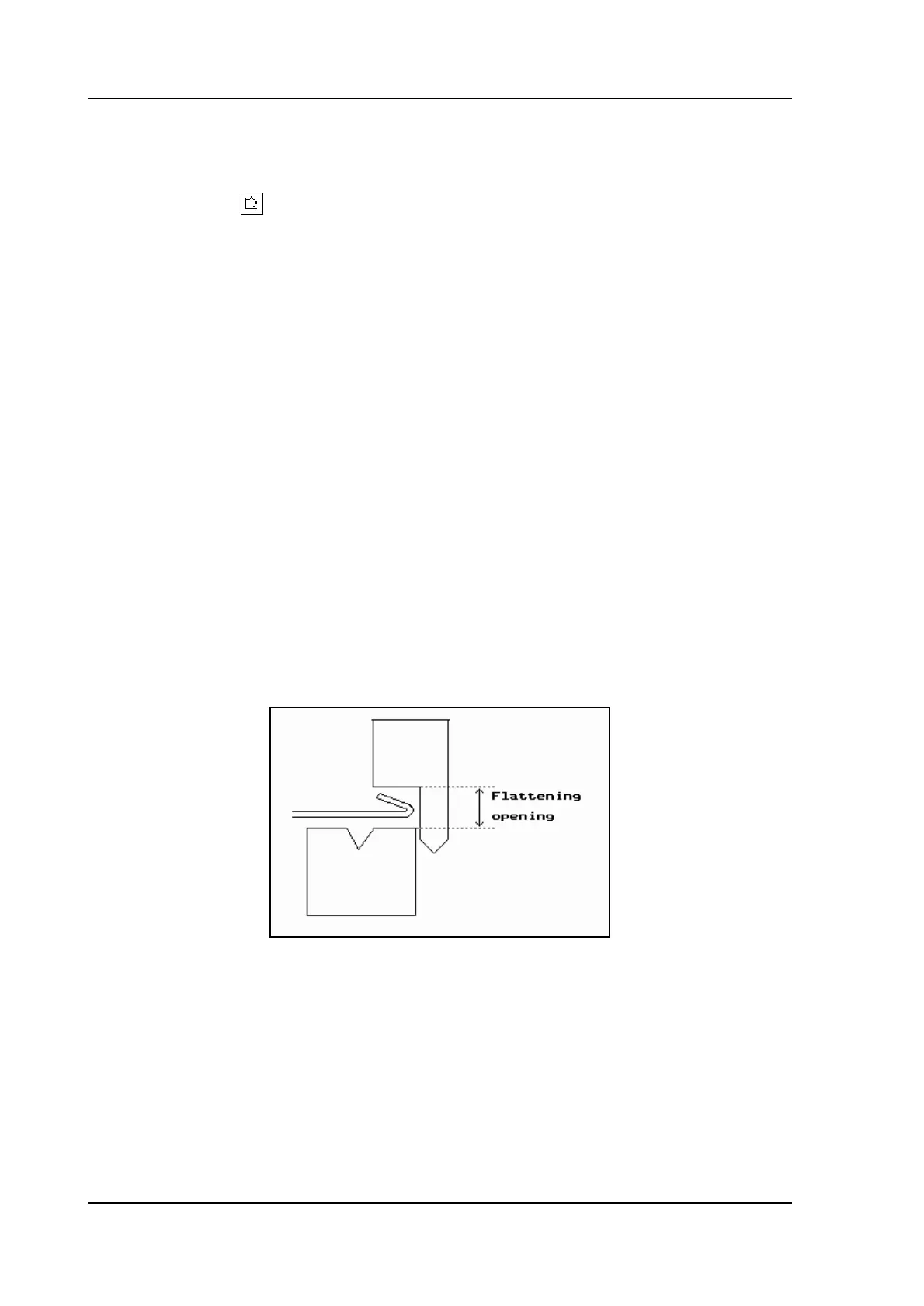
Flattening opening . . . . . . . . . . . . . . . . . . . . . . . . . . . . . . . . . . . . . . . .OP
Depending on the construction of your machine you can program here an openings
position for your punch at which position you can put in your product to flatten the
particular bend. See figure below. The opening position will also take 2x sheet thickness
into account.
8.j
Pressure correction . . . . . . . . . . . . . . . . . . . . . . . . . . . . . . . . . . . . . . .PC
Percentage of calculated force which actually controls the pressure valve.
Clamping correction . . . . . . . . . . . . . . . . . . . . . . . . . . . . . . . . . . . . . . .CC
The position of the beam at which the sheet is clamped, is calculated. In order to have
a firm clamped sheet it is possible to offset the calculated pinch point with the value here
programmed. A positive value will result in a deeper position, a negative value in a
higher position of the beam.



 To Next Page