2
Copy Operations
2-88 ineo+ 650/550/451
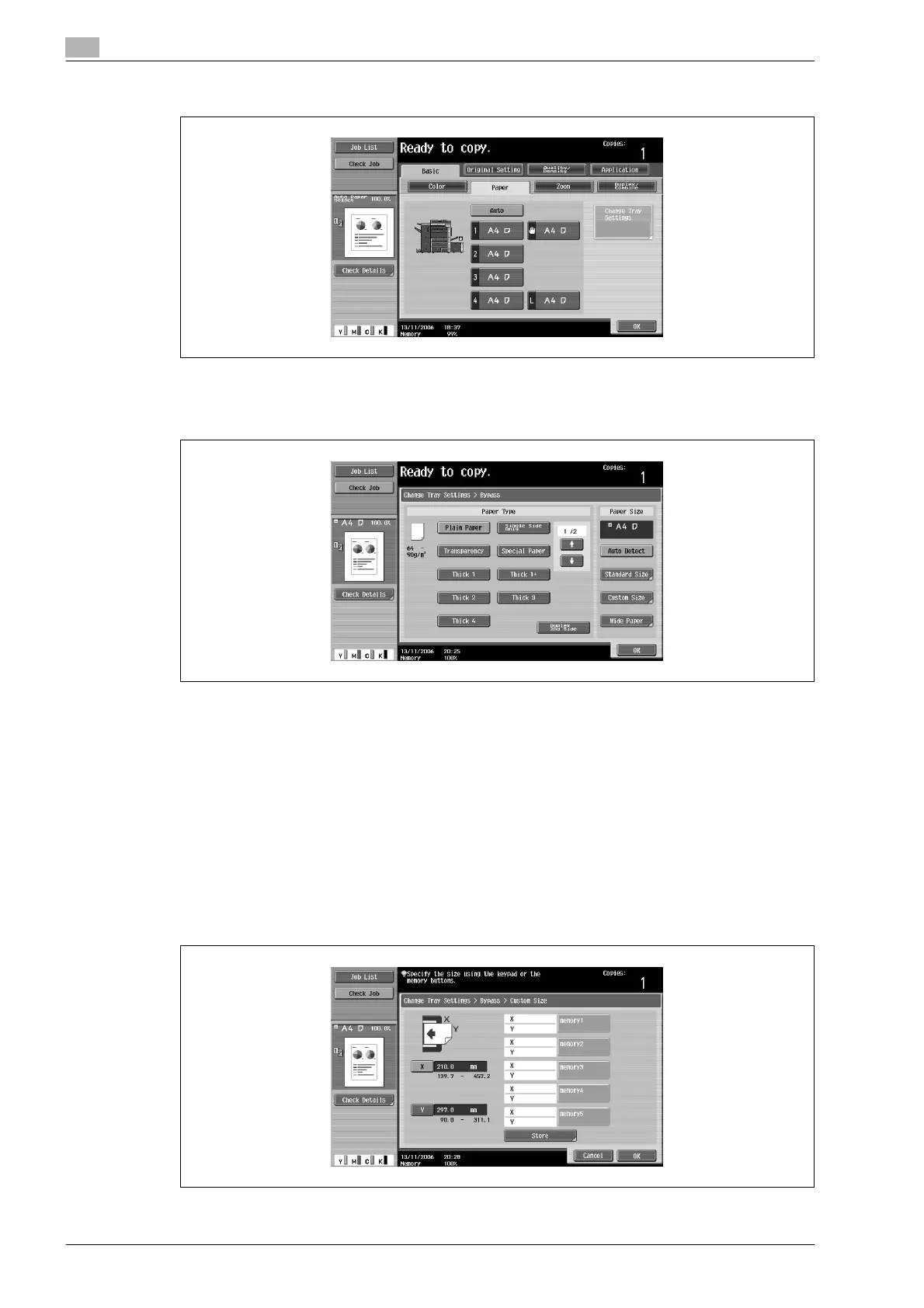
2 Select the button for the bypass tray.
3 Touch [Change Tray Settings].
4 Touch [Custom Size].
The Custom Size screen appears.
5 Specify the X and Y sides of the paper, and then touch [Store].
– Make sure that [X] is selected, and then use the keypad to type in the length of side X (between
139.7 mm and 457.2 mm).
– Touch [Y] to select it, and then use the keypad to type in the length of side Y (between 90.0 mm and
311.1 mm).
– Check the illustration in the screen for the sides that are considered X and Y.
– If a value outside the allowable range is specified, the message "Input error" appears. Type a value
within the allowable range.
– If the value was incorrectly entered, press the [C] (clear) key in the keypad to erase the value, and
then specify the correct value.
To cancel changes to the settings, touch [Cancel].










 To Next Page