ineo+ 650/550/451 3-5
Print Operations
3
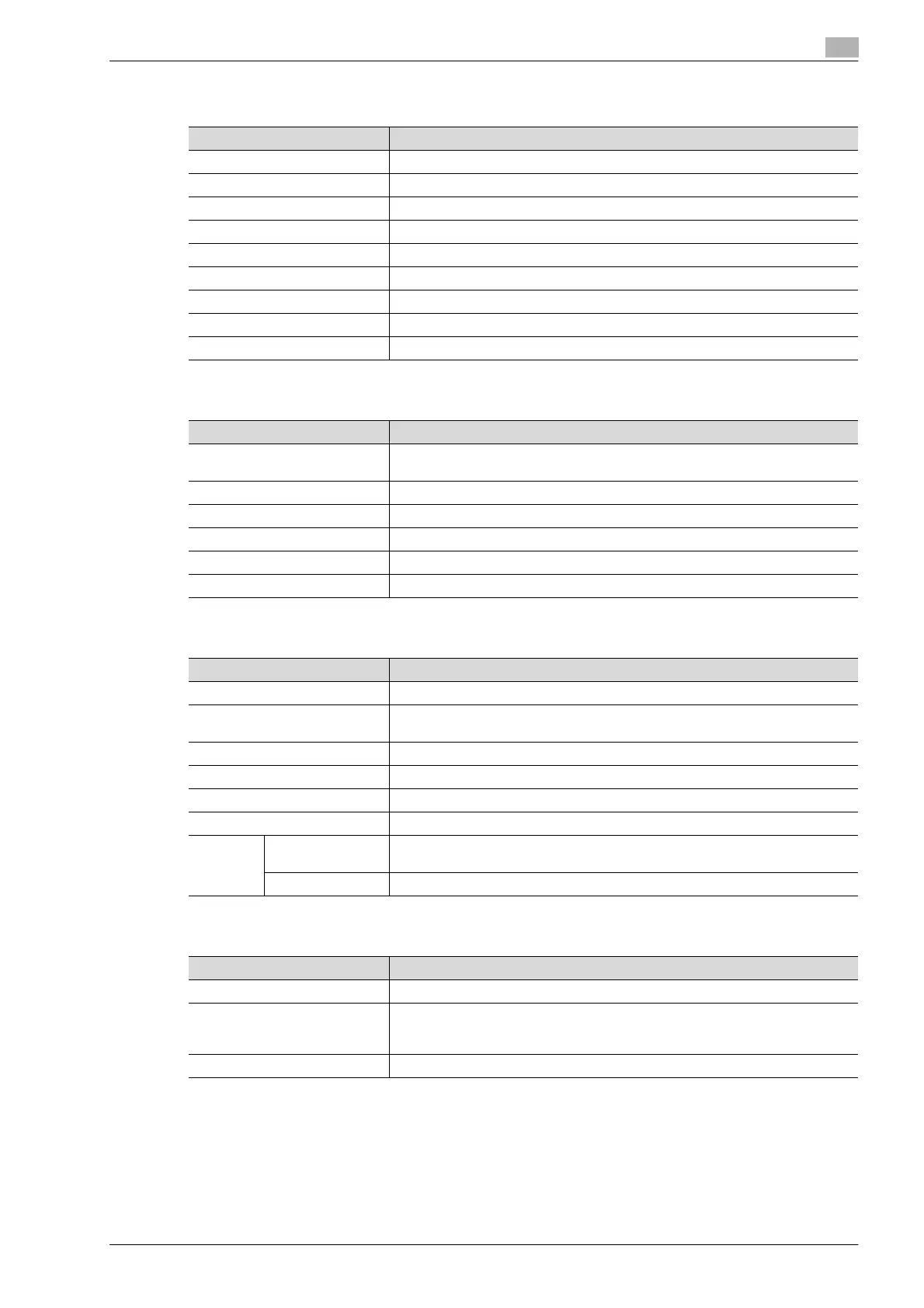
Cover mode tab
Stamp/Composition tab
Quality tab
Other tab
Item Function
Front Cover Attaches a front cover page.
Front Cover Tray Selects the paper tray for the front cover.
Back Cover Attaches a back cover page.
Back Cover Tray Selects the paper tray for the back cover.
Front Cover from Post Inserter Attaches a front cover from the post inserter.
Back Cover from Post Inserter Attaches a back cover from the post inserter.
Per Page Setting Inserts paper between pages and switches the paper and tray for each page.
Transparency Interleave Outputs and inserts interleaves when printing overhead projector transparencies.
Interleave Tray Selects the input tray for the transparency interleaves.
Item Function
Watermark Prints a watermark (text stamp) on the page being printed. Watermarks can be
added, changed, or deleted by clicking the [Edit] button.
Create Overlay File Prints an original document on top of an overlay that was created separately.
Copy Protect Prints a special pattern to prevent copying.
Date/Time Prints the date and time.
Page Number Prints the page number.
Header/Footer Prints a header and a footer.
Item Function
Select Color Specifies the color for printing.
Quality Adjustment Adjusts the image quality. You can select "Simple" to adjust entire documents or
"Detail" to adjust the text, photos, figures, tables, and graphs in the document.
Color Settings Prints with a quality suitable for the selected original document.
Pattern Specifies the graphic pattern details.
Image Compression Specifies the compression ratio for a graphic image.
Glossy Mode Prints with a gloss.
Font Set-
tings
Download Font
Format
Selects whether the fonts are downloaded to the printer as bitmap or outline.
Use Printer Fonts Selects whether to use TrueType fonts or the printer fonts when printing.
Item Function
Excel Job Control Controls jobs so that they are not separated when printing in Microsoft Excel.
Remove White Back-ground Removes the white background when creating an overlay file with Microsoft
PowerPoint. If this check box is cleared, the background is not removed and the
overlay file is created according to the orig-inal document data.
Driver Version Info Displays the version information of the printer driver.










 To Next Page