SOI 02.10 FV 94/142 599 70 59-01
2.12 - ADJUSTING THE "HINGED" DOOR ALIGNMENT
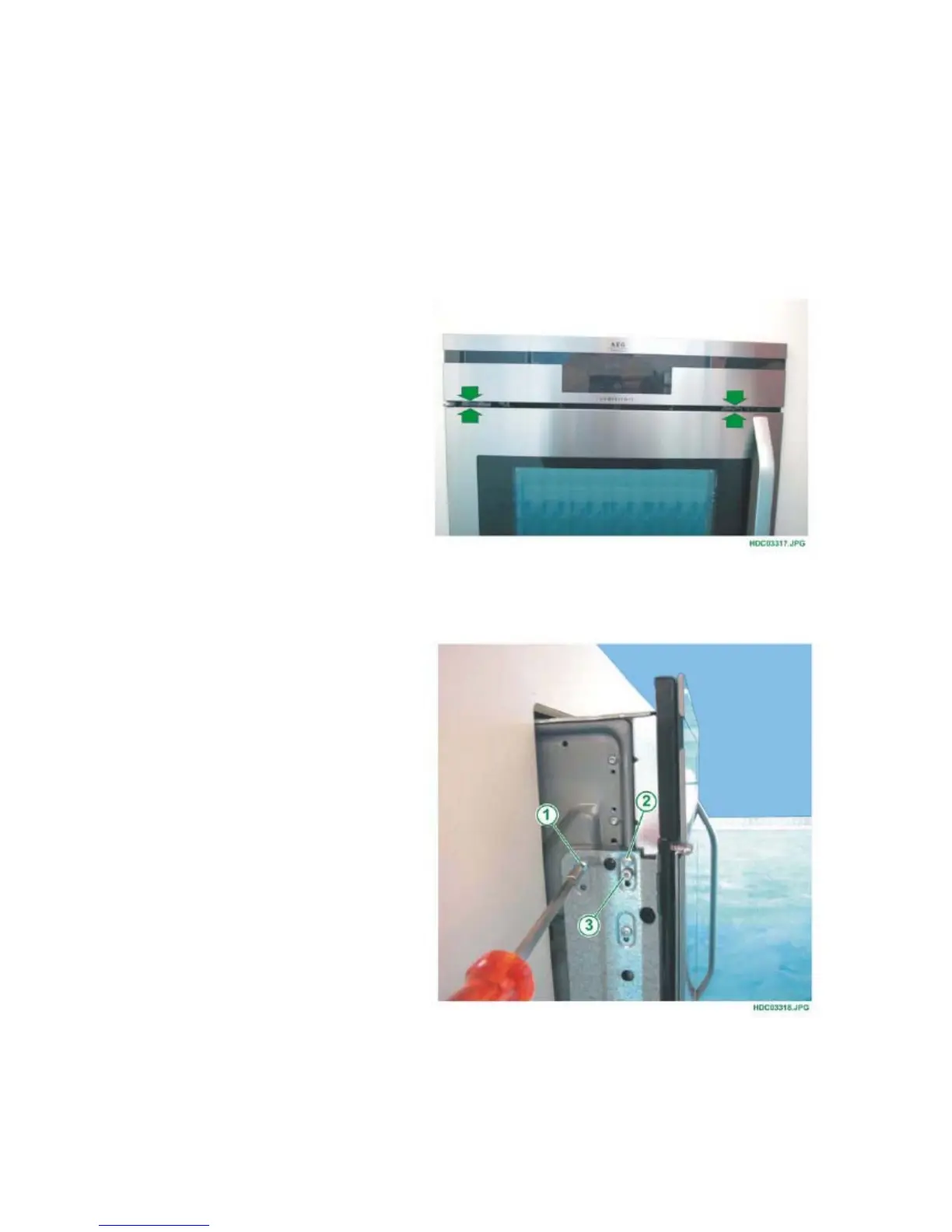
To align the door to the front panel (see Fig. 193), once you have extracted the oven from its
compartment - even partially - simply turn the adjustment screw (see Fig. 194 Pos.1) in the
following sequence:
1 - Loosen the two upper screws (see Chapter 2.12.1).
2 - Turn the adjustment screw until the door is aligned with the front panel, keeping the door
open during the adjustment procedure (see Chapter 2.12.2).
3 - Tighten the two upper screws (see Fig. 194 Pos. 1 and 2).
Fig. 193
2.12.1 - LOOSENING THE FIXING SCREWS
Fig. 194
1 - FIXING SCREW
UPPER REAR
2 - FIXING SCREW
UPPER FRONT
3 - ADJUSTMENT SCREW
FOR DOOR ALIGNMENT



 To Next Page
 Loading...