49
5-5-2. Selecting Preview Output
The outputs from M/E1PREV and M/E2PREV connectors are the previews for M/E1 and
M/E2 and their signals can be selected in the menu respectively. Select the output signals of
the preview as shown in the procedure below.
Display the PREVIEW menu
<HVS-16/24OUA>
Press the PREV button in the M/E1 or M/E2 group of the menu section.
<HVS-12ROUA>
Press the USER button where the PREVIEW function is assigned. (See section 15-2.
USER Buttons.)
To monitor all these signals, turn the controls F1 to F4 to set BKGD, KEY1, KEY2, and
KEY3 all to ON as shown in the figure above. To check the output of KEY3, set KEY3 to
ON and all others to OFF.
NOTE
Press the PREV button to turn it on and display the menu. The menu button(s) of the
bus where PREVIEW is set to ON (TRANS/BKGD, KEY1, KEY2, KEY3) lights up.
The display of a signal can also be turned on and off by pressing the menu button
while holding down the PREV button. This PREV setting is applied to the PREV and
AUX outputs on the MU rear panel, where ”preview” is selected for output signal.
5-5-3. Selecting AUX / CLEAN Output
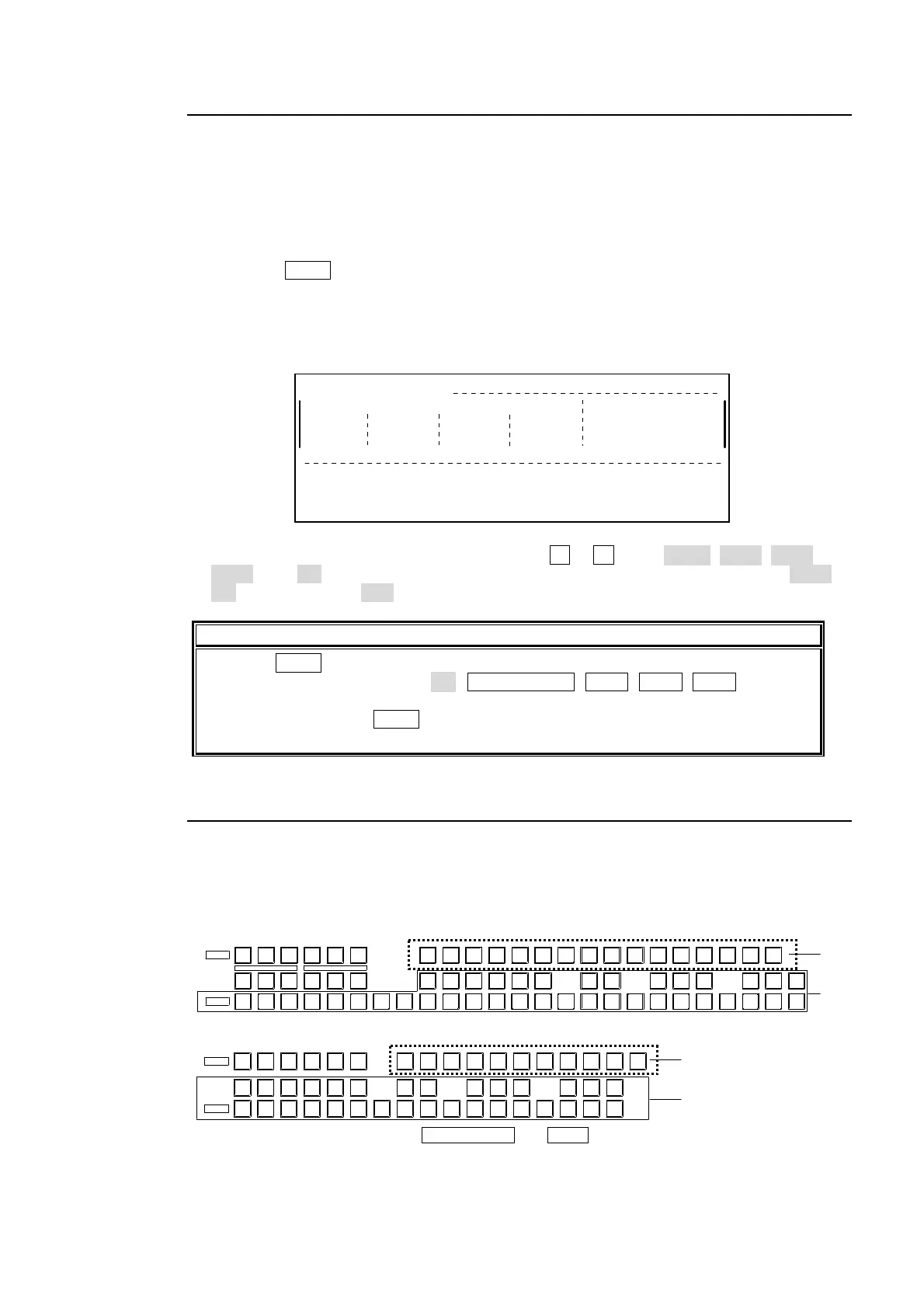
Available output signals for AUX1 to AUX10 (AUX11-16 added if the option installed) are
PGM, PREV, CLN, DVE KEY and all signals assignable to M/E bus.
Press a button in the BUS SELECT section to select an output target.
PREVIEW SELECT MENU
KEY1
ON
KEY2
ON
BKGD
ON
KEY3
ON
HVS-24OUA
Select the
output target.
Select the
output signal.
24232221201918171615654321 1413121110978
M/E1 M/E2
AUX/KEY
12 456
AUX
789
OUT A OUT B
AUX
10 11 12
AUX
13
AUX
14
AUX
15
AUX
16
M/E1
PGM
M/E1
PREV
M/E1 M/E2 M/E2 M/E2
BUS SELECT
KEY1
SRC
KEY2
SRC
KEY1
INS
KEY2
INS
KEY3
SRC
KEY3
INS
KEY1
SRC
KEY1
INS
KEY2
SRC
KEY3
SRC
KEY2
INS
KEY3
INS
AUX AUX
AUX
3
AUX
UTL1 UTL2
AUX
MV1 MV2
AUX AUX
KEY KEY
AUX AUX AUX
CLEAN PGM PREV CL EAN
MATT
Select the
output target.
.
Select the
output signal.
HVS-16OUA
* To select AUX11 to 16, press AUX1 to AUX6 with SHIFT pressed.
P/PP/PM/EM/EM/E
KEY3 KEY1KEY1 KEY2 KEY3KEY2
AUX
7
SHIFT
AUX1
3
10
AUX
9
AUX
8
AUX
25
AUXAUX AUX
14
AUX AUX
P/PP/PP/PM/EM/EM/EKEY
PREVPGM
6
OUT A PGM PREV
KEY
OUT B
MATT
16151413121110987654321
AUX/KEY
MV2MV1UTL2UTL1
CLEAN CLEAN
BUS SELECT
P/P



 To Next Page