Section 1
1-14 © Copyright 2009 GBC. All rights reserved. Advanced Punch Service Manual
1.4.7 Door Latch Inspection
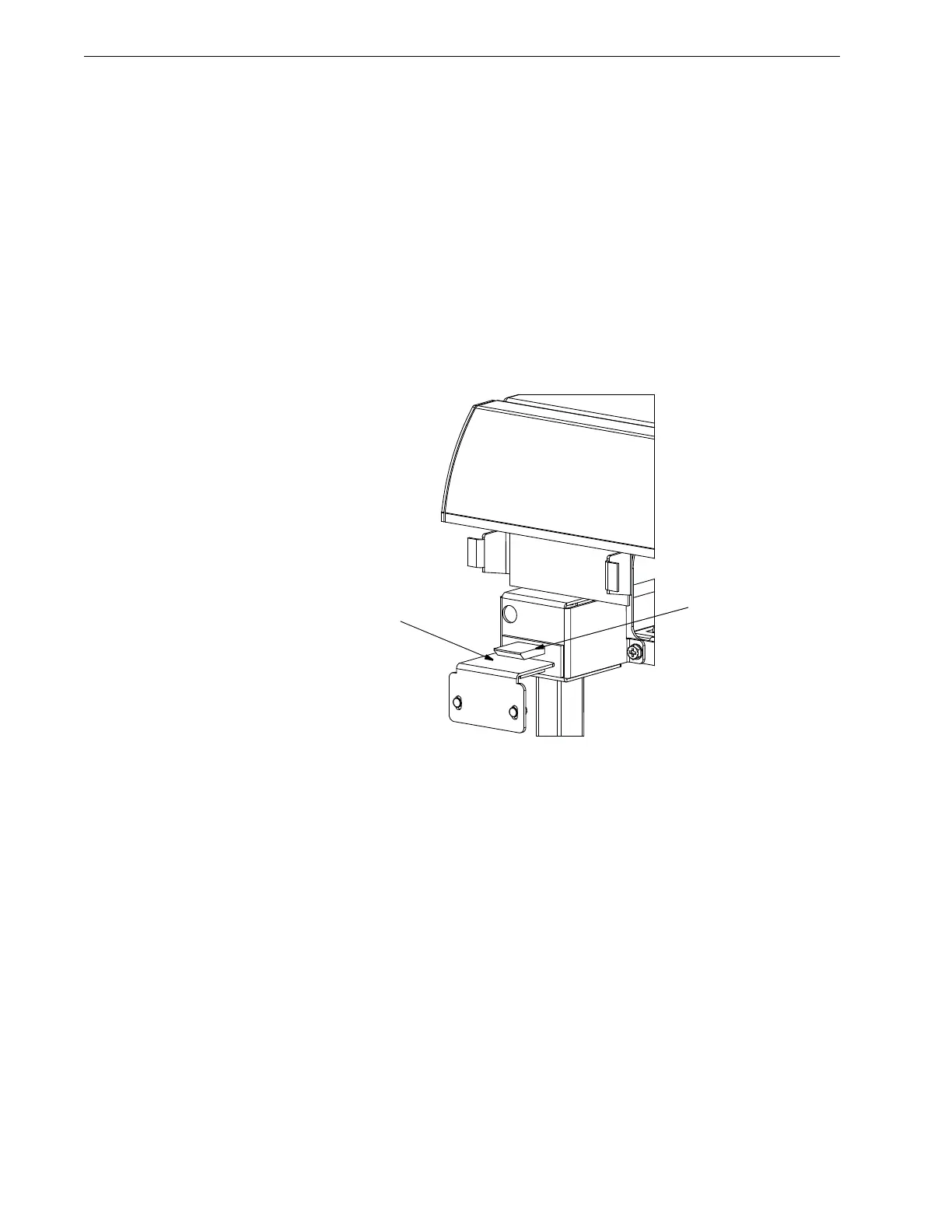
The door latch must hold the door closed and ensure that the switch activation tab
is depressing the door switch [1]. The switch tab [2] should press the switch button
just so that it is close to bottoming.
Maintenance Schedule
Inspect every 750K cycles.
Procedure
• Ensure latch holds door closed.
• Ensure switch is activated when the door is closed.
• To adjust the door latch, see “Door Latch” on page 4-5.
Figure 1.10 Door Switch Tab and Switch.
1.4.8 Separating Punch From Printer
Some procedures require separating the Advanced Punch from the printer and
finisher. Refer to “Separating the Punch From the Printer” on page 4-1.
1.4.9 Rear Cover Removal
Some procedures require the removal of the rear cover. Refer to “Removing the
Rear Cover” on page 4-2.
[2]



 To Next Page