Repair and Adjustment Procedures
Advanced Punch Service Manual © Copyright 2009 GBC. All rights reserved. 4-15
4.5 Punch Idler Rollers
Idler rollers press against the drive rollers and move the paper through the Advanced
Punch. Most can be serviced without disassembling punch components. Unplug unit and
separate from the printer. Refer to
“Separating the Punch From the Printer” on page 4-
1.
Maintenance Schedule
Inspect and clean every 750K cycles. Refer to
“Idler Roller Inspection and Cleaning” on
page 1-21.
Replace idler rollers every 2000K cycles.
Procedure
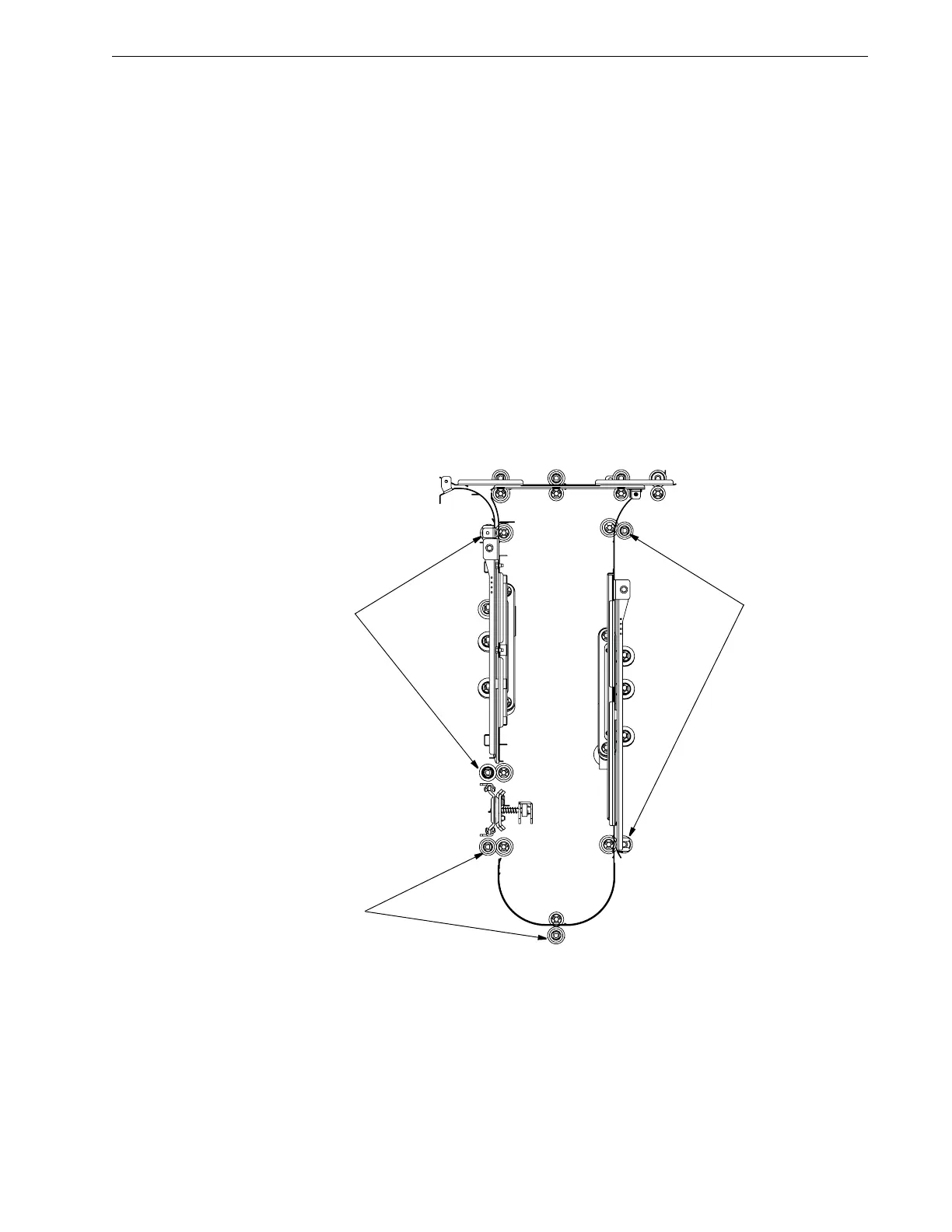
Inspect rollers for wear patterns or groves [1]. The roller surface should be even and have
a textured surface. Replace per the maintenance schedule. Idler Rollers other than the
Aligner panel idler rollers are shown in
Figure 4.16.
Figure 4.16 Punch Idler Roller Locations.
[1]



 To Next Page