10-6 10. DELTA TAU DATA SYSTEMS
UMAC
Make UMAC settings by using the software “PEWIN32PRO2 *”. For more information, refer to the UMAC manual issued by the
manufacturer.
* For Ethernet communication, PEWIN32PRO service pack 2.0 and later is necessary.
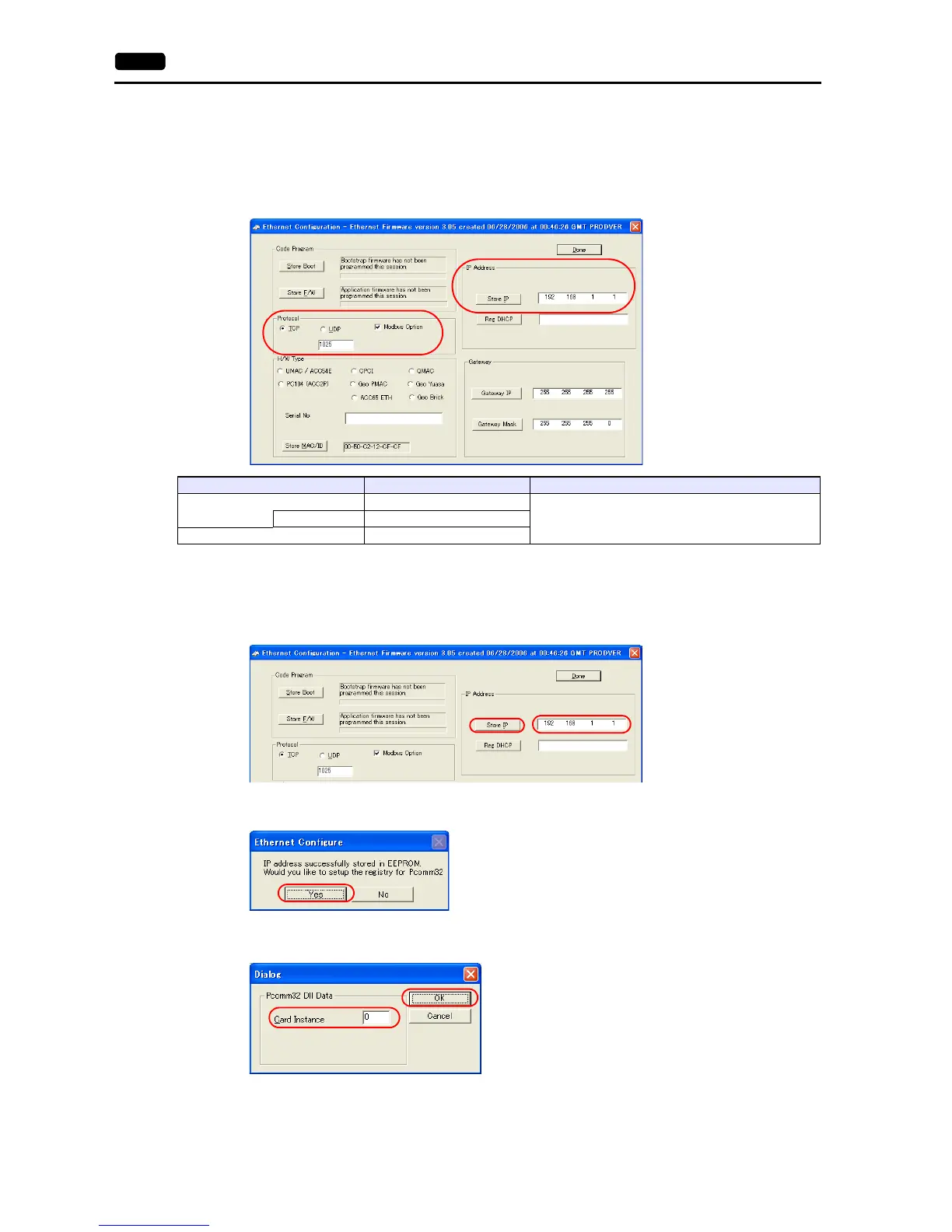
Ethernet configuration
Procedure for changing the IP address
1. Change the IP address on the [Ethernet Configuration] dialog.
2. Click [Store IP] on the [Ethernet Configuration] dialog.
3. The [Ethernet Configure] dialog is displayed.
Click [Yes].
4. The [Dialog] dialog is displayed.
Set “0” for [Card Instance] and click [OK].
Item Setting Remarks
Protocol
TCP
For more information, refer to the UMAC instruction manual.Port No. 1025 (fixed)
IP Address IP address of UMAC



 To Next Page