16-66 16. Fuji Electric
16.2.21HFR-C11K
Communication Setting
Editor
Communication setting
(Underlined setting: default)
IH Inverter
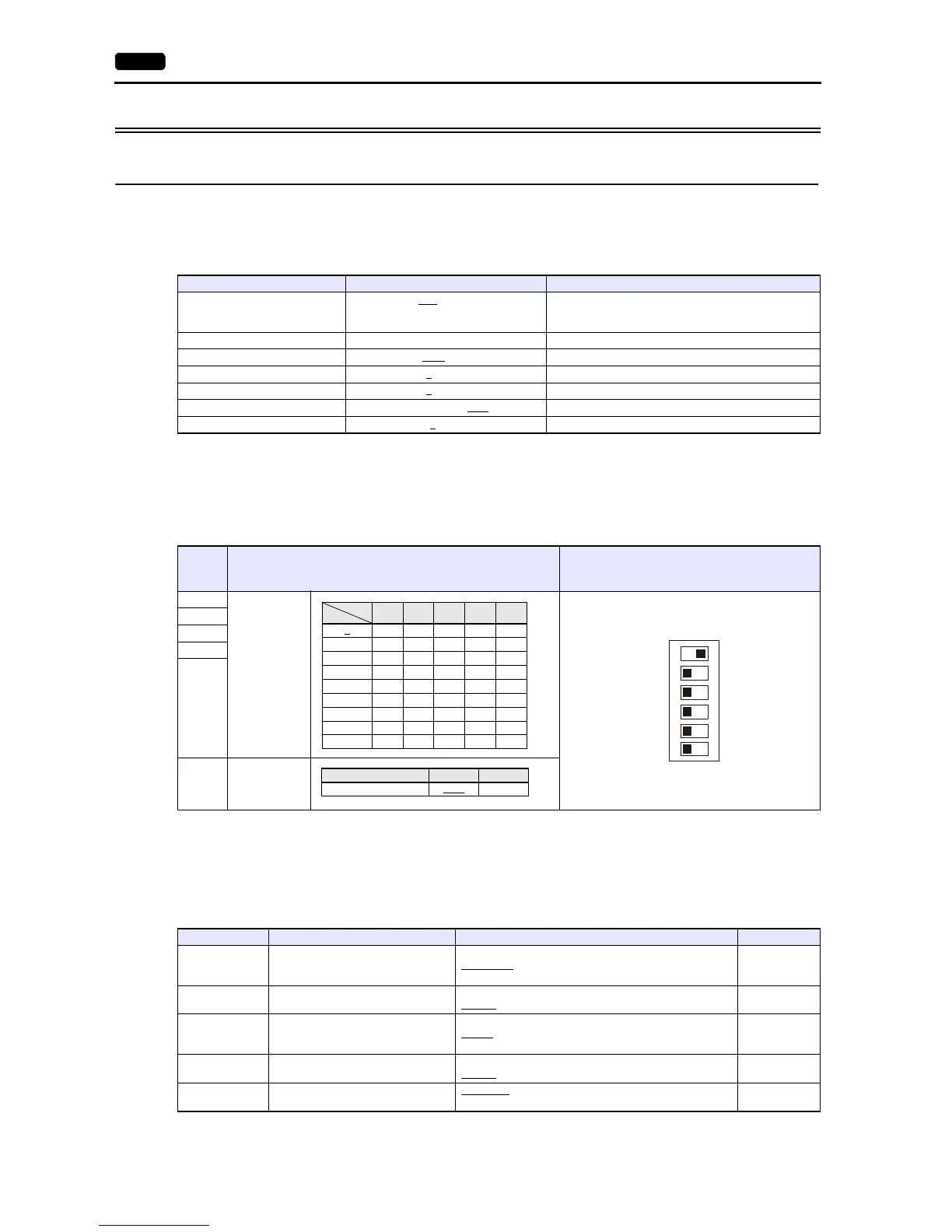
Be sure to match the settings to those made under [Communication Setting] of the editor. (Underlined setting: default)
SW3 setting (station address / terminating resistance)
*1 For connection to a V9, be sure to set the station address other than 0.
Communication setting
Set communication parameters.
Be sure to match the settings to those made under [Communication Setting] of the editor.
(Underlined setting: default)
* RS-485 communication is available when the communication is enabled by digital input.
Example: To make the communication enabled when digital input terminal X1 is turned ON;
Set “11 (RS485 communication selection (RS))” for function code i01 and turn on the digital input terminal X1 externally.
Terminals from X2 to X5 can also be used. Set the function code corresponding to the digital input terminal to use.
Item Setting Remarks
Connection Mode
1:1 / 1:n
/ Multi-link2 /
Multi-link2 (Ethernet) /
1:n Multi-link2 (Ethernet)
Signal Level RS-422/485
Baud Rate 4800 / 9600
/ 19200 bps
Data Length 7
/ 8 bits
Stop Bit 1
/ 2 bits
Parity None / Odd / Even
Targe t Por t N o. 1 to 31
Switch Contents
Example:
Station Address: 1
Terminating Resistance: None
1
Station
Address
*1
2
3
4
5
6
Terminating
Resistance
Function Code Item Setting Example
r 04 Baud rate
2: 4800 bps
3: 9600 bps
4: 19200 bps
3
r 05 Data length
0: 8 bit
1: 7 bits
1
r 06 Parity bit
0: None
1: Even
2: Odd
1
r 07 Stop bit
0: 2 bit
1: 1 bits
1
r 10
Communication protocol
*
0: FGI-bus
1: C9K mode
0



 To Next Page