2-4 2. ALLEN BRADLEY
1770-KF2
Setting changes will take effect when the power is turned on. After changing a setting, turn the power off and back on again.
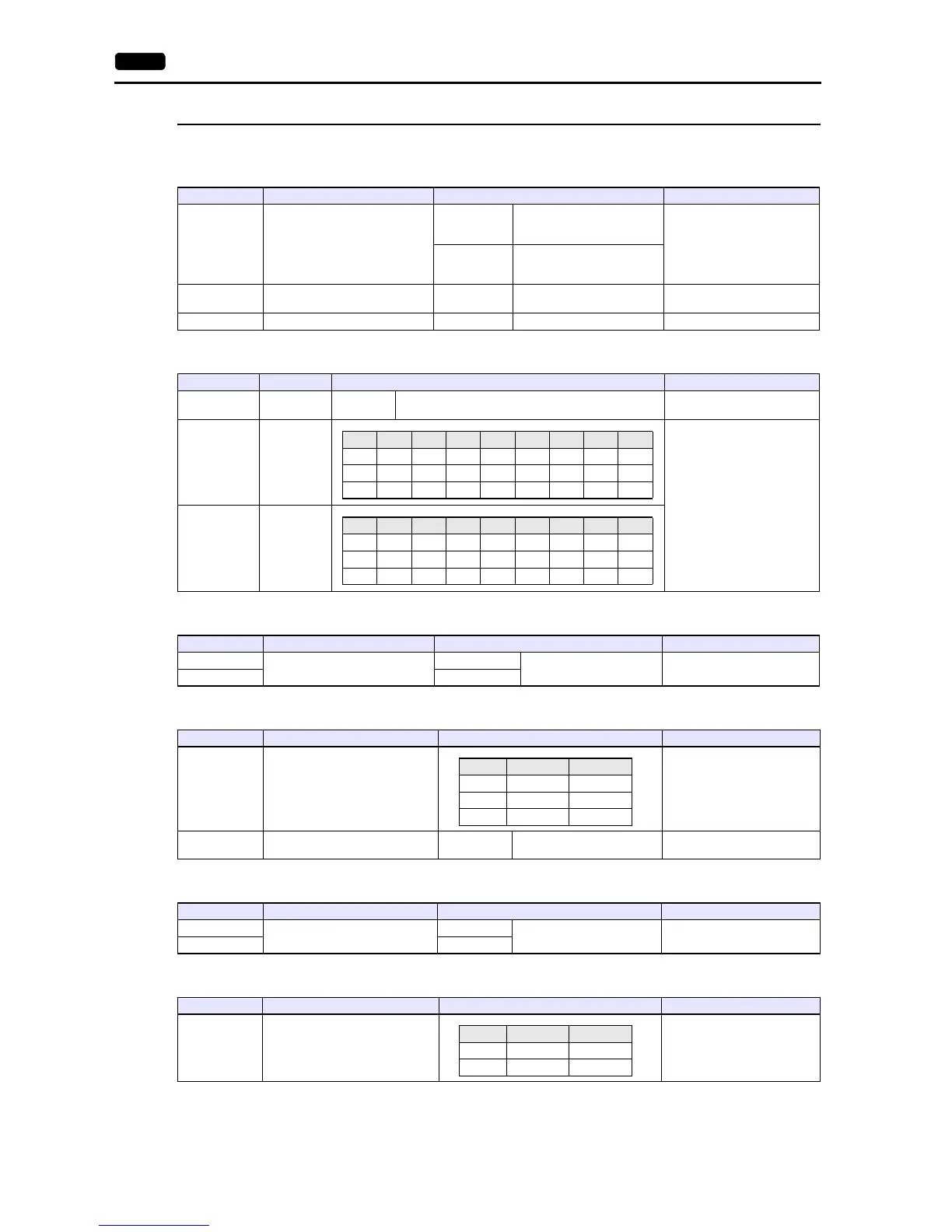
SW-1 (asynchronous link features)
SW-2, SW-3, SW-4 (station number)
SW-5 (network link communication rate)
SW-6 (asynchronous link communication rate and diagnostic commands)
SW-7 (selecting the network link)
SW-8 (RS-232-C/RS-422-A selection)
No. Item Setting Remarks
1, 2, 5 Asynchronous Link Features
SW1: OFF
SW2: OFF
SW5: OFF
Error check: BCC
Parity: None
Embedded response: No
SW1: ON
SW2: OFF
SW5: OFF
Error check: BCC
Parity: Even
Embedded response: No
3 Detect duplicate messages ON
Detect and ignore duplicate
messages
4 Hand shaking signals OFF Ignore handshaking signals
SW Item Setting Remarks
SW-2 First Digit 0
SW1: ON
SW2: ON
SW-3
Second Digit
(OCT)
Setting example:
Station number 15 (DEC) = 17
(OCT)
SW-3: ON, OFF, OFF
SW-4: ON, ON, ON
SW-4
Third Digit
(OCT)
No. Item Setting Remarks
1
Network Communication Rate
ON
57600 bps For DH+ port
2 ON
No. Item Setting Remarks
1, 2, 3 Asynchronous Communication Rate
Set the same value as the one
set on V9.
4 Diagnostic Commands ON
Execute Received Diagnostic
Commands
No. Item Setting Remarks
1
Selecting the Network Link
ON
Peer Communication Link
2 OFF
No. Item Setting Remarks
1, 2 Selection of RS-232C / RS-422-A



 To Next Page