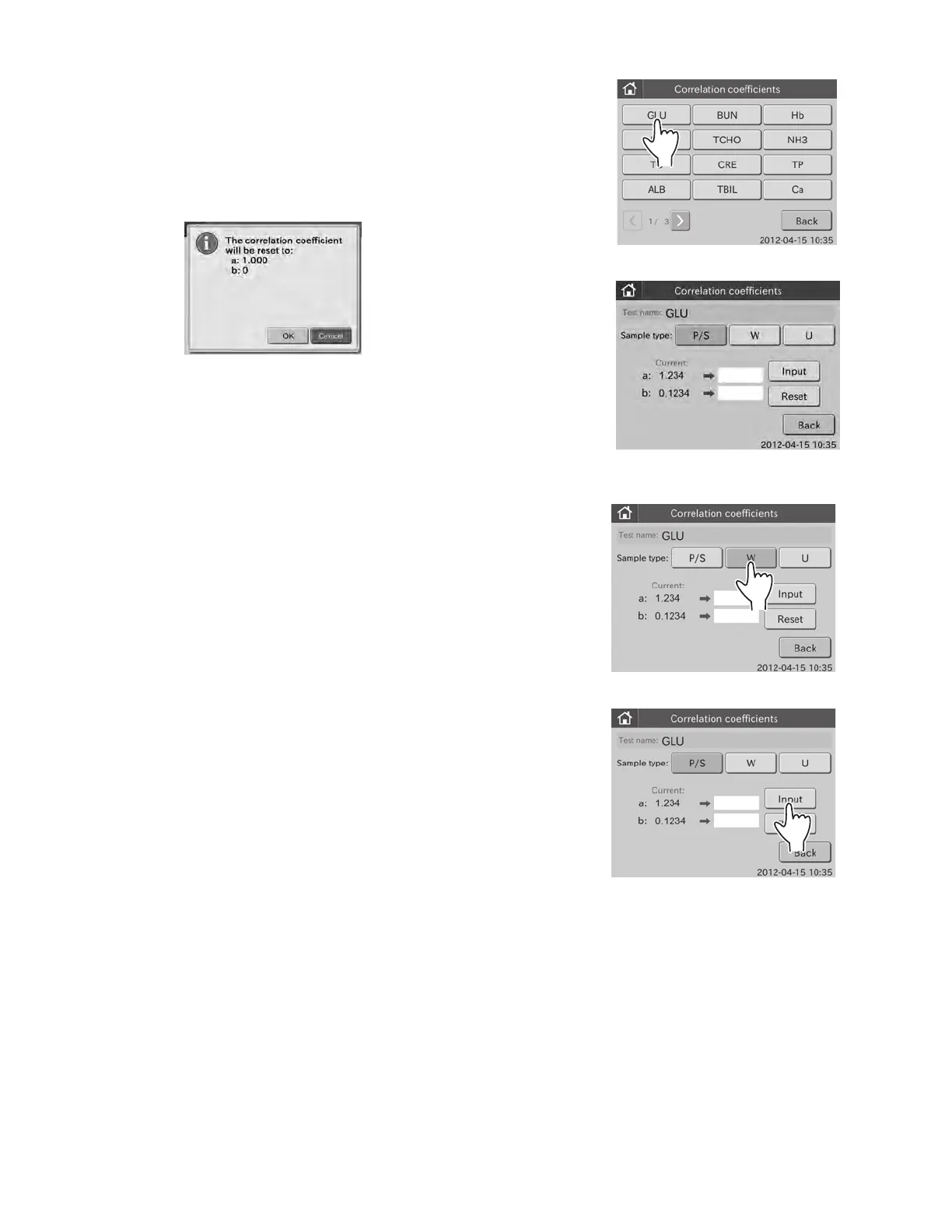
4. Touch the test name to be edited.
The edit dialogue is displayed.
NOTE: The sample type presently recorded in the analyzer has
been selected.
NOTE: When touching RESET, the reset confirmation dialogue
appears.
Touch OK to reset the selected test name and the correlation
coefficients for the selected sample type. Touch CANCEL to
cancel a reset. The display returns to the correlation coefficients
TOP dialogue.
NOTE: To cancel setting, touch BACK.
5. Change to another sample type.
a. Touch desired sample type.
6. Input correlation coefficients (a, b).
a. Touch INPUT.
The screen keyboard to input the correlation coefficient
(a ) appears.
For information about input method of the screen
keyboard dialogue, refer to Section 2.3.
NOTE: To cancel the input and return to the edit dialogue, touch
the X button.
b. Input value in the [a:], and then touch OK.
The screen keyboard to input the correlation coefficient
(b) appears.
(Example) GLU
105



 To Next Page