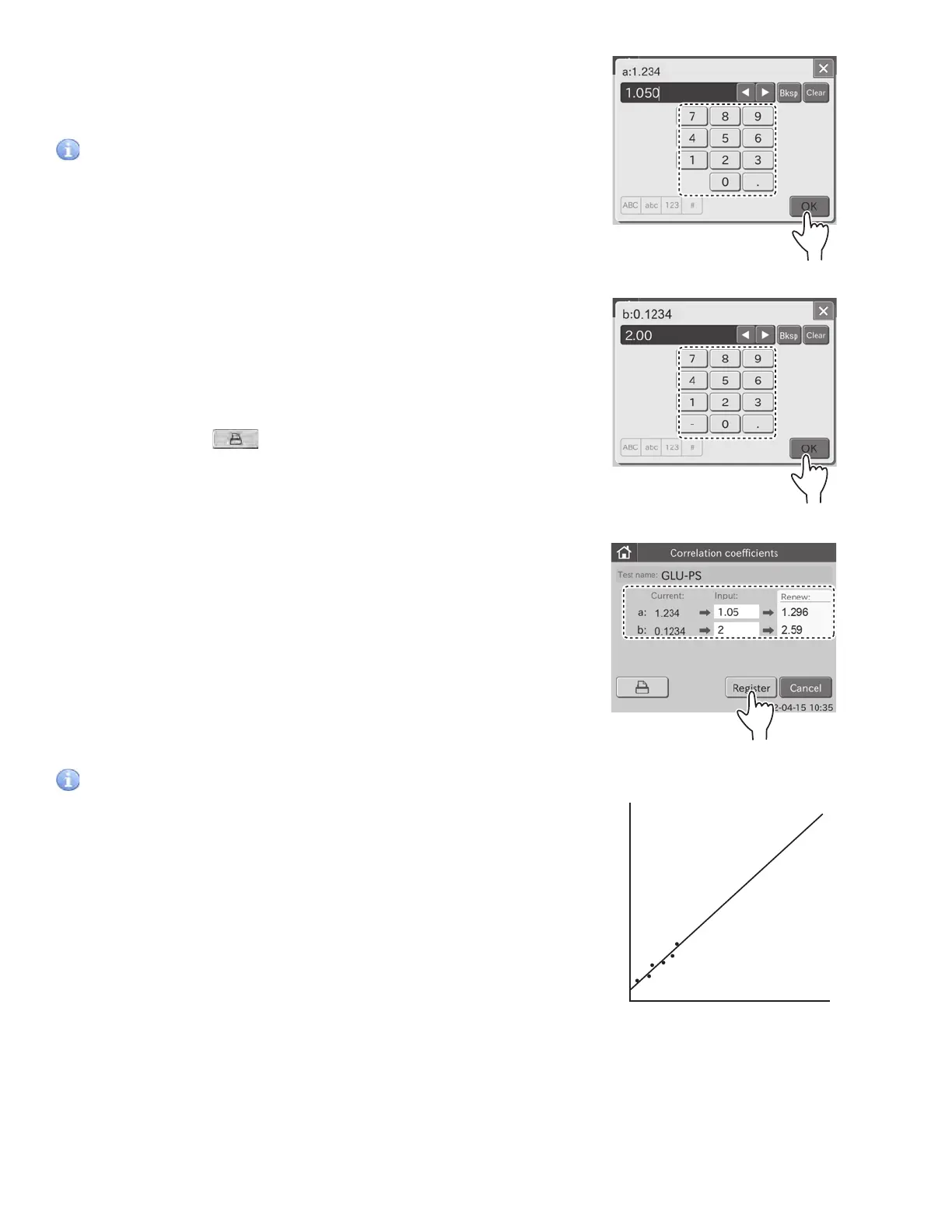
c. Input value in the [b:], and then touch OK.
The screen keyboard disappears, and the input correlation
coefficients (a, b) are displayed in the edit dialogue.
IMPORTANT
Incorrect inputs for (a, b) will cause incorrect test results. Make sure
that the inputs (a, b) are correct using this mode.
NOTE: If values for (a, b) have already been input, old values will not
be canceled as follows. If the old values are represented as (a1, b1),
and the new values as (a2, b2), the resulting values for (a, b) will be
determined according to the following formulas:
a = a1 x a2
b = a1 x b2 + b1
For further details, refer to the Description of the Correlation Function at
the end of this section.
NOTE: When touching
, the current values (a, b), input values
(a, b) and renew values are all printed out.
7. Touch REGISTER.
The input values are registered, and then the display returns
to the correlation coefficients TOP dialogue.
NOTE: To cancel setting, touch CANCEL.
IMPORTANT
Description of the correlation function
This function is designed to determine the correlation between
the measured data obtained using the Element DC and the data
obtained using the conventional measuring method with your own
instruments.
On the X-axis, the measured data obtained using your instruments
are plotted and on the Y-axis, the measured data obtained using the
Element DC.
The correlation regression equation in this case is:
Y = aX + b
FUJI DRI-CHEM
®
analyzer
Conventional measuring method
using your instruments
Y
Y=aX+b
X
106



 To Next Page