3.
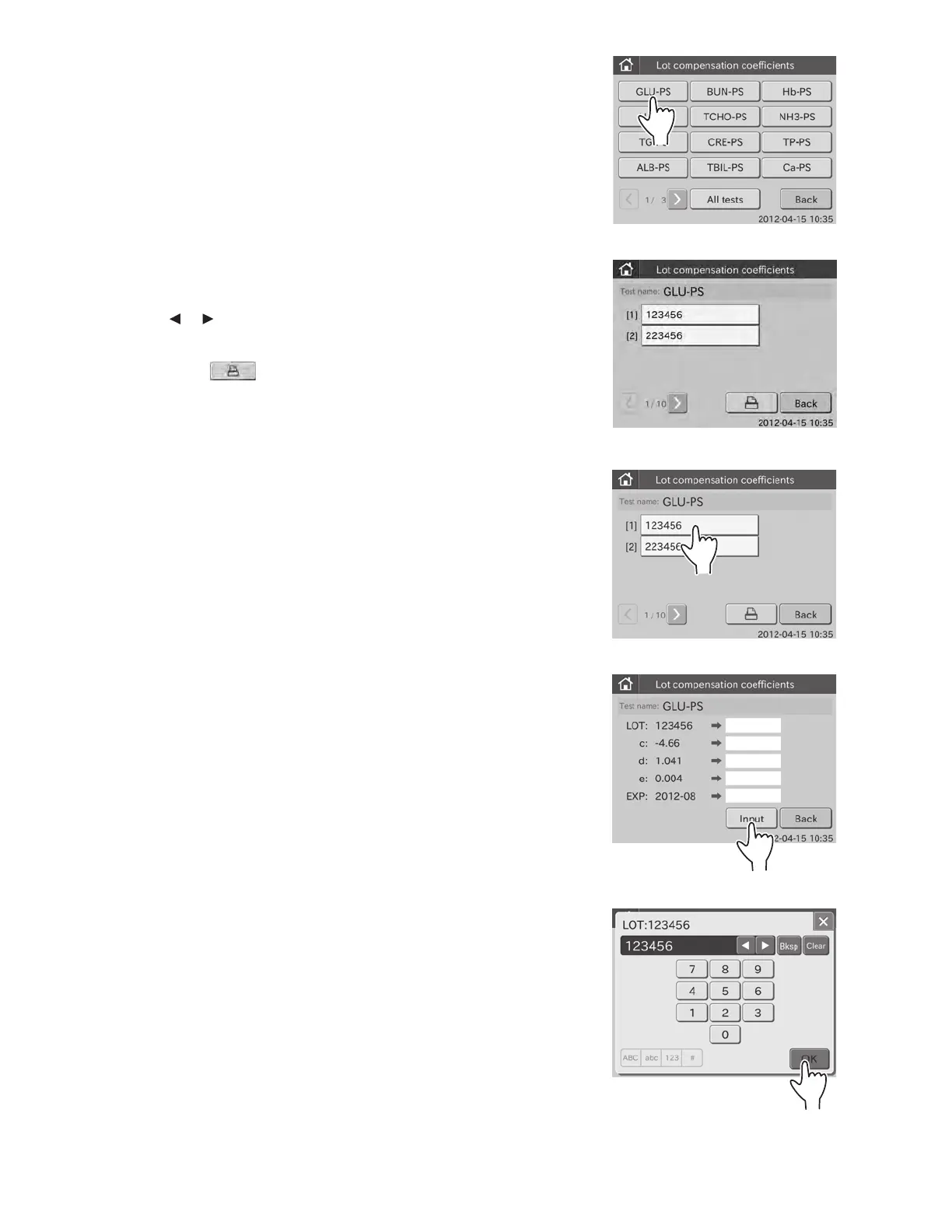
Select
TEST NAMESAMPLE TYPE to be edited.
A
fter selecting the button, the dialogue shown at the left is
displayed.
B
y touching
or
, you can see all lot No.s for the selected
“Test Name-Sample Type”.
NOTE: When touching
, the lot compensation coefficients for
each lot No. of the selected “Test Name-Sample Type” are printed
out.
NOTE: To cancel setting, touch BACK.
4.
T
ouch the lot No. that you want to input the lot compensation
coefficients.
T
he edit dialogue is displayed.
NOTE: To cancel setting, touch BACK.
5.
Touch
INPUT.
T
he screen keyboard to input lot No. appears.
F
or information about input method of the screen keyboard
dialogue, refer to Section 2.3.
NOTE: To cancel inputting and return to the edit dialogue, touch X.
6.
I
nput the lot No., and then touch
OK.
T
he screen keyboard to input the lot compensation coefficient
(c ) appears.
NOTE: The most significant digit (the Slide Type Number) is fixed.
Input the new Lot No. from the second digit.
109



 To Next Page