p.48
PRODUCT INSTALLATION
iTDC
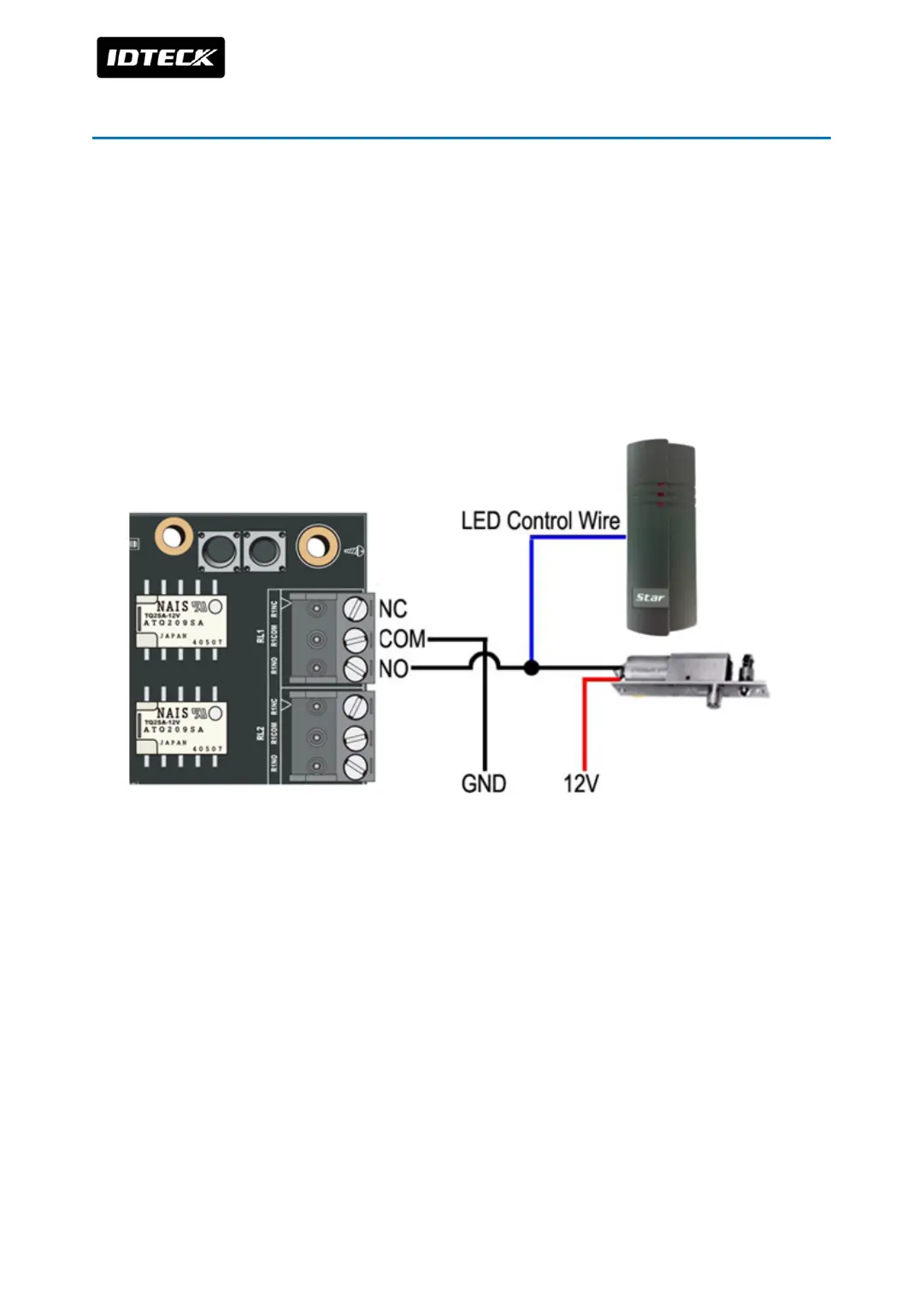
9 WIRING TO CONTROL LED/BUZZER OF READER
LED and Buzzer can be controlled by relay output of iTDC/iTDC-SR. This function is used to
check for door open status by LED of reader or Buzzer sound. Check the door lock type
(whether to Power Fail Safe or Power Fail Secure) then follow the description below to wire.
9.1 How to wire for presenting door open status by LED or Buzzer in Power Fail
Secure Power Fail Secure
Connect NO wire connecting door lock to LED/Buzzer control wire. Check the figure below.
9.2 How to wire for presenting door open status by LED or Buzzer in Power Fail
Secure Power Fail Safe
Connect NO wire of relay output port to LED Control Wire/Buzzer Control Wire. And you can
check operating status of door lock by LED or Buzzer sound



 To Next Page