COMMUNICATION WIRING
iTDC
p.53
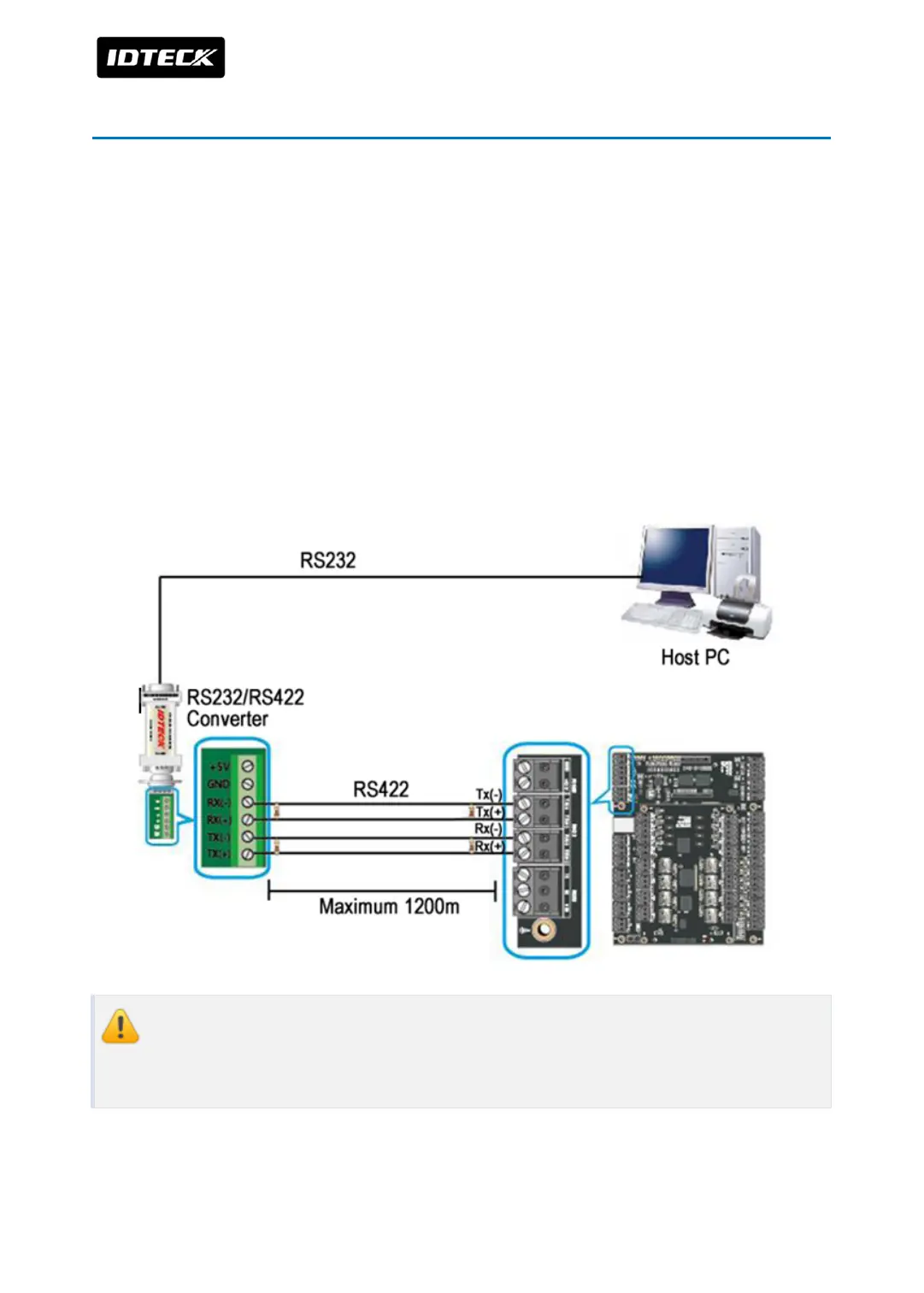
2 RS422 COMMUNICATION PORT
2.1 RS422 CONNECTION (INDEPENDENT WIRING)
RS422/RS232 converter is required to use RS422 communication between the
iTDC and a host computer. Please follow the instructions below;
●
Connect RS422-TX(+) of the iTDC to RS422-RX(+) port of the converter.
●
Connect RS422-TX(-) of the iTDC to RS422-RX(-) port of the converter.
●
Connect RS422-RX(+) of the iTDC to RS422-TX(+) port of the converter.
●
Connect RS422-RX(-) of the iTDC to RS422-TX(-) port of the converter.
●
Plug in the RS232 9-pin connector of the converter to the COM Port of the PC.
●
Install and run the iTDC Application Software.(STARWATCH iTDC PRO I, II or STANDARD)
If you don’t have serial port on the PC, purchase separate serial multi port card then
equip it on main board of PC. (USB to Serial port is not recommended to use. It has
low output current so communication error may be generated.)



 To Next Page