BASIC SETTING
iTDC
p.63
If you initialize the iTDC, all the data memories such as ID information, communication speed,
door setting, time schedule and event information stored in the controller will be cleared and
the basic setting values (factory setting values) will be reloaded. Therefore, the Initialization
should be performed by authorized personnel only.
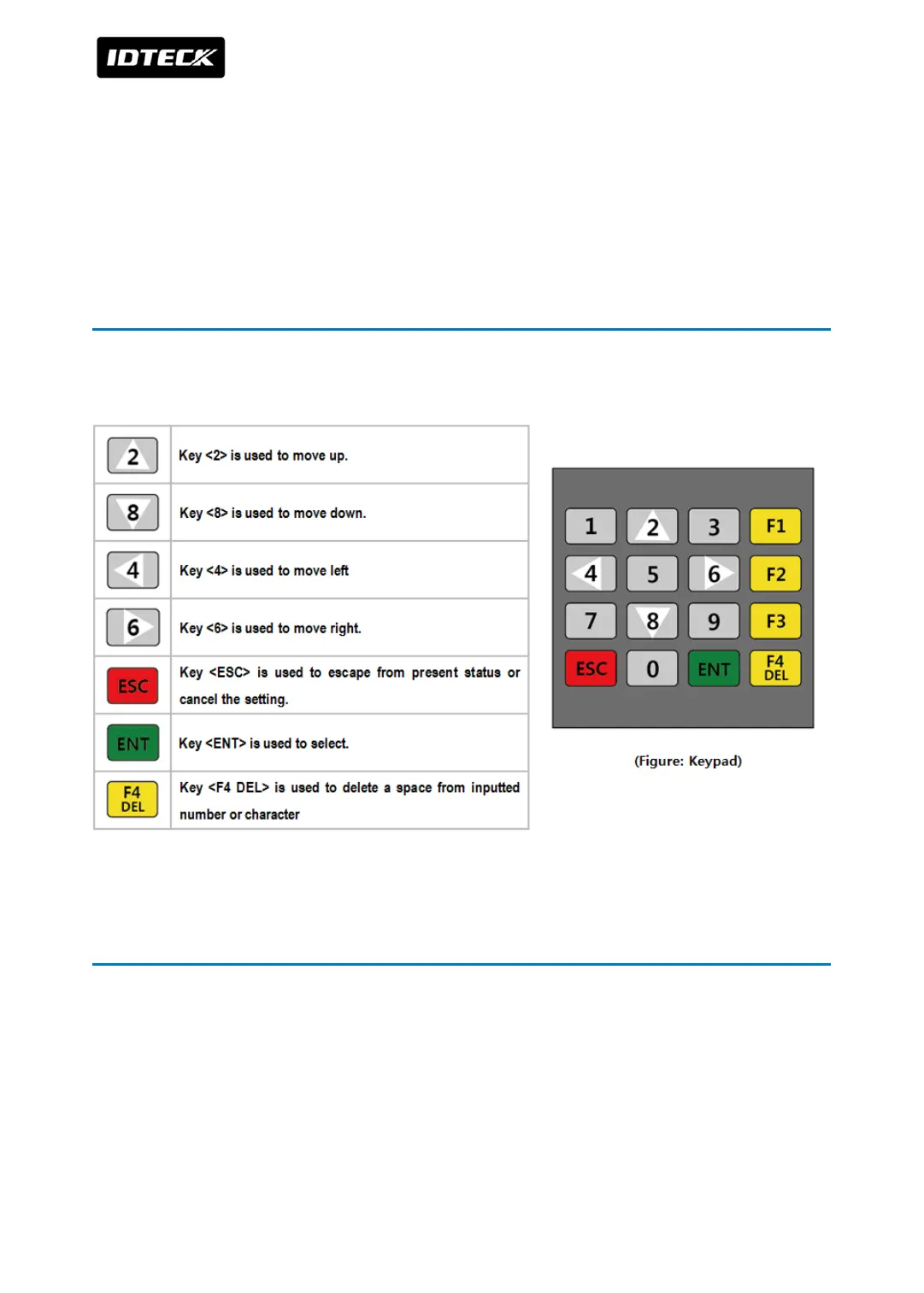
2 HOW TO USE KEYPAD
If you purchased optional keypad, check the description below to use it.
3 HOW TO ENTER THE SETUP MENU
To set-up or to change the iTDC settings, you have to enter the SETUP MENU first. Follow
instructions below.
1. Press <0> key 8 times for Master ID (Default setting “00000000”) and <ENT> key.
※In case of iTDC-SR, Default Master ID is ‘0000000000’ or ten ‘0’s
2. In SETUP Menu, there are 4 main SETUP MENU and you first get into [SETUP MENU F1].



 To Next Page