BASIC SETTING
iTDC
p.65
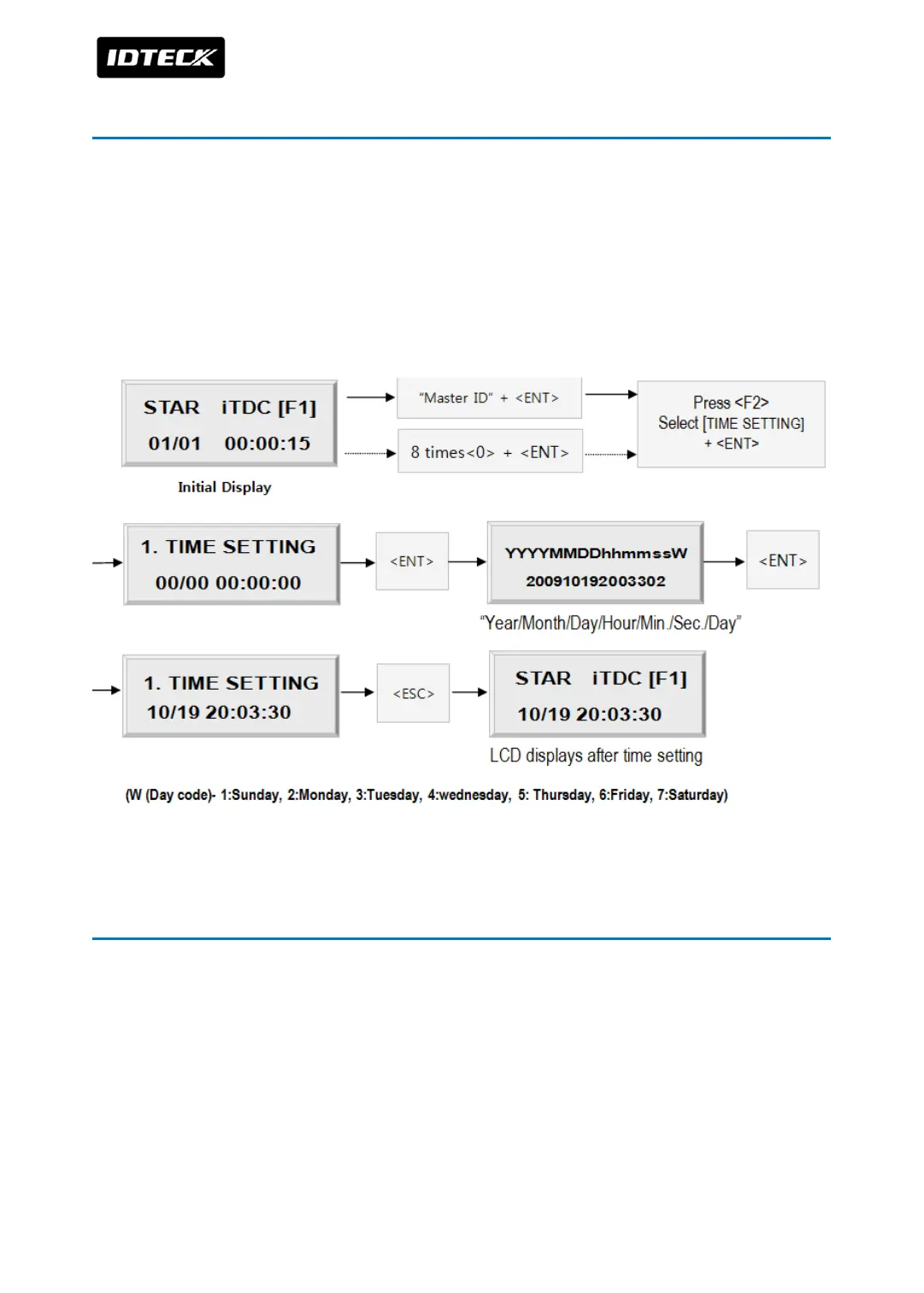
5 DATE AND TIME SETTING
Select [3.TIME SETTING] in the [SETUP MENU F1] and enter the Year / Month / Date / hour /
minute / second / Day (Total 15 digits) as shown below. LCD will display the new Date and
Time after the time setting completed but year and day will not be displayed. iTDC has 24
hours system and day codes are 1 for Sunday, 2 for Monday, 3 for Tuesday, 4 for
Wednesday, 5 for Thursday, 6 for Friday and 7 for Saturday. The Master ID for iTDC-SR is 10
digits number (Default setting “0000000000”).
6 MAXIMUM USER SETTING
This MAX USER SET is to configure maximum number of user ID to be registered into iTDC.
The default ID COUNT is 5,000 Users and the default EVENT Buffer size is 27,500 can be
stored when you operate iTDC .
Select [5. MAX USER SET] in the [SETUP MENU F3] then set-up the maximum User ID to be
registered into iTDC. Follow the steps to set-up ID COUNT.
The Master ID for iTDC-SR is 10 digits number (Default setting “0000000000”).



 To Next Page