12.1 Title Bar
The Title Bar is displayed at the top of the window. It identifies the software currently
running, and the source of the data, which can be either:
• A OPTIMIZER Smart IPG, in which case the serial number of the device, and the
date and time of the last interrogation are shown, or
• A file containing the nominal values of certain model, in which case its name is
displayed, or
• A file containing a set of parameter values already used and saved, in which case
its name is displayed.
12.2 ECG Window
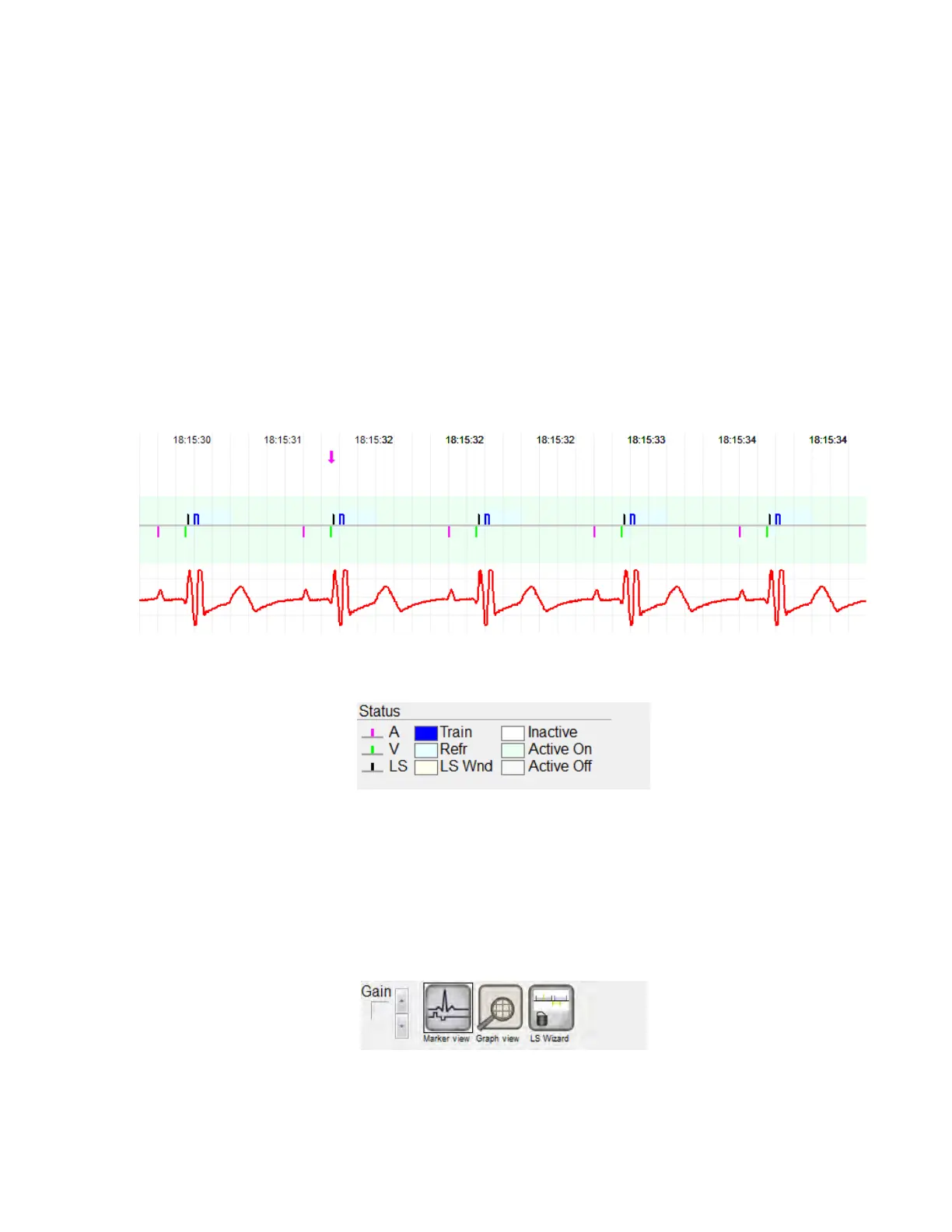
This window is displayed at the top of the screen. It scrolls the real-time ECG of the
patient. When the OPTIMIZER Smart IPG is in Marker Mode, markers are shown along
the ECG for the different events and conditions that may occur.
Figure 9: ECG Window in Marker Mode (Active ODO-LS-CCM Mode shown)
The trace and color references are shown in the ECG Reference Bar.
Figure 10: ECG Reference Bar
12.3 View Bar
The View Bar contains the buttons for following commands:
• Marker view: displays the ECG window in Marker view
• Graph view: displays the ECG window in Graph view
• LS Wizard: displays the ECG window in LS Wizard view
Figure 11: View Bar



 To Next Page