•
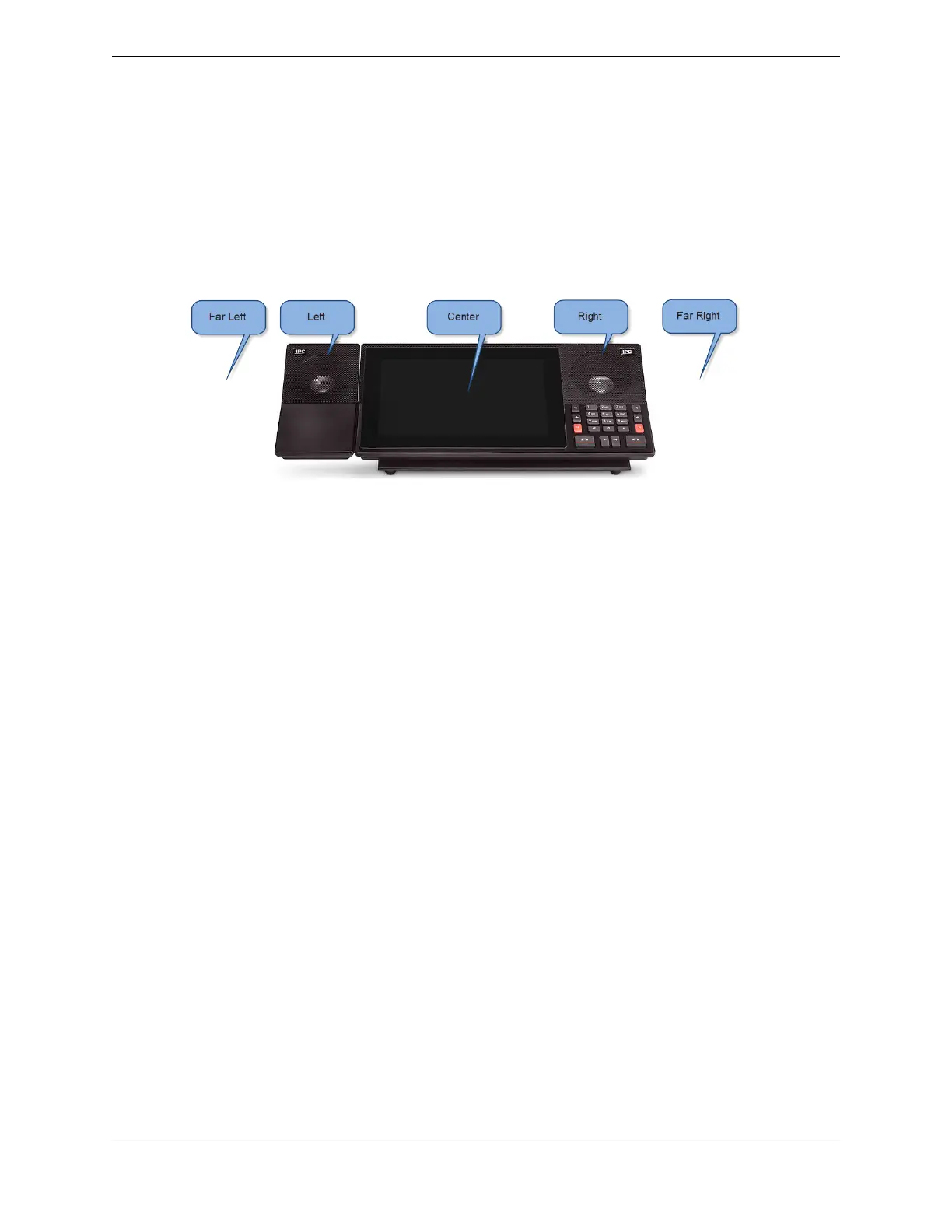
Far Left: sound appears to emanate from the left of the external speaker module.
•
Left: sound emanates from the external speaker module.
•
Center: sound appears to emanate from the center of the turret.
•
Right: sound emanates from the speaker in the primary module.
•
Far Right: sound appears to emanate from the right of the primary module speaker.
Figure 62: Spatial audio positions
The spatial audio technology requires an external speaker module. If there is no expansion module, the
speaker module must be connected to the primary module. If there is an expansion module, the speaker
must be connected to the expansion module and the module must be positioned to the left of the primary
module. The turrets must be powered by front room or LTPoE++ power to provide power to the external
speaker.
To optimize the spatial audio effect, position yourself directly in front of the turret. The far left and far
right positions might be less effective if the turrets are too close together, resulting in overlap of the
sound from the adjacent turrets.
The spatial audio position for each channel can be set by a Unigy administrator through the Unigy
Management System (UMS) or by an IQ/MAX TOUCH end user through the turret. End users can also
display the speaker channels that are assigned to each position through the Speakers application.
Tapping a spatial position button highlights the speaker channels that are assigned to the associated
position.
140 10.4: Use the Speakers application
August 26, 2019 IPC Proprietary



 To Next Page