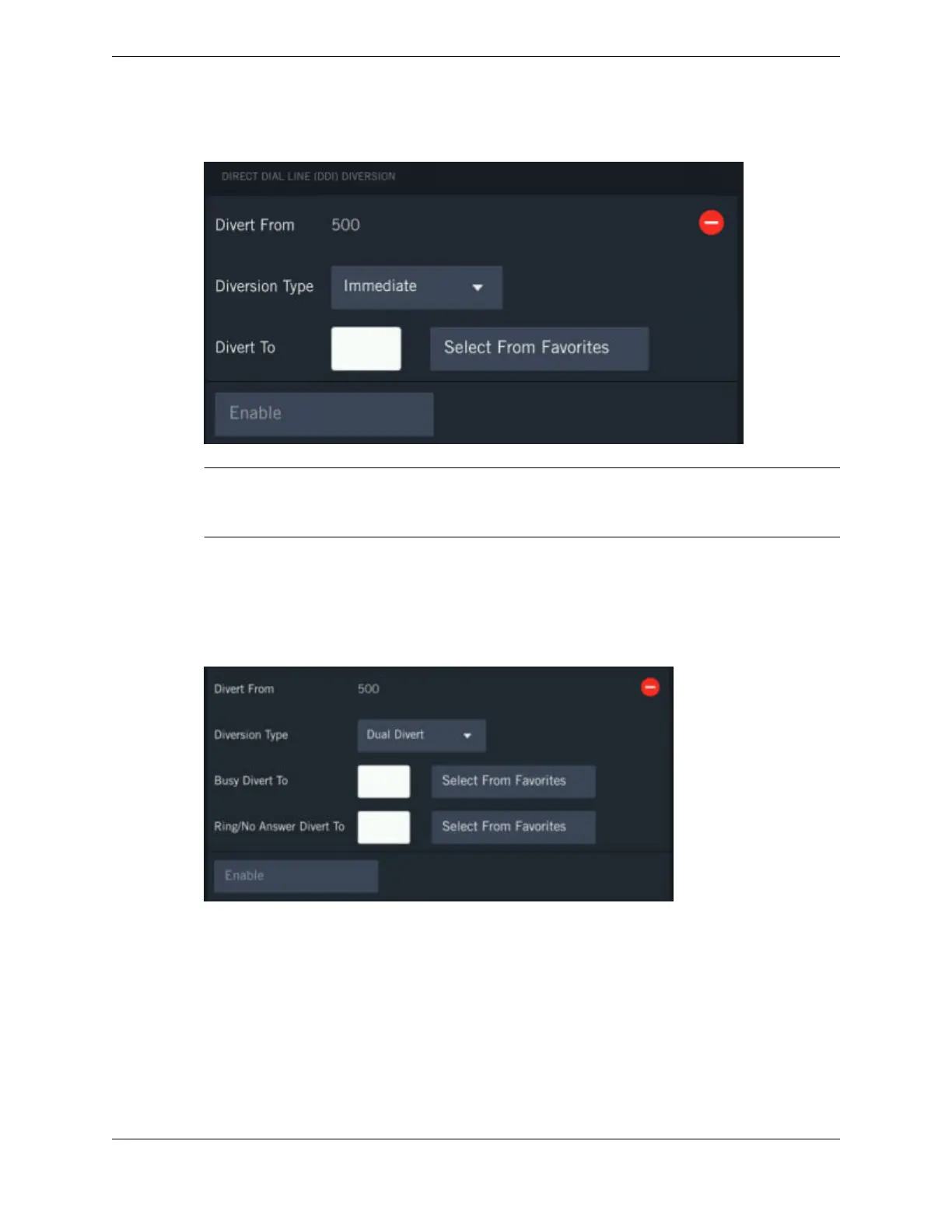
Figure 74: Diversion Type as Immediate, Busy, RNA, BRNA
Note
The figure above shows the Immediate diversion type. You will see a similar screen for the Busy,
Ring/No Answer, and Busy/Ring/No Answer diversion types.
•
The Divert To field displays the line to which the call should be diverted. Tap the Divert To text
box and type the line number or tap Select From Favorites then tap the number. The system
enables the number and changes the Enable button to Disable.
If you select the diversion type as Dual Divert, the device displays different set of fields.
Figure 75: Diversion Type as Dual Divert
•
The Busy Divert To field diverts the calls to the assigned line in this field when the turret is busy.
Enter the line number from the device keypad or tap Select From Favorites to add the line.
•
The Ring/No Answer Divert To field diverts the calls to the assigned line in this field when there
is no answer from the line after the specified time. Enter the line number from the device keypad
or tap Select From Favorites to add the line.
7. Tap Enable.
All calls to this line will be diverted per the conditions set.
11.3: Diversion 163
IPC Proprietary Unigy 4.3
IQ/MAX TOUCH Turret User Guide



 To Next Page