MENU
NB: the MIDI IN2 port operates always as a KEYBOARD port.
NB: the led of the EXIT button is used to notify MIDI activity. A blinking led means incoming MIDI
messages to the MIDI IN port.
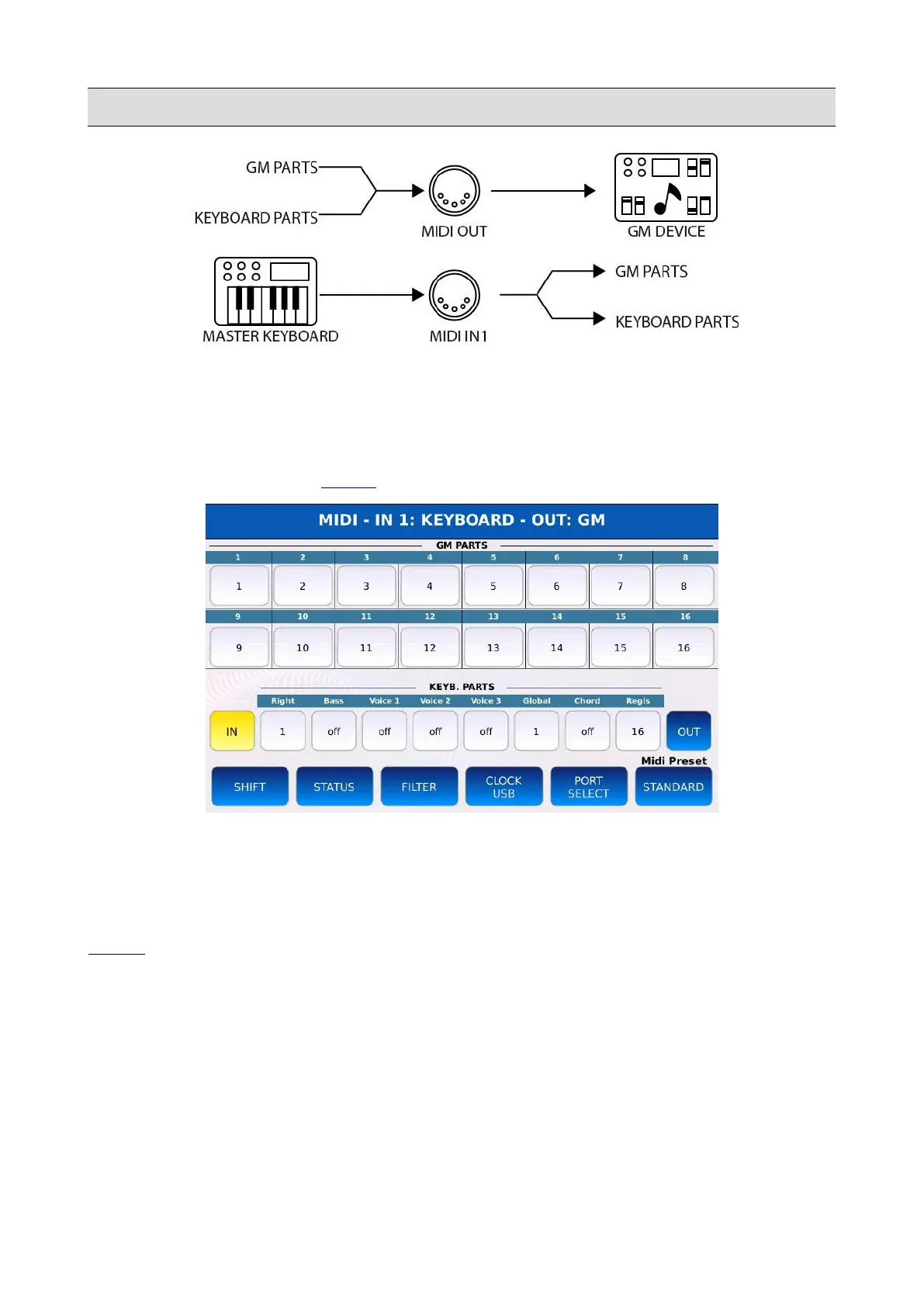
Tap on the MIDI button on the MENU page to display the MIDI page.
At the very top of the page is shown if the IN1 and OUT ports are working as GM or KEYBOARD
ports.
The central part of the page is split in half: the upper half shows the 16 GM parts used by the
GENERAL MIDI sound module, while the bottom half shows the KEYBOARD parts used by the
VOICE sound engine. Each part can be freely assigned to a MIDI channel (numbers range from 1 to
16), which is displayed in the corresponding cell. If the value shown is “off”, all messages coming
from/to that part are dropped.
• IN: displays the configuration of the IN1 and IN2 MIDI ports.
• OUT: displays the configuration of the OUT MIDI port.
• SHIFT: displays the transposition (in semitones) applied to Note On and Note Off messages.
Tap on the part buttons and use the Value Dial to change the transposition applied to that
part. Values range from -24 to 24 semitones.
KETRON - LOUNGE 111



 To Next Page