PLAYER
Jukebox
The Jukebox mode provides an alternative way to access files and songs. You can have up to 15
songs at the same time at your fingertips for easy and quick access allowing you to quickly navigate
through song collections.
In Jukebox mode, a song collection is called a “Set”. Each Set is linked to a specific folder path and,
when is selected, all the songs contained in that folder are loaded into the Jukebox virtual pads.
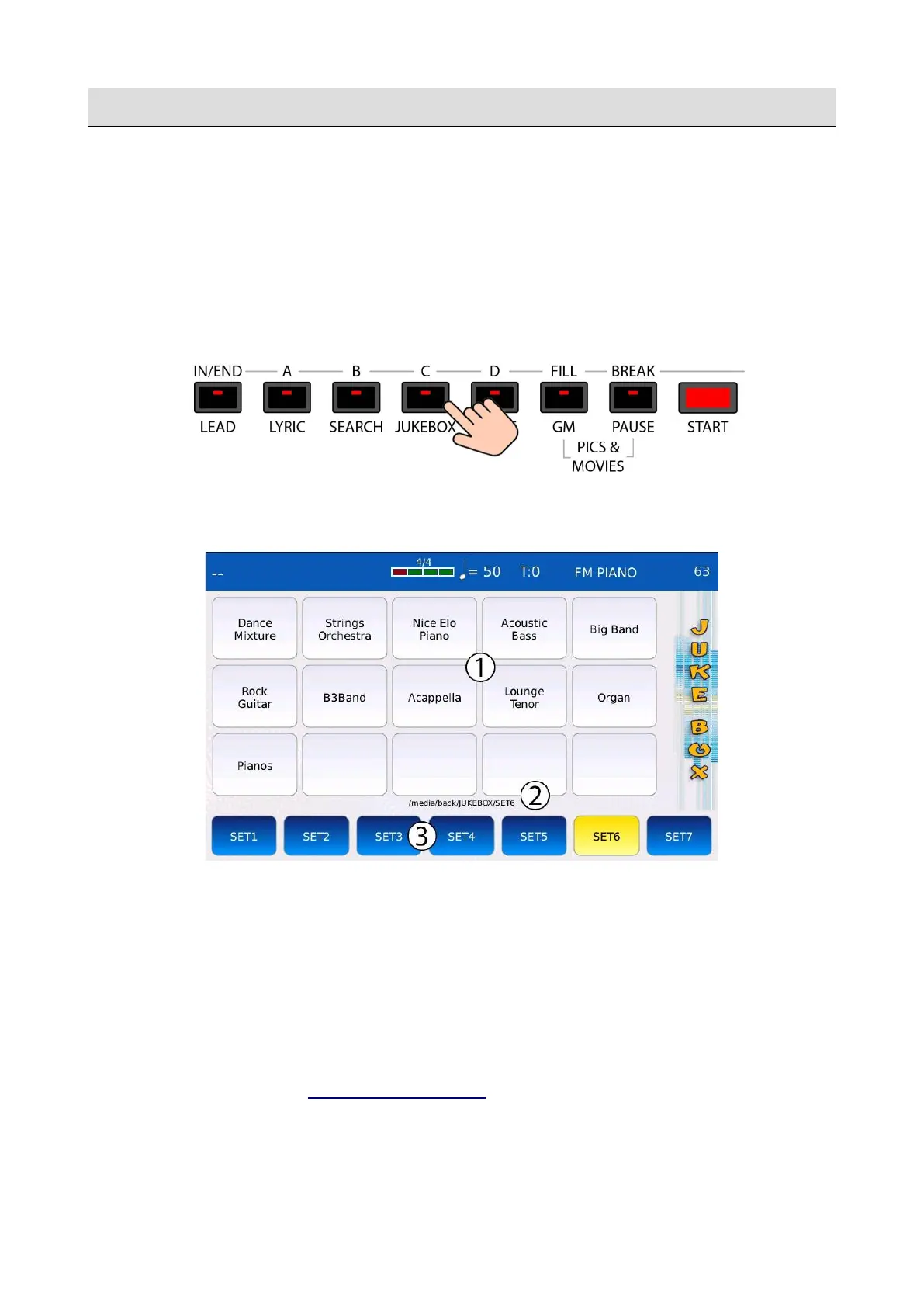
Press the JUKEBOX button to enter in JUKEBOX mode. The led of the JUKEBOX button will turn
on and the JUKEBOX page will be displayed on screen.
1. VIRTUAL PADS: show the names of all the files contained in a the Set. Tap on a virtual
pad to play a song. Tap again on the virtual pad to stop the song. Use the Value Dial to scroll
through all the songs of the Set.
2. FOLDER LOCATION: displays the path of the currently selected Set.
3. SETS: tap on a Set button to load all the songs contained in the corresponding Set. To add
songs to a Set, all you have to do is copying the songs into the folder linked to that Set. Tap
on and keep pressed to change the folder path linked to that Set.
Press EXIT to go back to the PLAYER MAIN VIEW.
30 - KETRON - LOUNGE



 To Next Page