MENU
Audio Recorder
The audio recorder can be used to record in real time the main output audio signal into a stereo .wav
file (44100 Hz and 16 bit resolution).
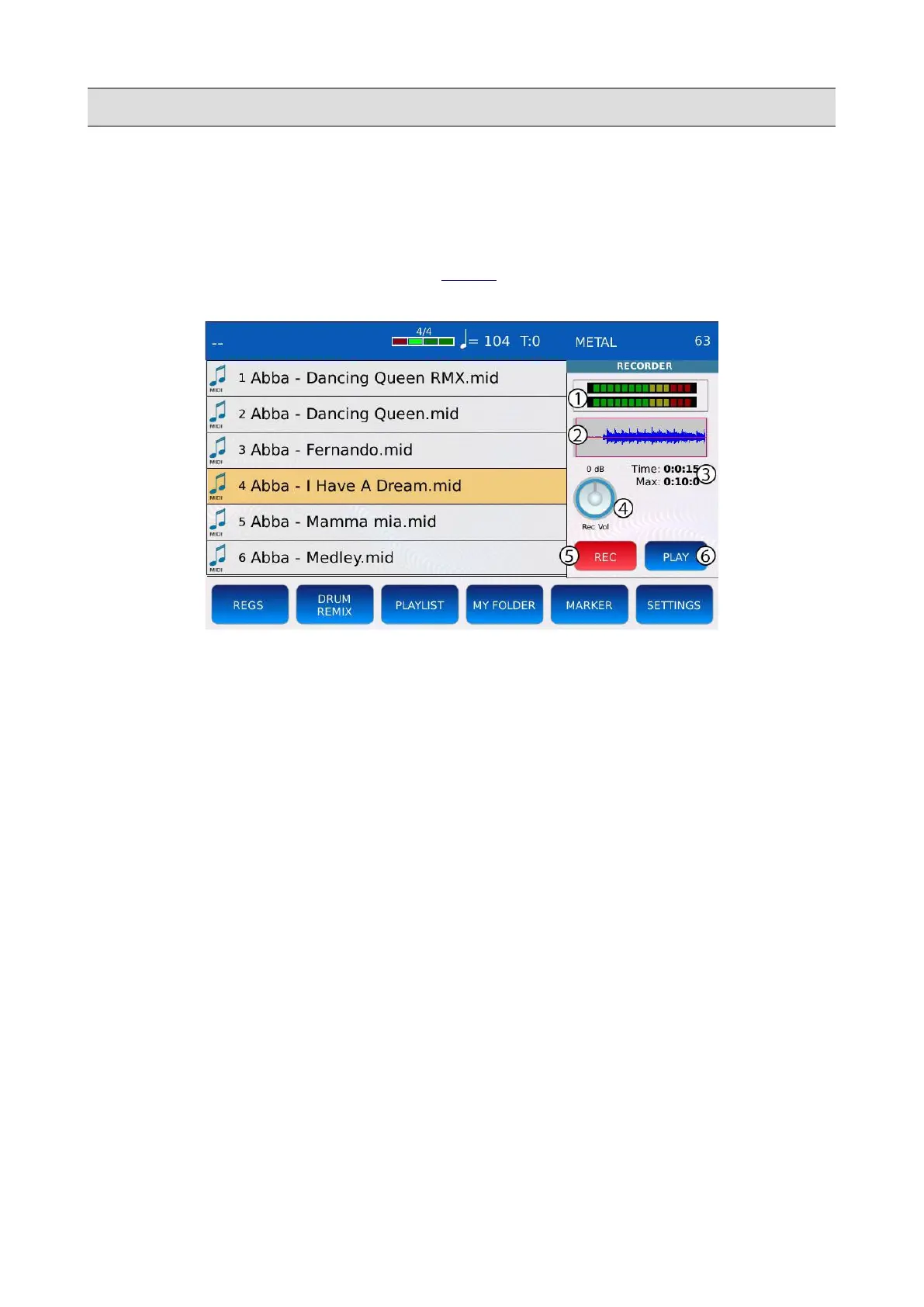
Tap on the AUDIO RECORDER button on the MENU page to display the AUDIO RECORDER
window on screen.
1. VU-meters: give a visual representation of the audio signal level. If the meters are green or
yellow the input signal is under the distortion threshold. If the meters are red, the input
signal is too loud and the recording will clip.
2. WAVEFORM: shows the recorded audio waveform.
3. CURRENT RECORDED TIME and MAX AVAILABLE DURATION: shows the total
recorded time and the maximum duration of a recording. If a recording lasts more than the
maximum available duration, the instrument will stop recording.
4. GAIN KNOB: adjusts the recorder input gain. Positive values increase the input signal level,
negative values reduce it. Be careful to not exceed the distortion threshold (the VU-meters
should never be red): if the gain is too high the signal will be distorted and the recording will
clip.
5. REC: starts and stops recording. When the instrument is recording, the MENU button led
and the REC button will slowly blink.
6. PLAY: replays the recorded file.
126 - KETRON - LOUNGE



 To Next Page