GETTING STARTED
Connections
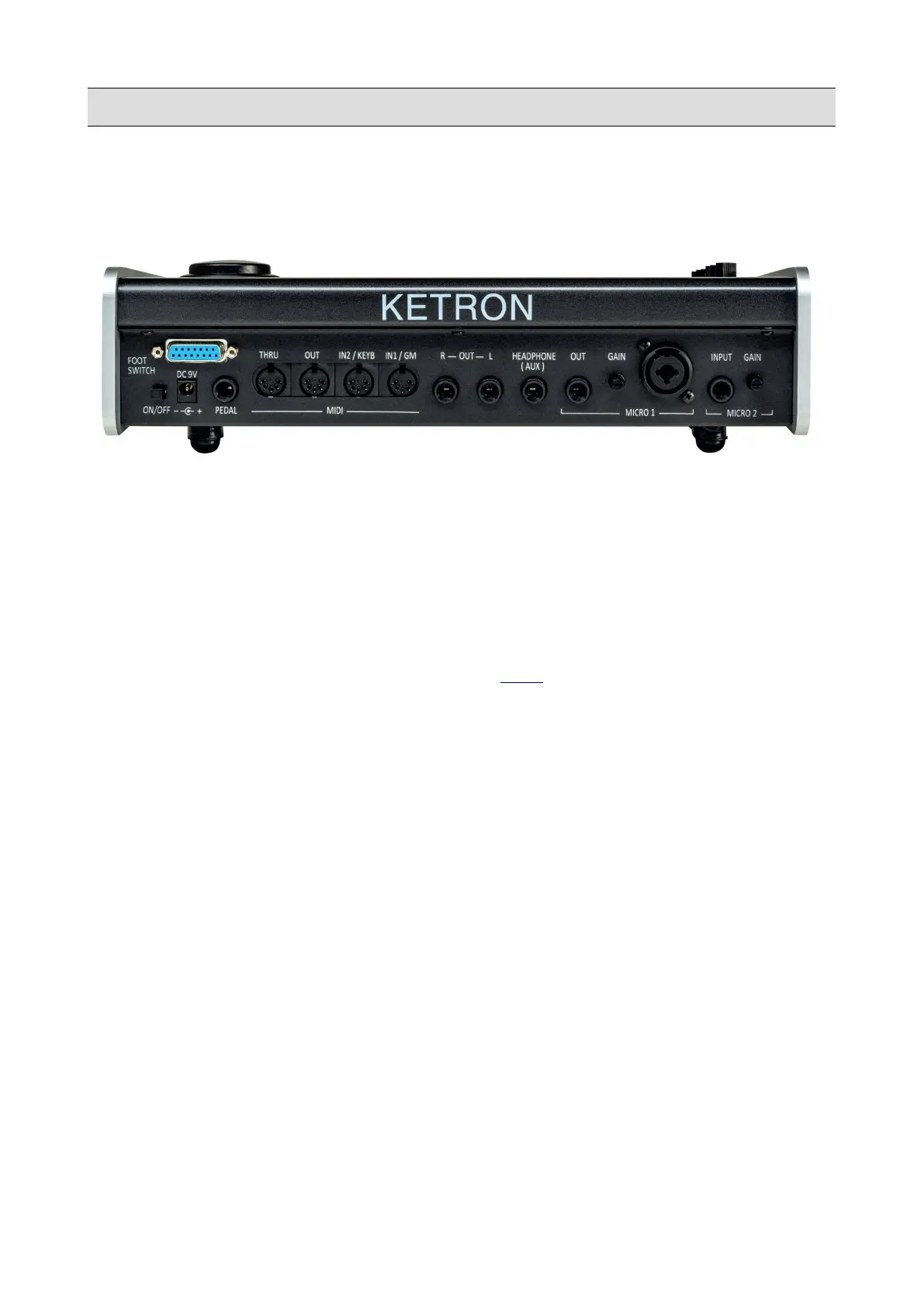
Real Panel
• ON/OFF: press this key to turn on and off the instrument. The instrument will take up to 30
seconds to start up and 10 seconds to turn off.
• DC 9 V 4A: main power supply socket. Please use only the power supply supplied with the
instrument. Output: 9 V, 4 A.
• VOLUME PEDAL: standard stereo jack port for Volume pedal connection (optional).
• MIDI: MIDI IN1 (GM), MIDI IN 2 (KEYBOARD), MIDI OUT and MIDI THRU ports for
transmitting and receiving MIDI messages (see MIDI).
• MAIN OUT: standard mono jack port to connect the instrument to a PA STEREO system:
Left (Left Mono) and Right (Right Mono). We strongly recommend using stereo
connections to get the best performance.
• HEADPHONE: standard stereo jack for headphone connection. The headphone volume is
controlled by the Master section.
• MICRO 1 IN: standard mono combo plug (TRS/XLR) for dynamic microphone connection.
• MICRO 1 GAIN: use this potentiometer to adjust the Micro 1 input signal gain.
• MICRO 1 OUT: replicates the MICRO 1 input signal.
• MICRO 2 IN: standard mono jack for connection of other auxiliary instruments such
Keyboard, Expander, Guitar or Dynamic Microphone.
• MICRO 2 GAIN: use this potentiometer to adjust the Micro 2 input signal gain.
• FOOTSWITCH: use this port to connect the KETRON footswitch controller (optional).
10 - KETRON - LOUNGE



 To Next Page