68
TOS3200
Displaying the Test Results
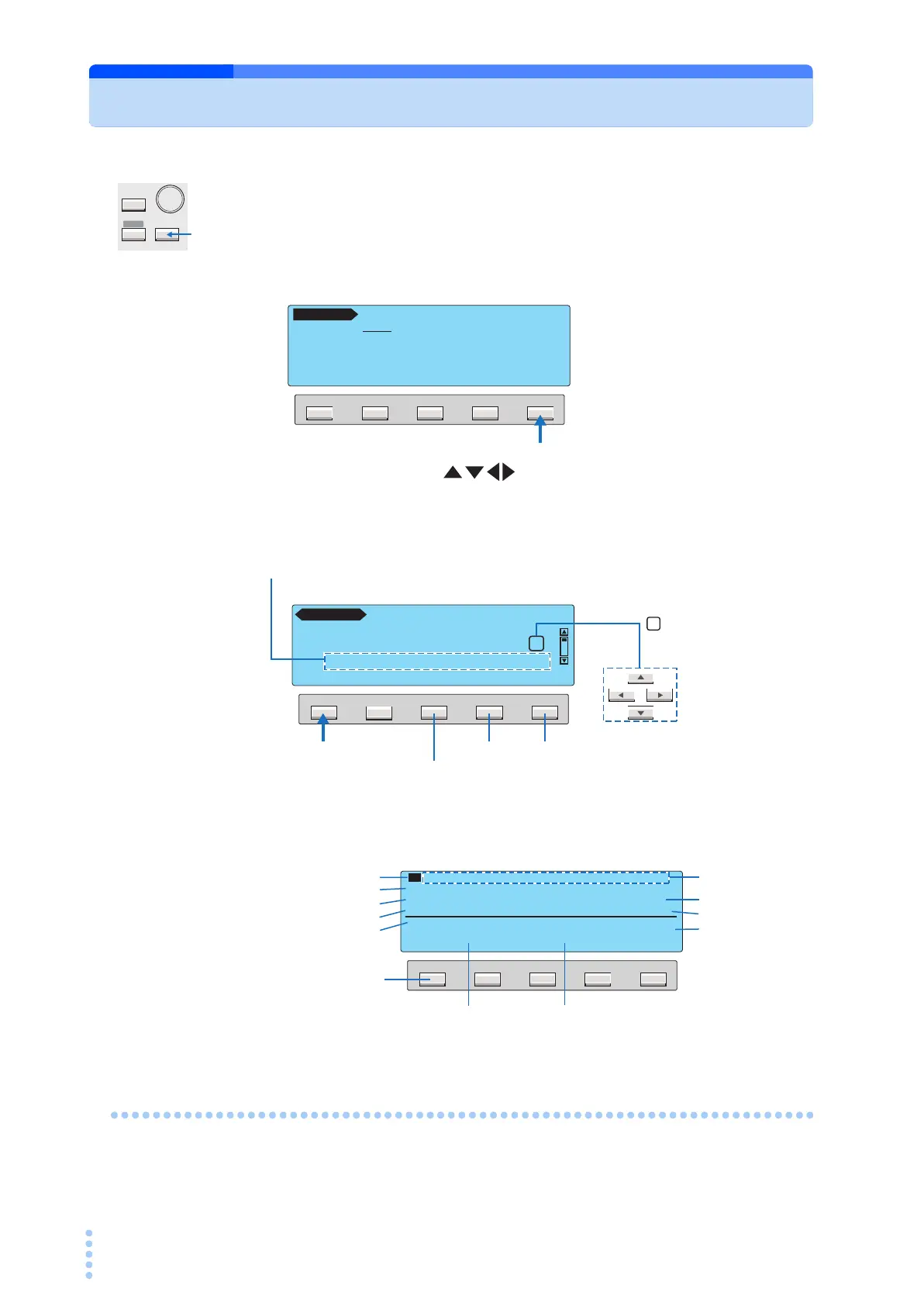
You can display the stored test results from the system setup screen 3/5 (SYSTEM3/5).
1
Press the SYSTEM key to display SYSTEM1/5.
2
Press the <NEXT> (F5) key twice to display SYSTEM3/5.
3
Press the arrow keys ( ) to select the desired memory number.
4
Press the DATA (F1) key.
The stored test results are displayed.
To return to the current measurement, press the MANUAL key.
Deleting the Stored Data
Select the memory number you want to delete in step 3 above, and press the DELETE (F3)
key.
SYSTEM
MANUAL
I / FEDIT
AUTO
F5F4F3F2F1
MEAS PASS CONV
MEAS MODE :NORM BUZ VOL (PASS) : 3
PASS HOLD :HOLD BUZ VOL (FAIL) : 3
CONV :OFF CONTRAST :10
SELV :OFF LINE BRK(AUTO) :ON
SELV <NEXT>
SYSTEM1 / 5
F5F4F3F2F1
DATA DELETE <PREV> <NEXT>
[MANUAL TEST DATA]
No
1 2 3 4 5 6 7 8 9 10
51:TC-TEST-NO.1
2006 / 10 / 17 13 : 45
SYSTEM3/5
If you select a memory number in which a test result is already saved, the saved
information is displayed.
For tests executed using test conditions that were recalled from the panel memory,
the panel memory number and name are included in the saved information.
Panel memory number: memory name year/month/day hour:minute
Deletes the test data of the selected memory number.
To SYSTEM4/5 To SYSTEM2/5
Move the box using
the arrow keys to select
the number.
F5F4F3F2F1
LIST
10 51:TC-TEST-NO.1 2006/10/17 13:45
FUNCTION :TC ENC-PE
NETWORK :A MODE :RMS
CONDITION :NORMAL POLARITY :NORMAL
NORM
PASS
0 µA
10
s
Memory number
Operation mode probe selection
Measurement network
Single fault mode
Normal current measurement or
maximum current hold
Current measurement
mode
Polarity of the EUT
power line
Return to the memory
selection screen.
Measured current
Saved information
Test time



 To Next Page