80
TOS3200
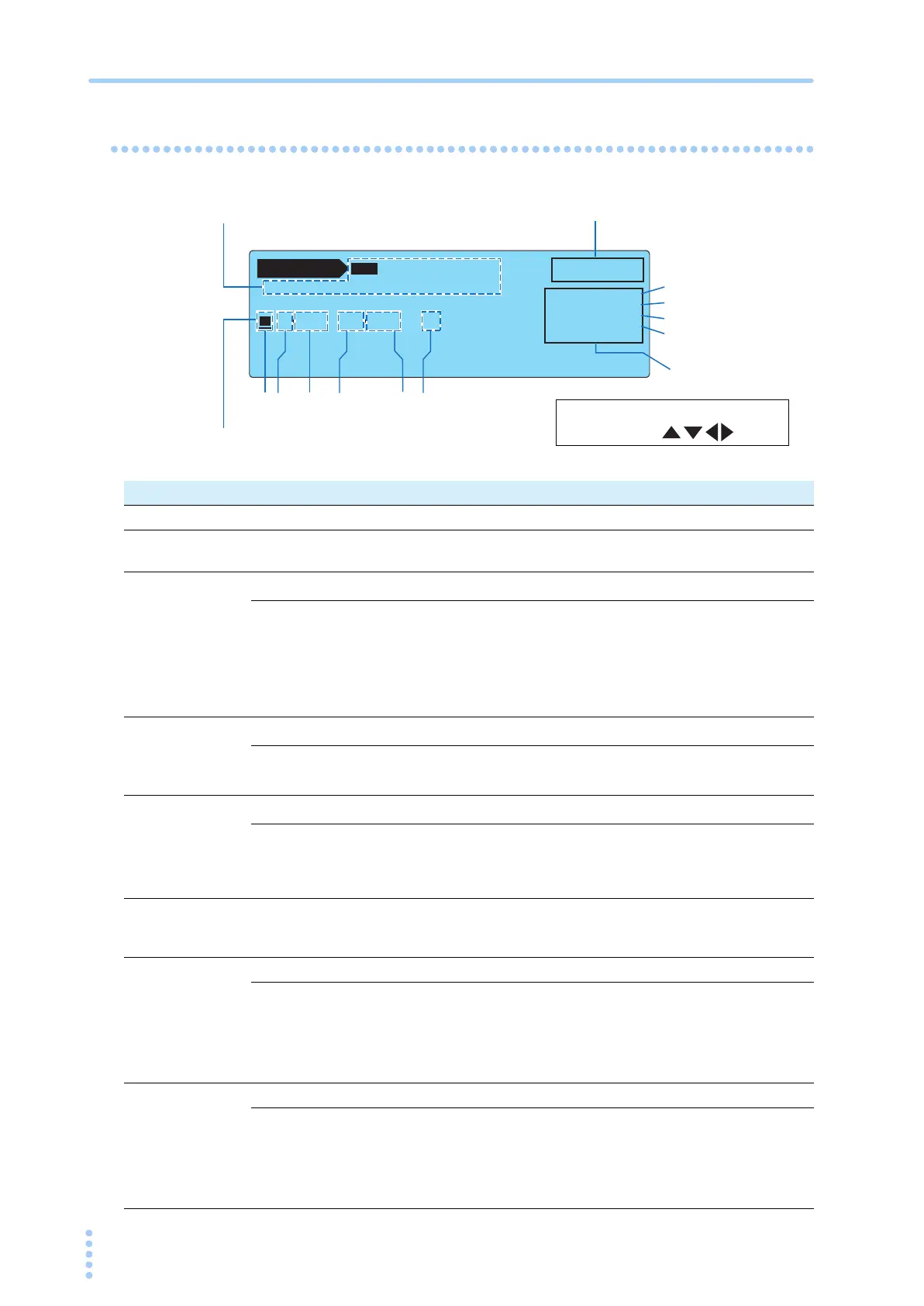
Creating Sequence Programs
Setup Items of AUTO1/2
AUTO 1 / 2
NTWK:A MODE:RMS ABORT:OFF
00 TC•E
NC
P
E
––P
NRM
•NORM––– 1s
01 TC•E
NC
P
E
––P
NRM
•NORM––– 1s
–––END
PRG
00:
--
UNTITLED
--
EDIT
INS UPPERLOWER WAIT TIMER
LOWER : 30µA
UPPER : 30.0mA
WAIT : OFF
TIMER : 1s
The number of the selected step is highlighted.
Program edit status
Test conditions of the
selected step
12 3 4 5 6
Test conditions common to all steps
(Set in AUTO2/2.)
7
8
9
10
You can move to each item using
the arrow keys ( ).
Item Description Panel operation
1 (Step number) Selects the step number to be edited. Rotary knob
2
(Operation
mode)
Selects TC or PCCTC. Rotary knob
3
(PROBE)
*1
Selects the connection destination of measurement terminals A and B.
E
NCPE Connected between the enclosure and earth.
Rotary knob
E
NCENC Connected between two enclosures.
E
NCLIV Connected between the enclosure and power line (live).
E
NCNEU
Connected between the enclosure and power line (neu-
tral).
4
(POL)
*2
Selects the polarity of the power line supplied to the EUT.
P
NRM Normal phase connection
Rotary knob
P
RVS Reverse phase connection
5
COND
*2
Selects the single fault mode.
NORM Normal status
Rotary knobFLT
NEU Power line (neutral) disconnected status
FLT
PE Earth line disconnected status
6 (Interval)
Sets the time until the next step is executed in the range of 1 s to 99 s
or HOLD. If set to HOLD, the next step will not start until you press the
START switch.
Rotary knob
7 LOWER Sets the lower limit of the judgment reference. F2 key
Lower ref-
erence
The selectable range varies depending on the NTWK
(measurement network) and MODE (current measure-
ment mode) settings on AUTO2/2. See Table 6-1.
You will not be able to enter the value if set to OFF.
Rotary knob
ON/OFF The item is turned on when the value is displayed. SHIFT+F2 key
8 UPPER Sets the upper limit of the judgment reference. F3 key
Upper ref-
erence
The selectable range varies depending on the NTWK
(measurement network) and MODE (current measurement
mode) settings on AUTO2/2. See Table 6-1.
You will not be able to enter the value if set to OFF.
Rotary knob
ON/OFF The item is turned on when the value is displayed. SHIFT+F3 key



 To Next Page