32
TOS3200
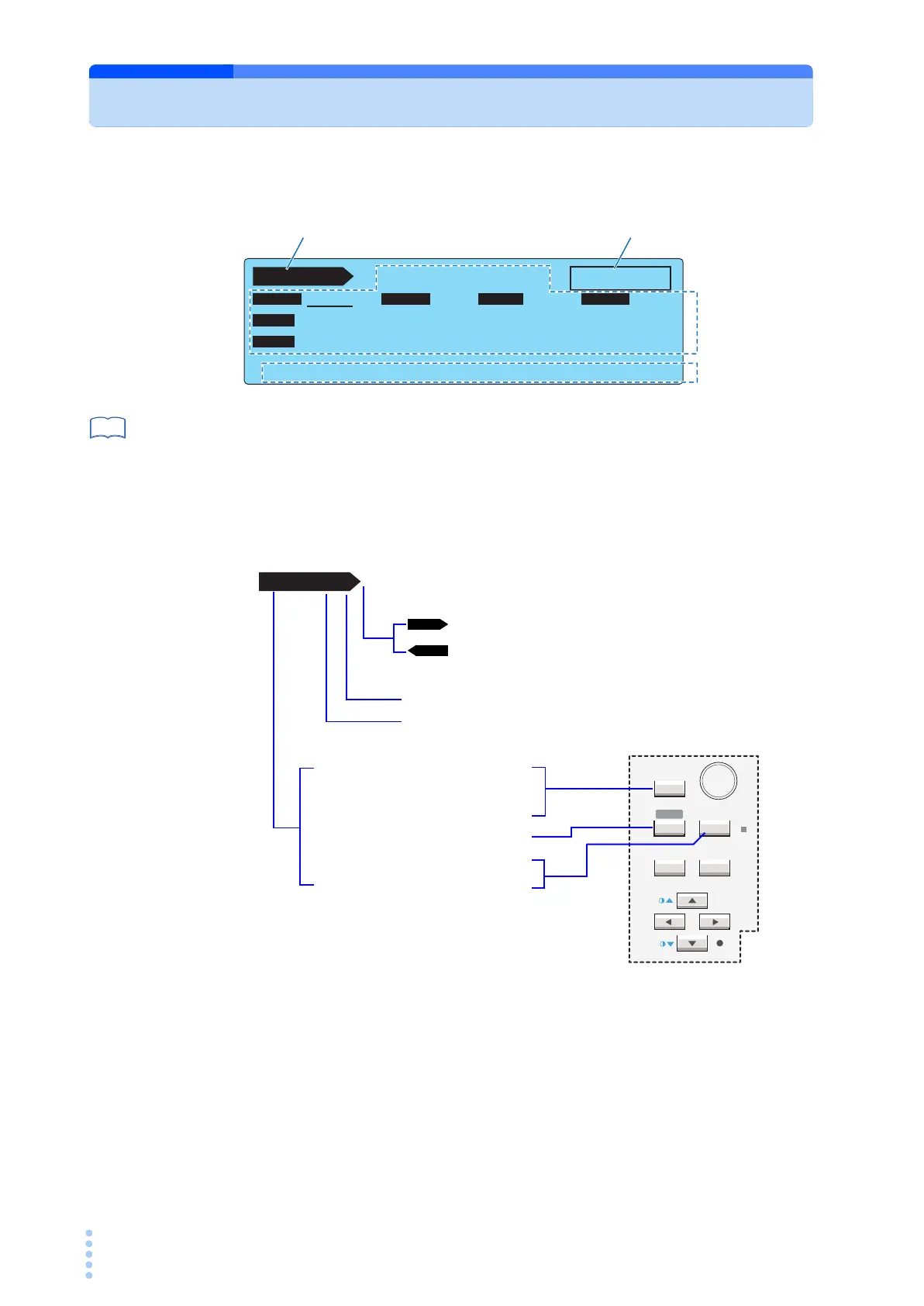
Screen Configuration
The screen consists of the following four areas.
p. 196
The screen above is the initial screen (factory default settings) that appears when you turn
the POWER switch for the first time. To reset the TOS3200 to factory default settings, turn on
the POWER switch while holding down the SHIFT key.
Screen title
Indicates the screen that is currently displayed.
TC 1/2
READY
E
NC
P
E
OFF ON
PROBE LOWER
UPPER TIMER
POL
NORM
NORM
COND
UPPER
OFF
TIMER
30.0 mA
10
s
PROBE LOWER UPPER TIME/WAIT
Data input
area
Screen title
Function key
name
Status
See
SYSTEM
RECALL ENTER
STORE
MANUAL
I / FEDIT
AUTO
RMT
PREV NEXT
Indicates that there is a next screen.
Indicates that there is a previous screen.
Indicates the total number of screens.
Indicates which screen is currently displayed among all the screens.
TC TC measurement
PCC PCC measurement
METER Meter Mode
AUTO Program test
SYSTEM System settings
INTERFACE Interface settings
TC 1 / 2



 To Next Page