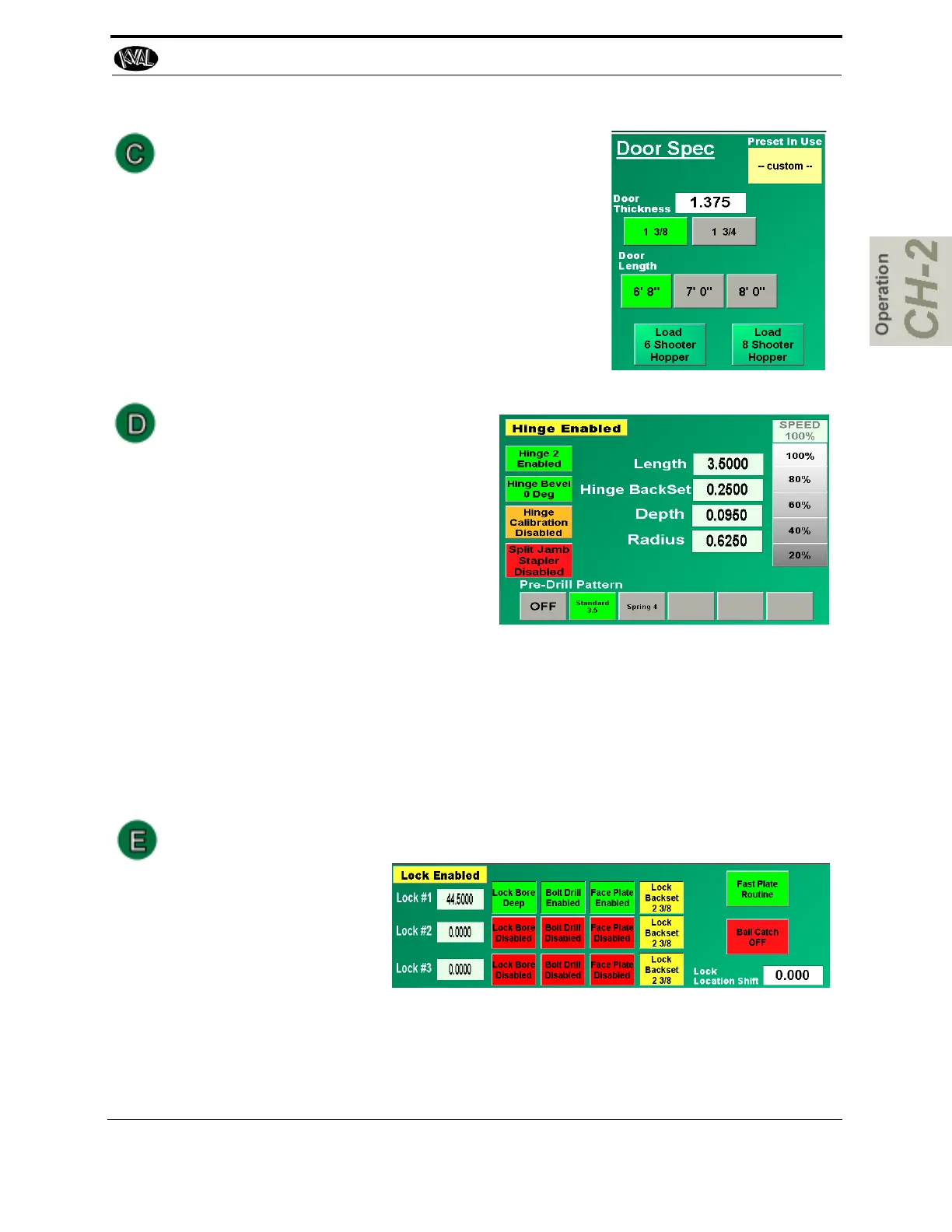
Door Spec Group
Set the parameters for the door in the Door Spec group.
The settings include:
• Shows the preset setting that is running
• Can enter a door thickness.
• Choice between two door thickness settings.
• Can Select Door Length
• Can load 6 Shooter or 8 Shooter (Option)
Hinge Spec Group
Set the parameters for the hinges in the
Hinge Spec group. The settings includes:
• Router speed adjustment (real time
adjust)
• The choice of pre-drill patterns
• Can enable or disable Hinge 2.
• Can select and change hinge parame-
ters
• Can disable and enable hinge calibrations.
• Can enable The Split Jamb Stapler (Option)
You can select Pre-Drill buttons to down load pre-drill parameters or turn off this func-
tion. To set Pre-Drill parameters, see “About the Pre-Drill Screen” on page 2-47 .
This section also contains the file list window, which displays files that are available to
use.
Back Section Group
Set the lock parame-
ters, in the Back Section
group. The settings
include lock specifica-
tions for 3 lock settings,
the ability to enable and
disable lock bore, bolt drill, and face plate routing. Fast Plate can be enabled or dis-
abled. Can Disable or enable the Ball Catch function (Option)
Lock Backset (Option) shows the backset for each head.
About the Main Screen
2-41
KVAL 994-X Operation/Service Manual



 To Next Page