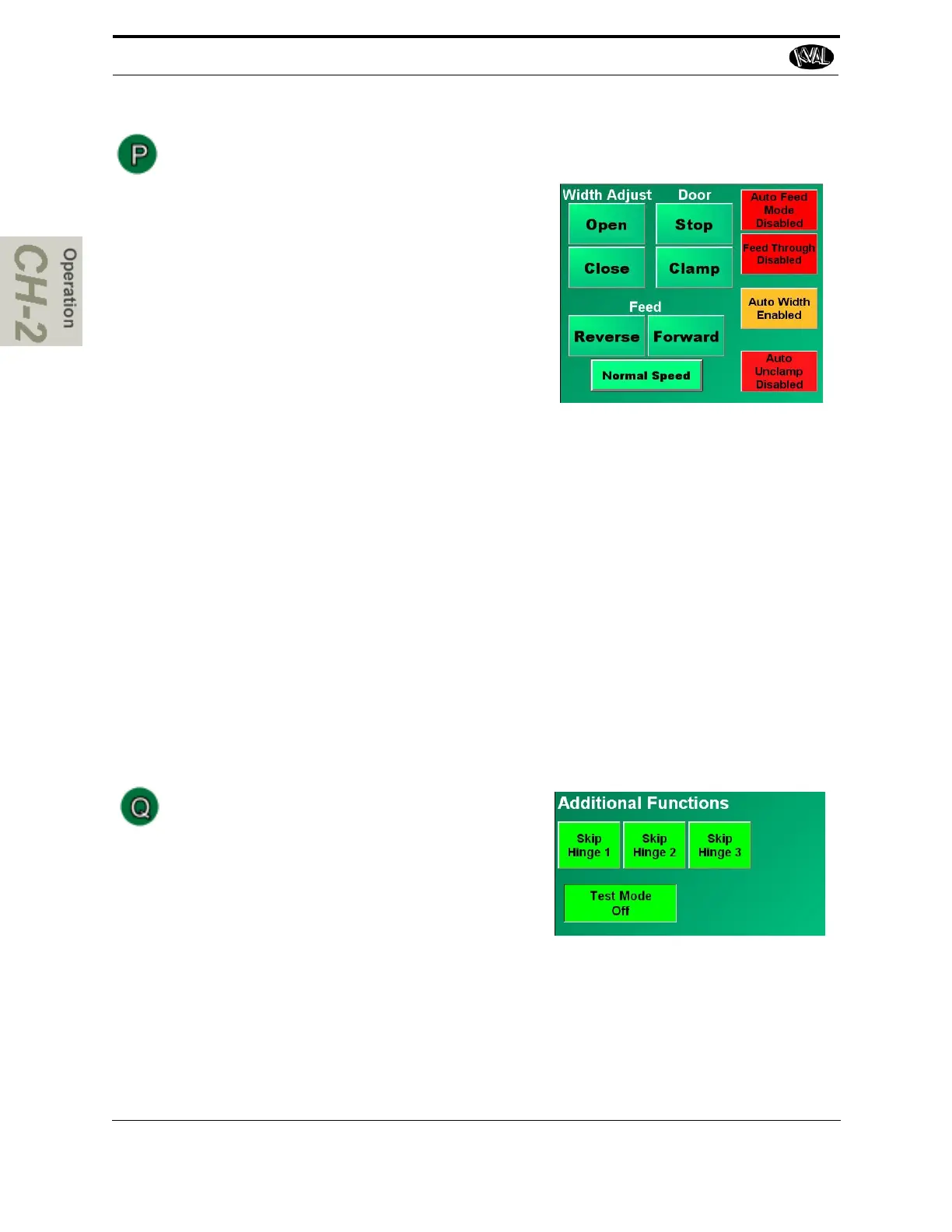
Width Adjust Operation
Width Adjust:
• Open: Press and hold the Open button to
open the width adjust carriage. To stop the
carriage, release the button. The carriage
will also stop if the positive travel limit eye
is activated.
• Close: Press and hold the Close button to
close the width adjust carriage. To stop the
carriage, release the button. The carriage
will also stop if the negative travel limit eye
is activated.
Door:
• Stop: Press the Stop button to extend or retract the appropriate door stop.
• Clamp: Press Clamp to activate the cylinders that clamp the door.
Feed:
• Reverse: Press and hold the Reverse button reverse the feed of the door. To stop
the feed, release the button.
• Forward: Press and hold the Forward button to move the door feed forward. To stop
the feed, release the button.
• Normal Speed: Press and hold the Normal Speed button to slow speed. To return to
previous speed, release the button.
Toggle Buttons:
The buttons to the right toggle auto functions on or off. For descriptions of these but-
tons, see “Auto Enable and Disable Buttons” on page 2-42 .
Additional Functions Operation
Skip Hinge 1-4: Select to Skip the hinge route
and drill functions any hinge.
Test Mode: Select to toggle the Test Mode on
or off.
Test Mode runs the hinge cycle, but does not
extend the tools. This is primarily used to ver-
ify a new template is correct and the hinge carriage will not bump into the H-Block
or other assemblies.



 To Next Page