Viva Series, MapView Interactive Display Feature 734
36.4.3 Point Symbols
Description When Display points is checked in Map View Settings, Points page, points are displayed, in
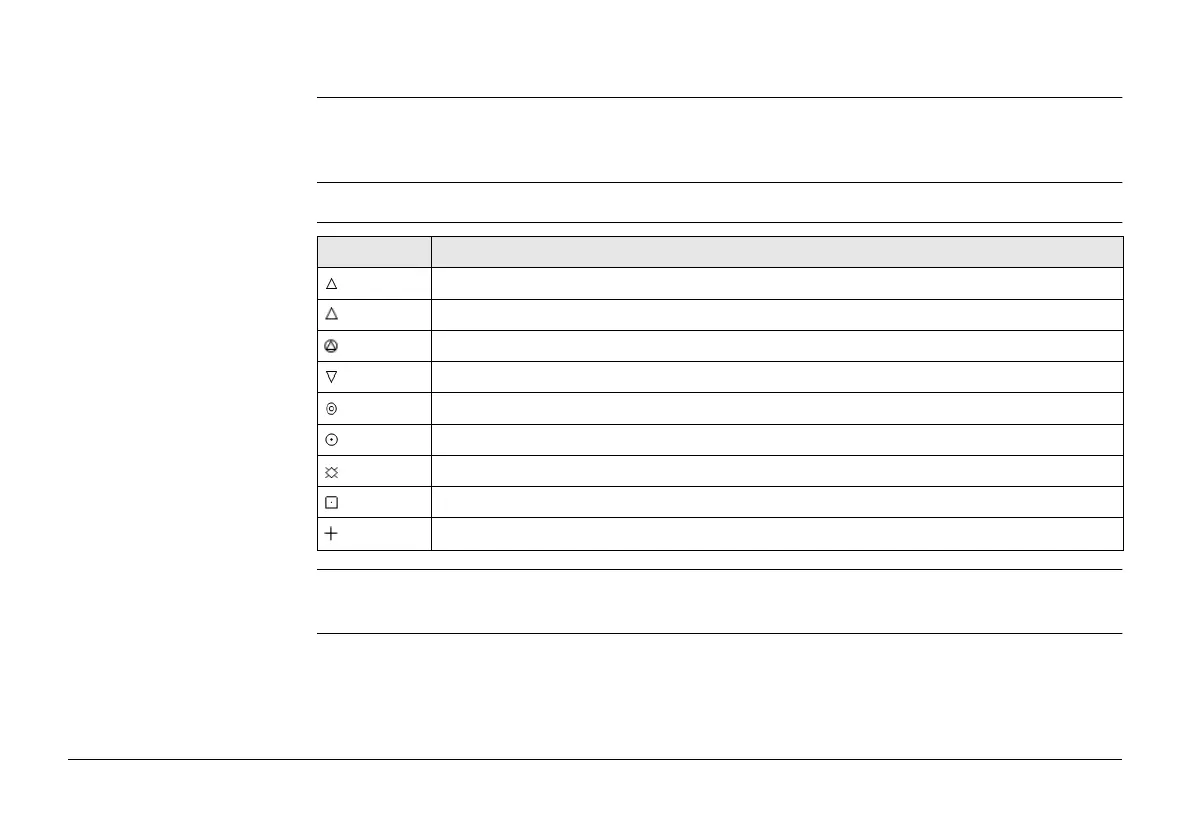
all modes, according to their class. A list of the point types available, and their description,
is available.
Access Press Symbol in Map View Settings, Points page.
Symbols
)
Points of class None or points of class Ctrl/Meas with a height only component cannot be
displayed in MapView.
Symbol Description
3D control point is a point of class CTRL with full coordinate triplet.
2D control point is a position only point of class CTRL.
Adjusted point is a point of class ADJ.
Base point is a point of class REF.
Average point is a point of class AVGE.
Measured point is a point of class MEAS.
Single Point Position uploaded from LGO.
Navigated point is a point of class NAV.
Estimated point is a point of class EST.


 To Next Page