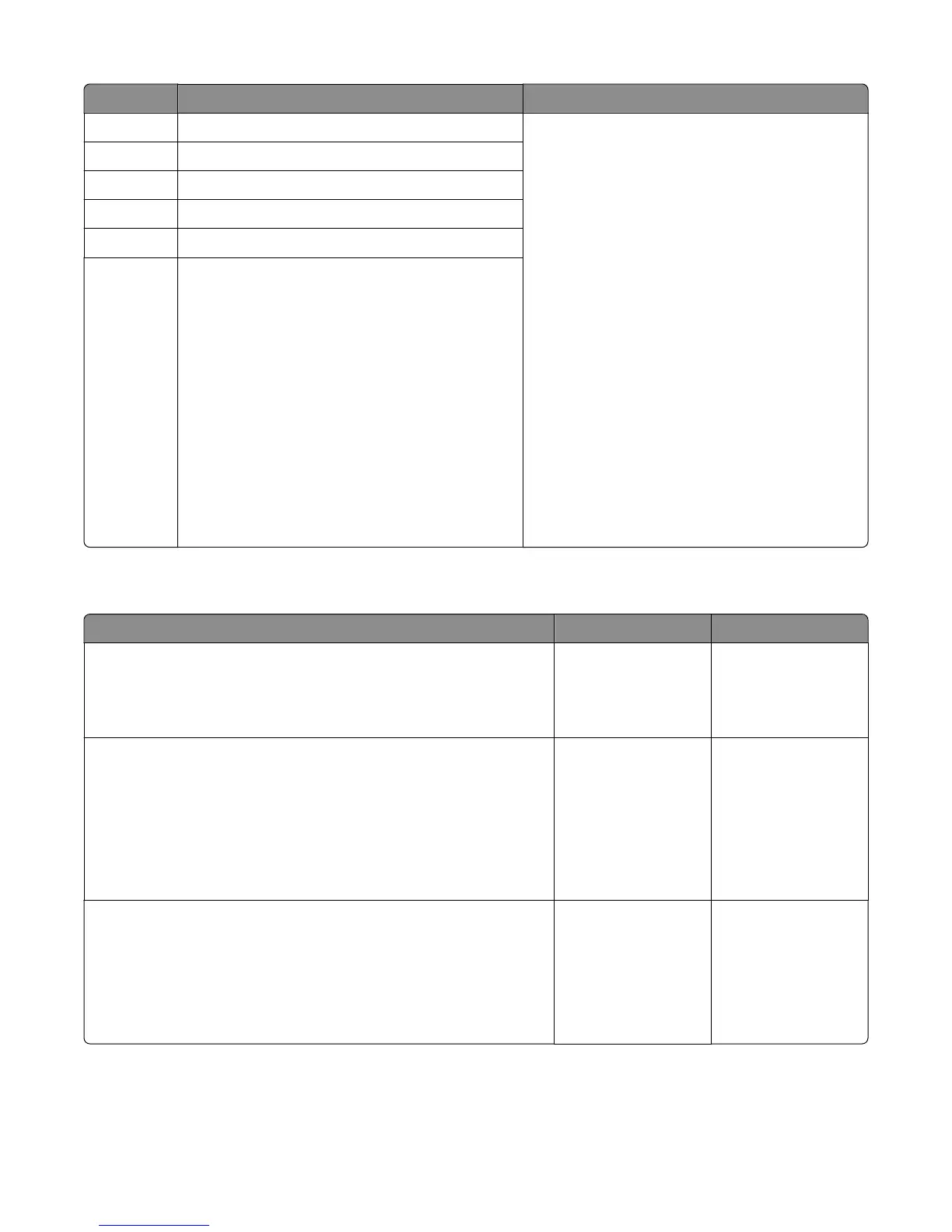
Error code Description Action
245.41 Media feeder motor stall in tray 5
1 POR the printer.
2 Open the media trays and make sure there are
no obstructions on the media path.
3 Check the following:
• Make sure the size of the media loaded is
within specifications.
• Make sure the tray guides are not set too
tight.
• Make sure the tray is not overfilled.
4 If only one option is installed, re‑seat the option
tray.
If
there are multiple options installed, swap
the current option with another matching media
tray to determine the source of the error.
If the error persists, then perform the following
service checks:
•
For 250/550‑sheet trays—go to “250/550-
sheet media tray option jam service check”
on page 152
• For HCIT—go to “HCIT jam service check” on
page 154
245.42
Media feeder motor under‑speed in tray 5
245.43 Media feeder motor did not reach the required speed
245.44 Separator pass through motor stall in tray 5
245.45 Separator pass through motor under‑speed in tray 5
245.46 Separator pass through motor did not reach the
required speed.
250/550-sheet media tray option jam service check
Action Yes No
Step 1
Open the media tray and check the media path.
Is it free of obstructions?
Go to step 2. Remove all
obstructions along the
paper path.
Step 2
Check the pick roller:
• make sure that the rollers are free from contamination and paper dust
• push the pick roller and check if its spring causes it to return to its
default position
Is it free of wear or damage?
Go to step 3. Replace the pick roller.
Go to “Drawer pick
roller removal ” on
page 399.
Step 3
Check the separator roller tires and gears:
• make sure that the rollers are free from contamination
• manually turn the gears and check if it causes the rollers to turn
Is it free of wear or damage?
Go to step 4. Replace the separator
roller. Go to “Media
tray separation roller
removal” on page
398.
4063
Diagnostic information
152



 To Next Page