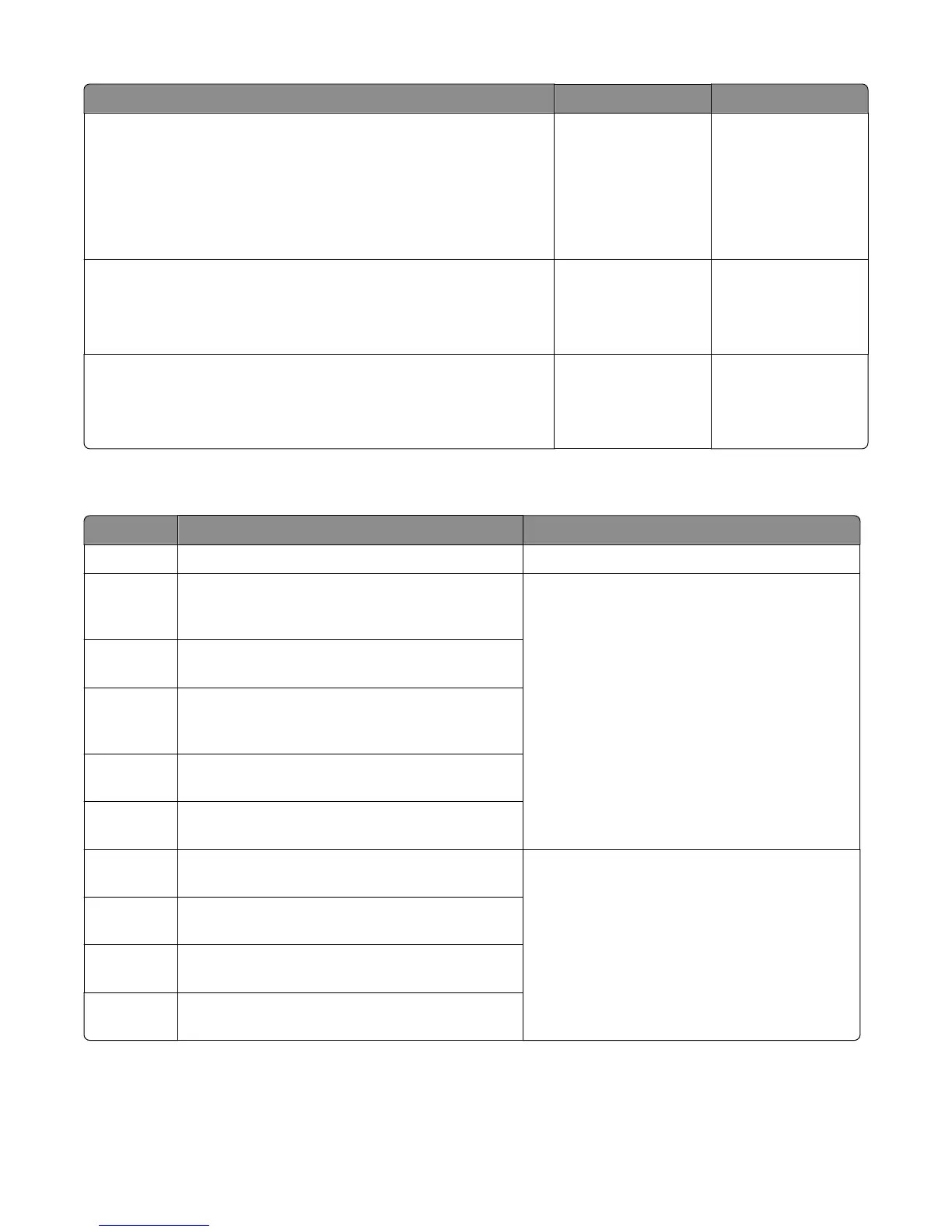
Action Yes No
Step 8
Check the connectors on the controller board. If damaged, then replace
the controller board. See
“HCIT controller PCBA removal” on page 424.
Reseat all connectors on the controller board, then POR the machine.
Does the error remain?
Replace the controller
board. Go to “HCIT
controller PCBA
removal” on page
424
.
If the error remains,
then go to step 9.
The problem is solved.
Step 9
Replace the tray.
Does the error remain?
Go to step 10. The problem is solved.
Step 10
Replace the drawer.
Does the error remain?
Contact the next level
of support.
The problem is solved.
4xx error messages (400‑499.99)
Error code Description Action
400.XX Invalid parameters during output option paper jam
411.01 Media remains detected by the output option
1/output expander sensor (pass through) after power
on.
1 Reseat all the installed output options on the
printer.
2 Open the rear door and clear obstructions along
the paper path.
3 Make sure that the sensors (pass through) are
free from obstructions.
If the problem remains, then go to “Output
expander jam service check” on page 188.
411.03
The media fed did not reach the output option
1/output expander sensor (pass through).
411.05 The media while feeding remains detected by the
output option 1/output expander sensor (pass
through).
411.09 Never received Page In Output from output option
1/output expander
411.10 Invalid Page ID returned by output option 1/output
expander
411.41 Output option 1/output expander main/interface
motor stalled
1 POR the machine.
2 Reseat the output option on the printer.
3 Open the rear door and clear obstructions along
the paper path.
If the problem remains, then go to
“Output
expander failure service check” on page 139.
411.42
Output option 1/output expander main/interface
motor did not reach the required speed.
411.43 Took too long to ramp up main/interface motor in
output option 1/output expander
411.53 Output option 1/output expander main/interface
motor did not reach the required speed.
4063
Diagnostic information
158


 To Next Page