Home
Lexmark
Printer
MS81 Series
Page 498
Lexmark MS81 Series - Page 498
645 pages
Manual
Save Page as PDF
To Next Page
To Next Page
To Previous Page
To Previous Page
Loading...
3
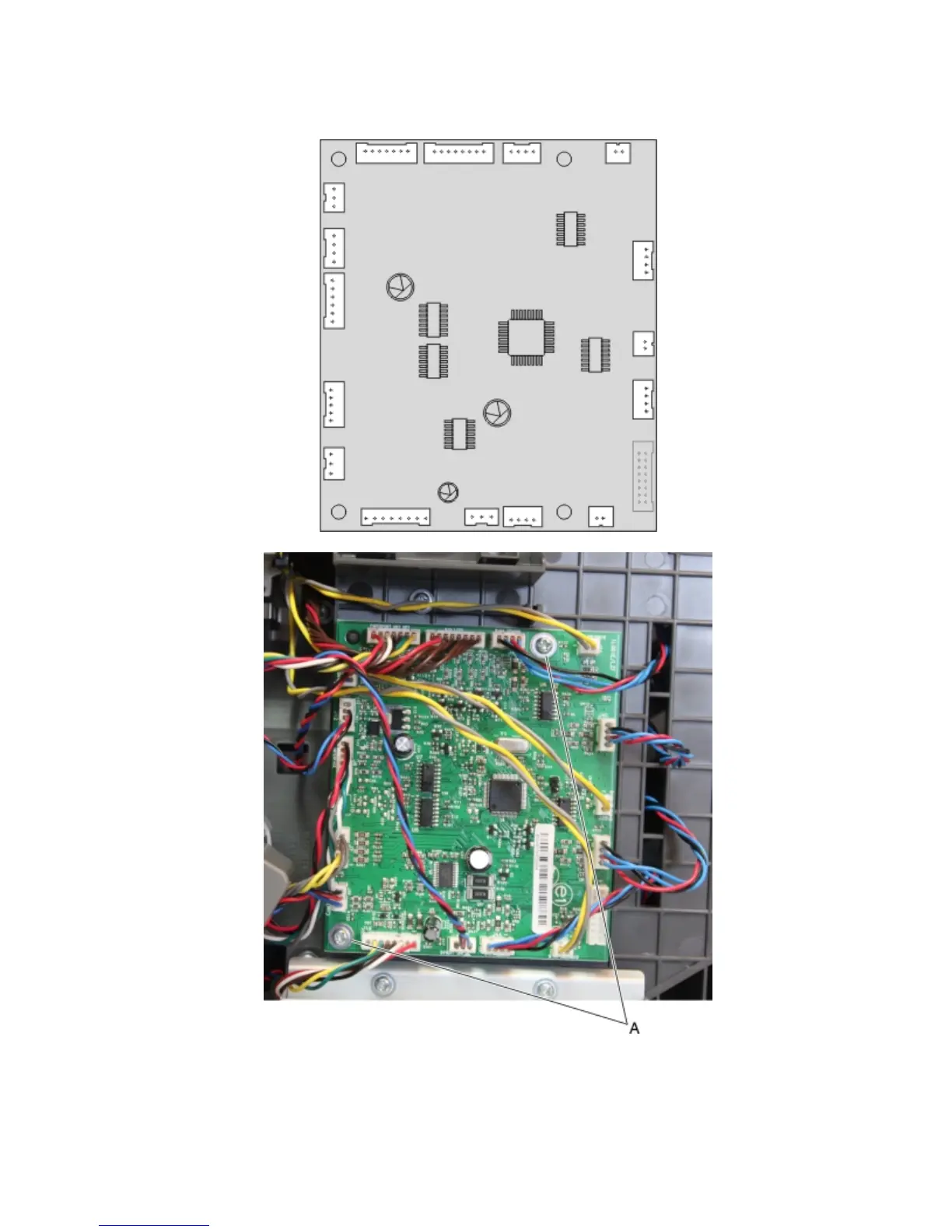
Disconnect all cables (J1B, J5, J4D, J2A, J4C, J2B, J4B, J2C, J4A, J8, J1A, J3B, J7, J6, J12, and J3T), and then remove
the two screws (A) from the controller PCBA.
4
Remove the controller PCBA.
4063
Repair information
498
497
499
Table of Contents
Main Page
Default Chapter
1
Service Manual
1
Product Information
2
Edition Notice
2
Table of Contents
3
Notices and Safety Information
17
Laser Notices
17
Safety
20
Preface
25
Service Manual Conventions
25
General Information
27
Printer Configurations
28
Basic Model
28
Fully Configured Model
28
Paper Guidelines
30
Paper Characteristics
30
Grain Direction
30
Moisture Content
30
Fiber Content
31
Selecting Paper
31
Selecting Preprinted Forms and Letterhead
31
Using Recycled Paper and Other Office Papers
31
Storing Paper
33
Data Security Notice
33
Tools Required for Service
33
Diagnostic Information
35
Troubleshooting Overview
35
Performing the Initial Troubleshooting Check
35
Error Code Number Key
36
Power-On Reset (POR) Sequence
36
Using Safe Mode
37
Safe Mode Print Behavior
37
Fixing Print Quality Issues
37
Initial Print Quality Check
38
Gray Background on Prints
38
Printer Is Printing Blank Pages
39
Printer Is Printing Solid Black Pages
40
Repeating Defects
41
Shadow Images Appear on Prints
41
Skewed Print
42
Streaked Horizontal Lines Appear on Prints
43
Streaked Vertical Lines Appear on Prints
45
Toner Rubs off
46
Paper Jams
46
Understanding Jam Numbers and Locations
47
200-201 Paper Jams
49
Sensor (Input) Static Jam Service Check
53
Sensor (Input) Early Arriving Jam Service Check
53
Sensor (Input) Never- or Late-Arriving Jam Service Check
54
Sensor (Input) Late-Leaving or DID-Not-Clear Jam Service Check
56
Main Drive Motor Control Jam Service Check
57
Printhead Motor Control Jam Service Check
58
Fuser Drive Motor Control Jam Service Check
58
Sensor (Input) Miscellaneous Jam 1 Service Check
58
Sensor (Input) Miscellaneous Jam 2 Service Check
59
Sensor (Input) Miscellaneous Jam 3 Service Check
59
Paper Jams
60
Sensor (Fuser Exit) Static Jam Service Check
62
Sensor (Fuser Exit) Late-Leaving Jam Service Check
62
Sensor (Fuser Exit) Late-Arriving Jam Service Check
63
Sensor (Narrow Media) Late Arriving Jam Service Check
64
Sensor (Narrow Media) Static Jam Service Check
65
Sensor (Fuser Exit) Miscellaneous Jam Service Check
66
Fuser ID Chip Control Jam Service Check
66
Paper Jams
67
Upper Redrive Motor Control Jam Service Check
68
230 Paper Jams
68
Sensor (Duplex Path) Static Jam Service Check
71
Sensor (Duplex Path) Early Arriving Jam Service Check
72
Sensor (Duplex Path) Never- or Late-Arriving Jam Service Check
73
Sensor (Duplex Path) Late Leaving Jam Service Check
74
Duplex Control Jam Service Check
75
Sensor (Duplex Path) Miscellaneous Jam Service Check
75
Sensor (Input) Never-Arriving Jam (Exiting Duplex) Service Check
76
235-239 Paper Jams
76
24X Paper Jams
77
Media Feeder Motor Control Service Check
79
Media Tray 1, Tray Pulled Jam
80
Media Feeder Motor Tray Lift Error Service Check
81
Sensor (Input) Never-Arriving Jam from Tray 1 Service Check
81
250 Paper Jams
82
Sensor (Input) Never-Arriving Jam from MPF Media Tray Service Check
84
41Y.XX Paper Jams
86
43Y.XX Paper Jams
87
451 Paper Jams
88
455-457 Paper Jams
89
User Attendance Messages (0-99.99)
92
Toner Level Sensing Error Check
97
Toner Cartridge Smart Chip Error Service Check
97
Imaging Unit Smart Chip Service Check
98
Fuser Unit Smart Chip Service Check
99
Printer Hardware Errors (100-199.99)
99
Printer Hardware Error Messages(100-199.99)
100
Printhead ID Service Check
104
Printhead Service Check
104
Fuser Drive Motor Service Check
105
Fuser Service Check
105
LVPS Service Check
106
Toner Level Sensing Service Check
106
Main Drive Motor Service Check
107
Media Feeder Service Check
107
Redrive Motor Service Check
108
Duplex Motor Service Check
108
Toner Add Motor Service Check
109
Main Cooling Fan Service Check
109
Cartridge Cooling Fan Service Check
110
LVPS Cooling Fan Service Check
110
HVPS Cooling Fan Service Check
111
Miscellaneous Cooling Fan Service Check
111
Firmware And/Or System Electronics Errors (900-999.99)
111
9Xx Error Messages
112
System Software Error Service Check
115
NVRAM Mismatch Failure Service Check
120
Input/Output Option Hardware Errors
121
3Xx Error Messages (300-399.99)
121
250/550-Sheet Transport Motor Failure Service Check
126
250/550-Sheet Media Feeder Failure Service Check
128
250/550-Sheet Controller Board Failure Service Check
130
HCIT Lift Drive Motor Failure Service Check
131
HCIT Lift Plate Failure Service Check
133
HCIT Transport Motor Failure Service Check
135
HCOE Failure Service Check
137
Mailbox Failure Service Check
138
Output Expander Failure Service Check
139
Input/Output Option Paper Jam Errors
141
Input Option Jam Error Messages (242-245.99)
141
250/550-Sheet Media Tray Option Jam Service Check
152
HCIT Jam Service Check
154
HCIT Source Jam Service Check
156
4Xx Error Messages (400-499.99)
158
Sensor (Mailbox Pass Through) Jam Service Check
167
Mailbox Diverter Jam Service Check
170
HCOE Diverter Jam Service Check
172
Sensor (HCOE Pass Through) Jam Service Check
173
Sensor (Finisher Pass Through) Jam Service Check
175
Finisher Left Tamper Jam Service Check
177
Finisher Right Tamper Jam Service Check
179
Finisher Ejector Jam Service Check
181
Finisher Diverter Jam Service Check
182
Finisher Paddle Jam Service Check
183
Finisher Tray Holder Jam Service Check
185
Stapler Carriage Jam Service Check
186
Output Expander Jam Service Check
188
Sensor (Media in Stapler) Jam Service Check
190
Symptoms
191
Base Printer Symptoms
191
Network Service Check
191
Dead Machine Service Check
194
Option Tray Symptoms
195
250/550-Sheet Media Type Error Service Check
196
250/550-Sheet Tray Undetected Service Check
198
HCIT Incorrect Media Error Service Check
199
HCIT Media Type Error Service Check
201
HCIT Undetected Service Check
203
HCIT Media Low Undetected Service Check
204
Finisher Side Door Error Service Check
206
Mailbox Incorrect bin Exit Service Check
208
Finisher Cartridge Error Service Check
209
Finisher Undetected Service Check
211
Finisher bin Error Service Check
212
Finisher Door Undetected Service Check
213
Stapler Carriage Failure Service Check
215
Finisher bin Media Present Error Service Check
216
Output Expander Error Service Check
218
Service Menus
219
Using the Printer Control Panel
219
Menus List
220
Diagnostics Menu
220
Entering Diagnostics Mode
221
Registration
221
Print Tests
222
Print Quality Pages (Prt Quality
222
Hardware Tests
222
Panel Test
222
Button Test
223
DRAM Test
223
Serial Wrap Test
224
USB HS Test Mode
224
Duplex Tests
225
Quick Test
225
Top Margin
226
Sensor Test
226
Motor Test
226
Duplex Feed 1
227
Duplex Feed 2
227
Input Tray Tests
227
Feed Tests
227
Sensor Tests
228
Output bin Tests
228
Feed Tests
228
Feed to All Bins
228
Sensor Test
229
Diverter Test
229
Finisher Tests
229
Staple Test
229
Hole Punch Test
230
Feed Test (Finisher)
230
Finisher Sensor Test
230
Base Sensor Test
231
Device Tests
231
Quick Disk Test
231
Disk Test/Clean
232
Flash Test
232
Printer Setup
232
Defaults
232
Printed Page Count
233
Permanent Page Count (Perm
233
Processor ID
233
Engine Setting [X]
234
Edge to Edge
234
Parallel Strobe Adjustment (Par 1 Strobe Adj)
234
Ep Setup
234
EP Defaults
234
Fuser Temperature (Fuser Temp)
234
Fuser Page Count
235
Warm up Time
235
Transfer
235
Charge Roll
235
Print Contrast
235
Automatic Darkness Adjust (Auto Dark Adj)
236
Gap Adjust
236
Menu Settings Page
236
Reports
236
Clear Log
237
Display Log
237
Event Log
237
Installed Licenses
237
Print Log
237
Exit Diags
238
Configuration Menu
238
Entering Configuration Mode
239
Reset Roller Kit Counter
239
Roller Kit Counter Value
239
Event Log
240
Menu Settings Page
240
Print Quality Pages
240
Reports
240
Size Sensing
240
Download Emuls
241
Panel Menus
241
PPDS Emulation
241
Safe Mode
241
Energy Conserve
242
Factory Defaults
242
Paper Prompts
242
Action for Prompts
243
Envelope Prompts
243
Disk Encryption
244
Erase All Information on Disk
244
Jobs on Disk
244
A5 Loading
245
Font Sharpening
245
Require Standby
245
Wipe All Settings
245
Key Repeat Initial Delay
246
Key Repeat Rate
246
LES Applications
246
UI Automation
246
Clear Custom Status
247
Clear Supply Usage History
247
USB Speed
247
Wiper Message
247
Automatically Display Error Screens
248
USB Pnp
248
Entering Invalid Engine Mode
248
Entering Recovery Mode
248
Accessing the Network SE Menu
249
Service Engineer Menu
249
Accessing the Service Engineer (SE) Menu
249
Service Engineer (SE) Menu
249
Repair Information
251
Removal Precautions
251
Handling ESD-Sensitive Parts
251
Controller Board/Control Panel Replacement
252
Esf Solutions Backup
252
Ribbon Cable Connectors
253
Zero Insertion Force (ZIF) Connectors
253
Horizontal Top Contact Connector
254
Horizontal Bottom Contact Connector
257
Vertical Mount Contact Connector
260
Horizontal Sliding Contact Connector
263
Low Insertion Force (LIF) Connector
266
Adjustments
267
Media Aligner Roller Adjustment
269
Polygon Printhead Mechanical Registration Adjustment
270
Removal Procedures
272
Base Printer - Cover Removals
273
Left Cover Removal
273
Rear Lower Cover Removal
276
Top Cover Removal
278
Right Cover Removal
278
Rear Door Removal
280
Base Printer- Front Removals
281
Duplex Exit Diverter Removal
282
Front Door Removal
284
Inner Guide Deflector Removal
285
Laser Printhead Removal
286
Left Inner Cover Removal
291
Media Aligner Roller Removal
293
Media Turn Guide Removal
295
Media Vertical Guide Removal
296
MPF Feeder Lift Plate Removal
298
MPF Pick Roller Removal
301
MPF Tray Removal
303
Right Inner Cover Removal
304
Sensor (Input) Removal
305
Sensor (Toner Density) Removal
307
Transfer Roller Left Arm with Cable Removal
308
Transfer Roller Right Arm Removal
309
Transfer Roller Removal
312
Base Printer - Rear Removals
314
Duplex Motor Removal
314
Fuser Removal
316
Fuser Access Door Removal
318
Left Frame Pivot Removal
319
Output bin Sensor Cover Removal
320
Right Frame Pivot Removal
321
Sensor (Rear Door Interlock) Removal
322
Base Printer - Top Removals
322
Sensor (Standard bin Full) Removal
323
Standard bin Cover Removal
324
Upper Redrive Removal
325
Base Printer - Bottom Removals
327
Duplex Front Flap Removal
328
Duplex Rear Flap Removal
329
Left Frame Extension Removal
330
Media Tray Removal
332
Pick Roller Assembly Removal
333
Right Frame Extension
334
Sensor (Duplex Path) Removal
335
Sensor (Tray 1 Media Out) Removal
336
Separator Roller Assembly Removal
338
Base Printer - Left Removals
339
Controller Board Removal
340
Controller Board Access Cover Removal
341
Controller Board Access Shield Removal
342
Fuser Drive Motor Removal
342
Main Cooling Fan Removal
344
Main Drive Motor Removal
345
Media Feeder Removal
347
PCBA Housing Removal
348
Sensor (Control Panel Interlock) Removal
350
Sensor (Pick Roller Position) Removal
351
Toner Add Motor Removal
352
Base Printer - Right Removals
353
Cartridge Cooling Fan Removal
354
Duplex Cooling Fan Removal
355
HVPS Removal
356
LVPS Removal
357
Control Panel Removals
360
4.3-Inch Tilting Display Removal
360
7-Inch Tilting Display Removal
363
Control Panel Removal (2.4-Inch Screen)
366
Control Panel Removal (4.3-Inch Screen, 7-Inch Screen)
372
Control Panel Board (2.4-Inch Tilting Display) Removal
378
Control Panel Board (4.3-Inch Tilting Display) Removal
381
Control Panel Board (7-Inch Tilting Display) Removal (Ms812De)
384
Control Panel Front Cover Removal
387
Control Panel Latch Removal
389
Control Panel Left Bezel Removal
390
Left Control Panel Hinge Removal
391
Right Control Panel Hinge Removal
394
250/550-Sheet Media Tray Option Removals
397
250/550-Sheet Media Tray and Drawer Assembly Removal
397
Media Tray Separation Roller Removal
398
Media Tray Assembly Removal
398
Media Tray Front Cover Removal
398
Drawer Pick Roller Removal
399
Sensor (Pick Roll Position) Removal
399
Drawer Assembly Rear Cover Removal
400
Drawer Assembly Left Cover Removal
401
Drawer Controller PCBA Removal
402
Drawer Upper Interface Cable Removal
403
Drawer Lower Interface Cable Removal
404
Drawer Media Feeder Removal
405
Drawer Transport Motor Removal
407
Sensor (Drawer Pass Through) Removal
408
Sensor (Pick) Removal
410
High Capacity Input Tray Option Removals
413
HCIT and Drawer Assembly Removal
413
HCIT Removal
414
HCIT Drawer Assembly Removal
414
HCIT Separator Roll Assembly Removal
415
HCIT Media Guide Removal
415
HCIT Front Cover Removal
416
HCIT Pick Arm Assembly Removal
418
HCIT Drawer Assembly Rear Cover Removal
419
HCIT Drawer Assembly Left Cover Removal
420
HCIT Drawer Assembly Right Cover Removal
422
HCIT Controller PCBA Removal
424
HCIT Top Cover Assembly Removal
425
HCIT Lift Drive Motor Removal
427
HCIT Drawer Assembly Interface Cable Removal
429
Sensor (HCIT Media Low) with Flag Removal
430
Sensor (Pick Roll Position) Removal
431
Sensor (HCIT Pick) Removal
433
HCIT Media Feeder Removal
434
Output Expander Option Removals
437
Output Expander Assembly Removal
437
Output Expander Top Cover Removal
437
Output Expander Rear Door Removal
438
Output Expander Sensor Cover Removal
440
Sensor (Media bin Full) with Flag Removal
440
Output Expander Right Cover Removal
441
Output Expander Left Cover Removal
443
Output Expander Controller PCBA Removal
445
Lower Interface Cable Removal
446
Upper Interface Cable Removal
446
Spring with String Removal
448
High Capacity Output Expander Option Removals
450
High Capacity Output Expander Assembly Removal
450
HCOE Top Cover Removal
450
HCOE Rear Door Removal
451
HCOE Sensor Cover Removal
452
Sensor (HCOE Media bin Full) with Flag Removal
453
HCOE Right Outer Cover Removal
453
HCOE Left Cover Removal
455
HCOE Controller PCBA Removal
457
HCOE Lower Interface Cable Removal
459
HCOE Upper Interface Cable Removal
460
Staple Finisher Option Removals
461
Staple Finisher Assembly Removal
461
Stapler Rear Door Removal
462
Stapler Right Cover Removal
464
Sensor (Cartridge Door Interlock) Removal
466
Stapler Door Close Limit Switch Removal
466
Stapler Carriage Assembly Removal
469
Stapler Left Cover Removal
470
Stapler Cartridge Access Door Removal
472
Stapler Top Cover Removal
472
Stapler Spring with String Removal
474
Media Stack Flap (Right) Removal
475
Media Stack Flap (Left) Removal
476
Standard Output bin LED Removal
479
Sensor (Finisher bin Media Present) Removal
480
Tamper Motor (Right) Removal
481
Tamper Motor (Left) Removal
481
Tamper Drive Belt Removal
482
Paddle Drive Motor Removal
483
Stapler Lower Interface Cable Removal
484
Stapler Controller PCBA Removal
486
Sensor (bin Full Send) Removal
487
Sensor (bin Full Receive) Removal
488
Mailbox Option Removals
490
Mailbox Assembly Removal
490
Mailbox Top Cover Removal
490
Mailbox Rear Door Removal
490
Mailbox Right Cover Removal
492
Mailbox Spring with String Removal
493
Mailbox Solenoid Removal
494
Mailbox Left Cover Removal
496
Mailbox Controller PCBA Removal
497
Sensor (Mailbox Divert Motor) Removal
499
Mailbox Lower Interface Cable Removal
500
Mailbox Upper Interface Cable Removal
502
Mailbox Divert Motor Removal
502
Mailbox Media bin Full Flag Removal
504
Sensor (Mailbox bin Full Receive) Removal
505
Mailbox Belt Removal
508
Mailbox Output bin LED Assembly Removal
510
Component Locations
515
Connectors
515
Controller Board
515
Maintenance
523
Inspection Guide
523
Scheduled Maintenance
525
Fuser Maintenance Kits
525
Replacing Fuser Maintenance Kits
525
Identifying the Type of Fuser Used in the Printer
526
Resetting the Roller Kit Counter
527
Preventive Maintenance
528
Device-Specific Preventive Maintenance
528
Lubrication Specification
528
Cleaning the Printer
528
Parts Catalog
530
Legend
530
Assembly 1: Covers
533
Assembly 2: Paper Path
535
Assembly 3: Fusers
537
Assembly 4: Electronics
539
Assembly 5: Drive Motors
543
Assembly 6: Duplex
545
Assembly 7: Frame
547
Assembly 8: Control Panel
549
Assembly 9: Paper Tray
553
Assembly 10: Input Options
555
Assembly 11: 250-Sheet Tray Option
557
Assembly 12: 550-Sheet Tray Option
559
Assembly 13: High Capacity Input Tray Option 1
561
Assembly 14: High Capacity Input Tray Option 2
563
Assembly 15: Output Options
565
Assembly 16: Output Expander Option
567
Assembly 17: High Capacity Output Expander Option
569
Assembly 18: Staple Finisher Option 1
571
Assembly 19: Staple Finisher Option 2
573
Assembly 20: Mailbox Option 1
575
Assembly 21: Mailbox Option 2
577
Assembly 22: Miscellaneous
579
Assembly 23: Power Cords
581
Appendix A: Printer Specifications
583
Power Specifications
583
Operating Clearances
584
Acoustics
584
Environment
585
Processor
585
Appendix B: Options and Features
587
Available Internal Options
587
Input Options Supported
587
Output Options Supported
587
Physical Specifications (Options)
588
Options Configurations
588
Appendix C: Theory of Operation
589
Models Ms81X and Ms71X Paper Path Rollers and Sensors
590
Models Ms81X and Ms71X Sensors
591
Functions of Main Components - Need a New Title
591
Media Tray Assembly
591
Rear Media Guide
591
Side Media Guide
591
Media Tray
592
Media Feeder
592
Sensor (Media Size)
592
Sensor (Pick Roller Position)
592
Multi-Purpose Feeder (MPF)
592
MPF Pick Roller
593
MPF Pick Solenoid
593
Registration
593
Sensor (Input)
594
Duplex
594
Sensor (Duplex Path)
594
Transfer
594
Transfer Roller
594
Printhead
595
Fuser Components
596
Heat Belt (Belt Fuser)
597
Heat Belt (Hot Roll Fuser)
597
Pressure Roll
597
Heater Lamp (Hot Roll Fuser)
597
Thermistor
597
Sensor (Fuser Exit)
598
Sensor (Narrow Media) (Hot Roll Fuser Only)
598
Exit
598
Sensor (Standard bin Full)
598
Drive
599
Main Drive Motor Assembly
599
Fuser Drive Motor Assembly
599
Toner Add Motor Assembly
599
Redrive Motor Assembly
599
Sensors
600
Electrical Components and Controller
600
Sensor (Control Panel Door Interlock)
601
Sensor (Rear Door Interlock)
601
Main Cooling Fan
601
Cartridge Cooling Fan
601
Duplex Cooling Fan
601
Fuser Cooling Fan (Hot Roll Printer Only)
601
LVPS Board Assembly
602
HVPS Board Assembly
602
Controller Board
602
Xerographic and Print Cartridge Components
602
Supported Paper Sizes, Types, and Weights
606
Auto Density Sensing
606
Paper Types and Weights Supported by the Printer
606
Paper Sizes Supported by the Printer
607
Paper Sizes, Types, and Weights Supported by the Optional Finishers
608
Output Options Theory
610
Output Expander Theory
610
High Capacity Output Expander Theory
611
Mailbox Theory
612
Staple Finisher Theory
613
Appendix D: Acronyms
615
Acronyms
615
Index
617
Part Number Index
625
Part Name Index
635
Related product manuals
Lexmark MS81x
659 pages
Lexmark MS810
364 pages
Lexmark MS821
970 pages
Lexmark MS823
226 pages
Lexmark MS826
226 pages
Lexmark MS810n
17 pages
Lexmark MS812dn
17 pages
Lexmark MS810de
19 pages
Lexmark MS811dn
17 pages
Lexmark MS810 Series
361 pages
Lexmark MS811 Series
2 pages
Lexmark MS812 Series
2 pages


 To Next Page