2-20 PCWS 2015 Setup Guide - 2nd Edition
PCWS 2015 BIOS
Advanced
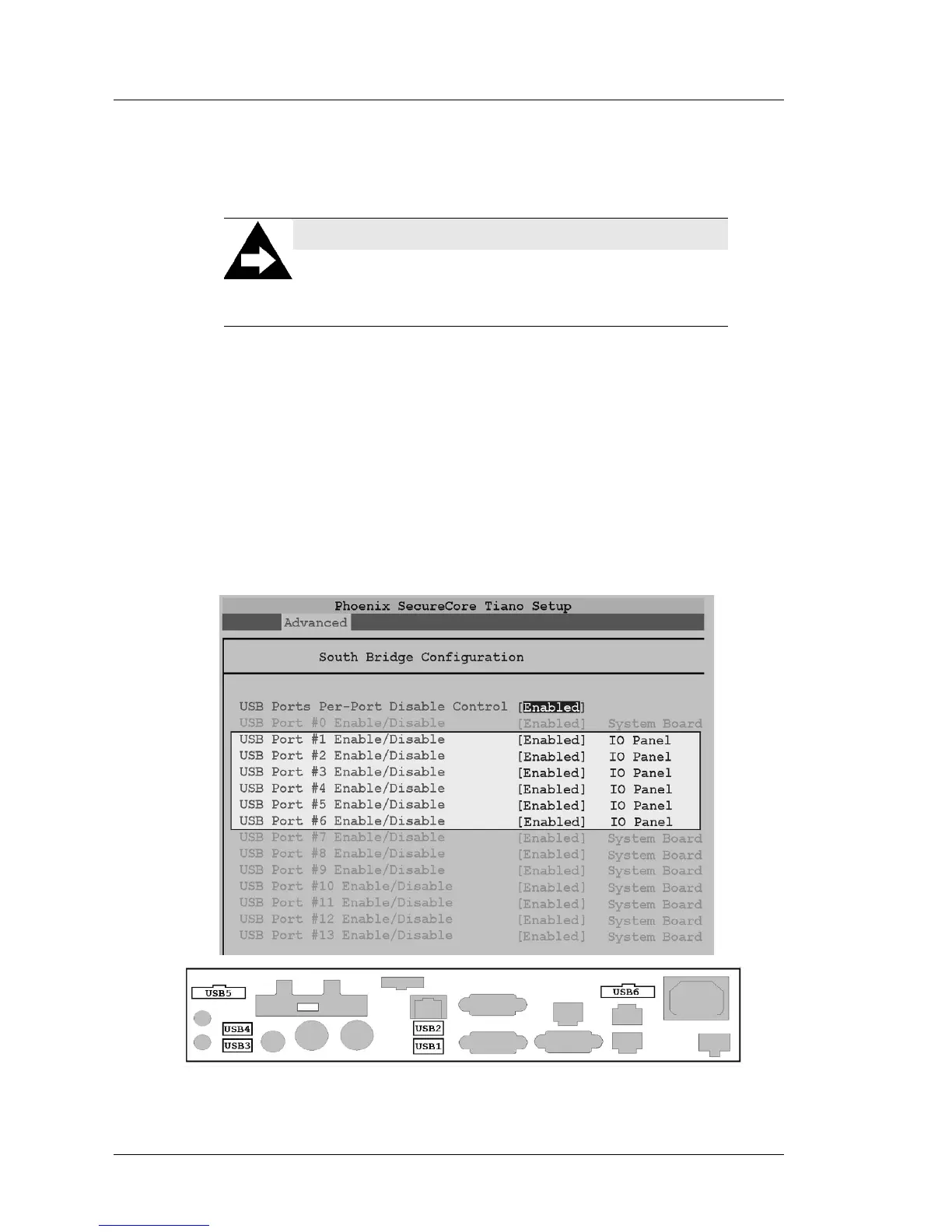
USB Ports Per-Port Disable Control [Enabled]
This selection controls the PCWS 2015 USB ports on Revision C or D
System Boards. By default, all USB ports are enabled.l
• To disable IO Panel USB Port(s) scroll to the USB Port Per-Port
Disable Control field and select [Enabled].
• The screen expands to show all 14 USB Ports as shown in the upper
half of Figure 2-9. IO Panel Ports USB1 through USB6 are
highlighted to distinguish them from System Board USB ports.
• To disable one or more IO Panel USB ports, scroll to the individual
field and press Enter. Disabling internal USB ports is not
recommended.
• Select [Disable] from the pop-up, then [Enter]. When complete, press
[F10], [Y] to save and restart.
Figure 2-9: USB Per Port Enable/Disable USB1 - USB6
NOTICE:
Updating the PCWS 2015 BIOS or using the ‘Load Setup
Defaults’ selection from the BIOS Exit menu re-enables
all USB ports.



 To Next Page