Morgana DocuMaster MFC - Service Manual 195
6. General Procedures - MFC Test Program Description
6.4 MFC Test Program Description
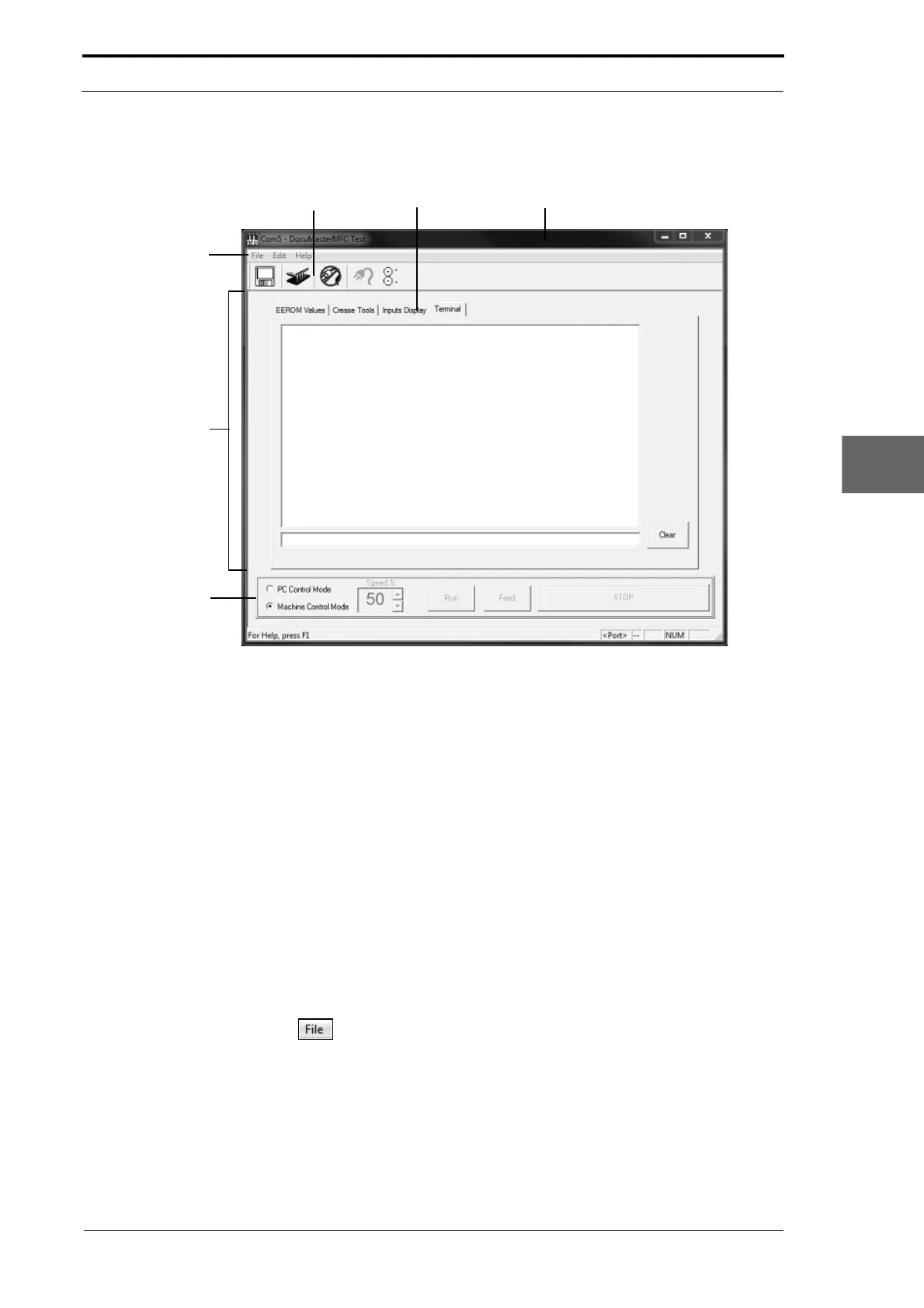
To ol B a r
Page Tabs Title Bar
Menu Bar
Control Bar
Information Area
Figure 6.2 Parts of the MFC Test Program Window
6.4.1 The Title Bar
The title bar shows the program name and connection port information when the
program is connected to the MFC.
The title bar also contains the window maximise, minimise
and close buttons.
6.4.2 The Menu Bar
The Menu Bar shows the available menus that are used to manage the MFC Test
program.
The File Menu
Click on
to open the ‘File’ Menu The File drop down menu lists three options:
(1) Save Terminal Screen
• Saves the current terminal session.
(2) Save Terminal Screen As...
• Creates a terminal session log txt.file in a location of your choice.
(3) Exit
• Closes the MFC Test Program.



 To Next Page