7. Electrical and Control System - PC Configuration Problems
248 Morgana DocuMaster MFC - Service Manual
7.10 PC Configuration Problems
7.10.1 Install Hyperterminal on a Vista or Windows 7 Operating System
Hyperterminal is a program known as a terminal emulator. A terminal emulator
connects your computer to other remote computers. Hyperterminal was available freely
on Windows 95 and Windows XP operating systems. However, Microsoft did not
supply Hyperterminal with its Vista or Windows 7 operating systems.
If you have used Hyperterminal before
and would like to continue using Hyperterminal
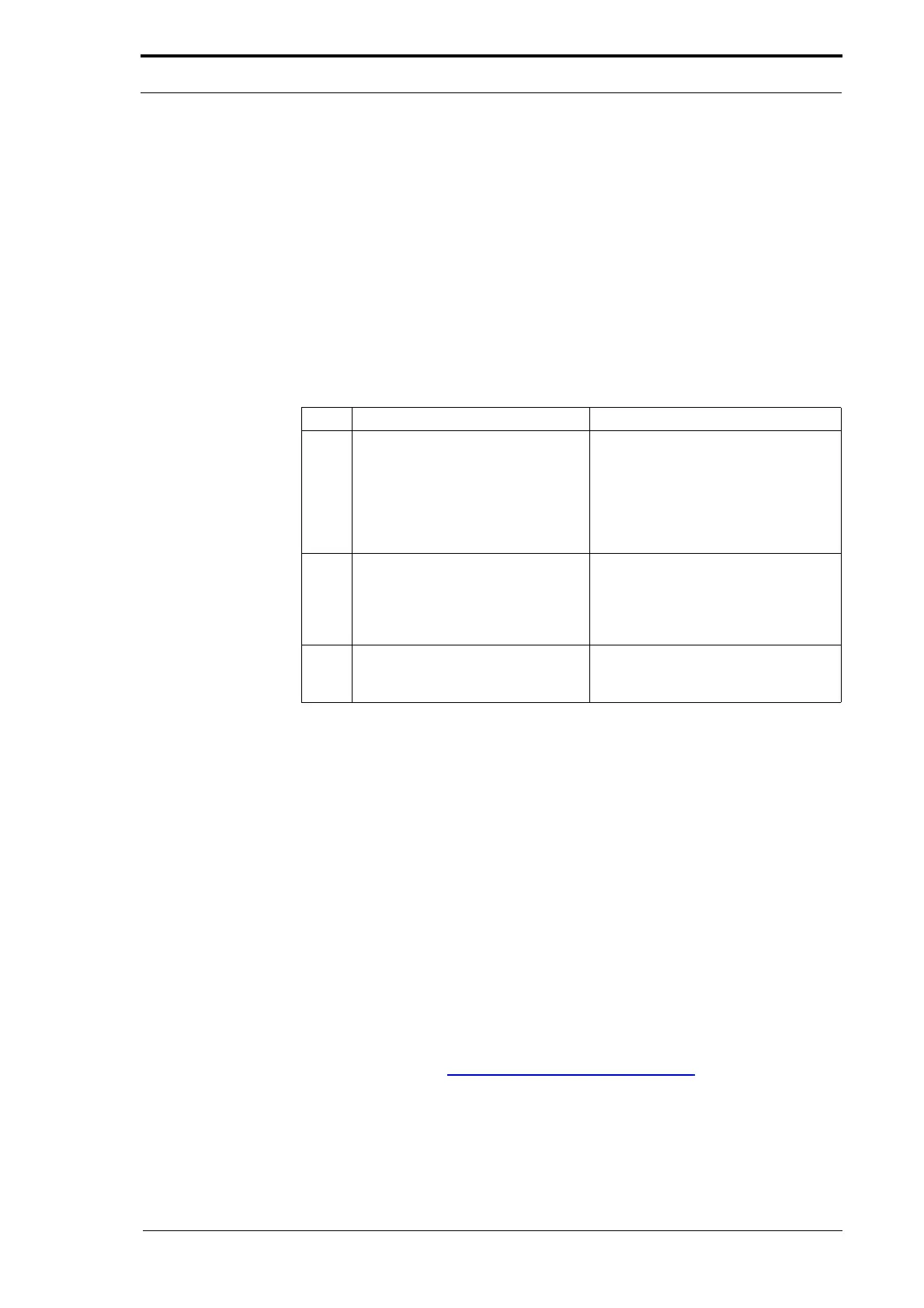
with a Vista or Windows 7 operating system you can. You will need access to a
computer with a Windows 95 or Windows XP operating system.
Step Action Information
1 Create a new folder on your
computer
.
On a 32-bit computer:
• C:\Program Files\Hyperterminal
On a 64-bit computer:
• C:\Program Files (x86)
\Hyperterminal
2 From Windows XP copy the
Hyperterminal files:
hypertrm.exe
hypertrm.dll
hypertrm.chm
Windows XP file locations:
C:\Program Files\windows NT\
C:\WINDOWS\System32\
C:\WINDOWS\HELP\
3 Paste the Hyperterminal files
into
the new Hyperterminal folder on
your computer.
Alternative terminal emulator programs are available. Many of these are open source
and can be freely downloaded from the internet.
7.10.2 Setting the Network Port Number Range (Vista and Windows 7)
Microsoft has changed the network port number range for Windows Vista and Windows
7. This causes a problem when updating GUI software via TFTP using the download
option within the boot menu. The download fails with the following message:
<TFTP Download Failed. TFTP Connection Failure ?>
The new network port numbers are outside the
range expected by the CPU. To work
correctly, the port number must be less than 32768.
For further information on this issue refer to the Microsof
t Help and Support article
929851 at:
http://support.microsoft.com/kb/929851/
The solution is shown below:
This procedure forces Windows to only allocate port numbers between 31000 and
31
999.



 To Next Page