4.8.11.1
Removing the Existing Coiled Cord Cable
Procedure:
1. Rotate the locking collar at the base of the microphone in a counterclockwise direction until it stops.
2. Pull out the cord and away from the base of the microphone.
3. Install the new coiled cord GMKN4072_ in a reverse order of removal.
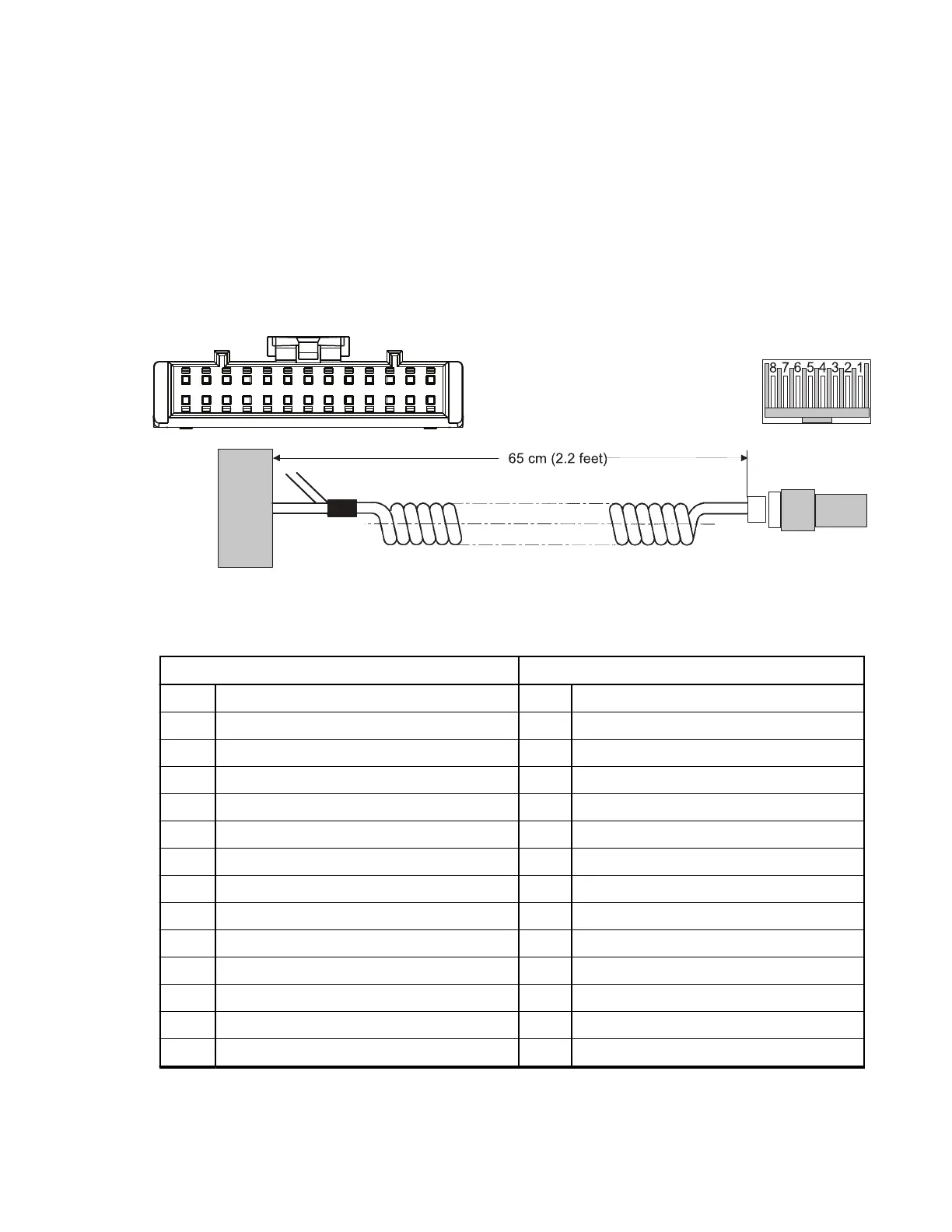
Part Number: GMKN4072_, Length: 65 cm (2.2 ft)
Figure 84: Pin Assignment of Cable from Accessory Connector to Microphone Housing
Table 92: Pin Assignment of Cable from Accessory Connector to Microphone Housing
To Accessory Connector (left) To Microphone Housing (right)
1 nc 1 nc
... ... 2 nc
11 nc 3 PTT (white)
12 GND (black) 4 EXT_MIC (blue)
13 EXT_MIC (blue) 5 GND (black)
14 nc 6 HOOK (red)
15 nc 7 nc
16 nc 8 nc
17 EXT_PTT (white)
18 nc
19 HOOK (red)
20 nc
... ...
26 nc
MN009998A01-AA
Chapter 4: Connectors and PIN Assignment
121



 To Next Page