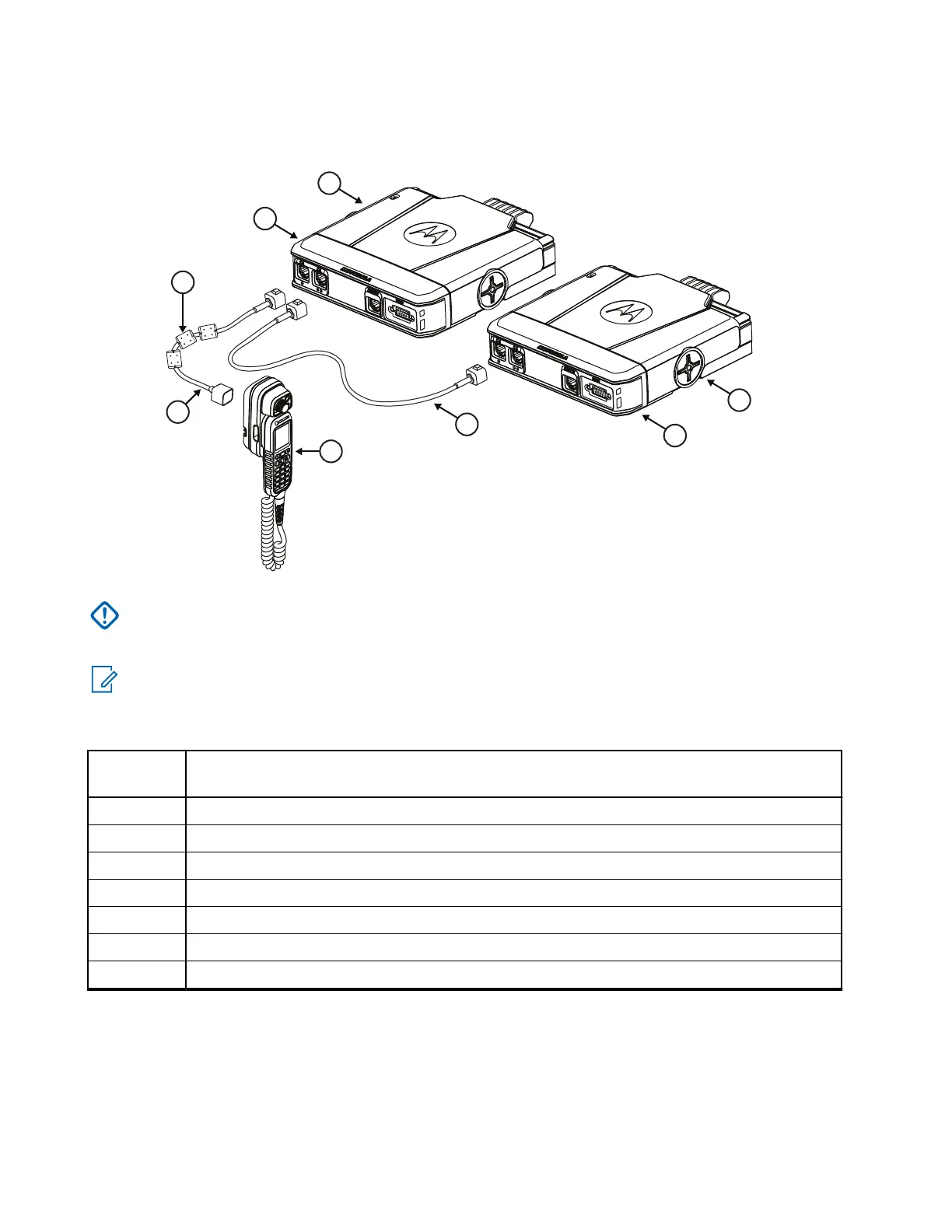
Figure 16: Multi-Radio Control Installation with TSCH
IMPORTANT: If you enter a message on one control head, all buttons except the Emergency button is
disabled on the other control head. You can turn off your radio using the Power Off button of the inactive
control head.
NOTE: For Multi-Radio Control installations, the Emergency Hot Mic and Ambience Listening functions
require a Visor Microphone to connect to the rear of each radio.
Table 39: Configurations – Graphics Description
Annota-
tion
Description
1 Transceiver
2 Dual Remote Expansion Head – PMLN8597_
3 Telephone Style Control Head (TSCH)
4 Remote Ethernet Control Head (RECH) – IP54 or IP67
5 Ferrite Clamps – 91012044001
6 Remote RJ50 Ethernet Cable or IP67 RECH RJ50 Ethernet Cable
7 Mobile to Mobile Ethernet Cable, 3 m – PMKN4177_
MN009998A01-AA
Chapter 3: Radio Installation
50



 To Next Page