120
A
Softkey Codes/Screen Messages
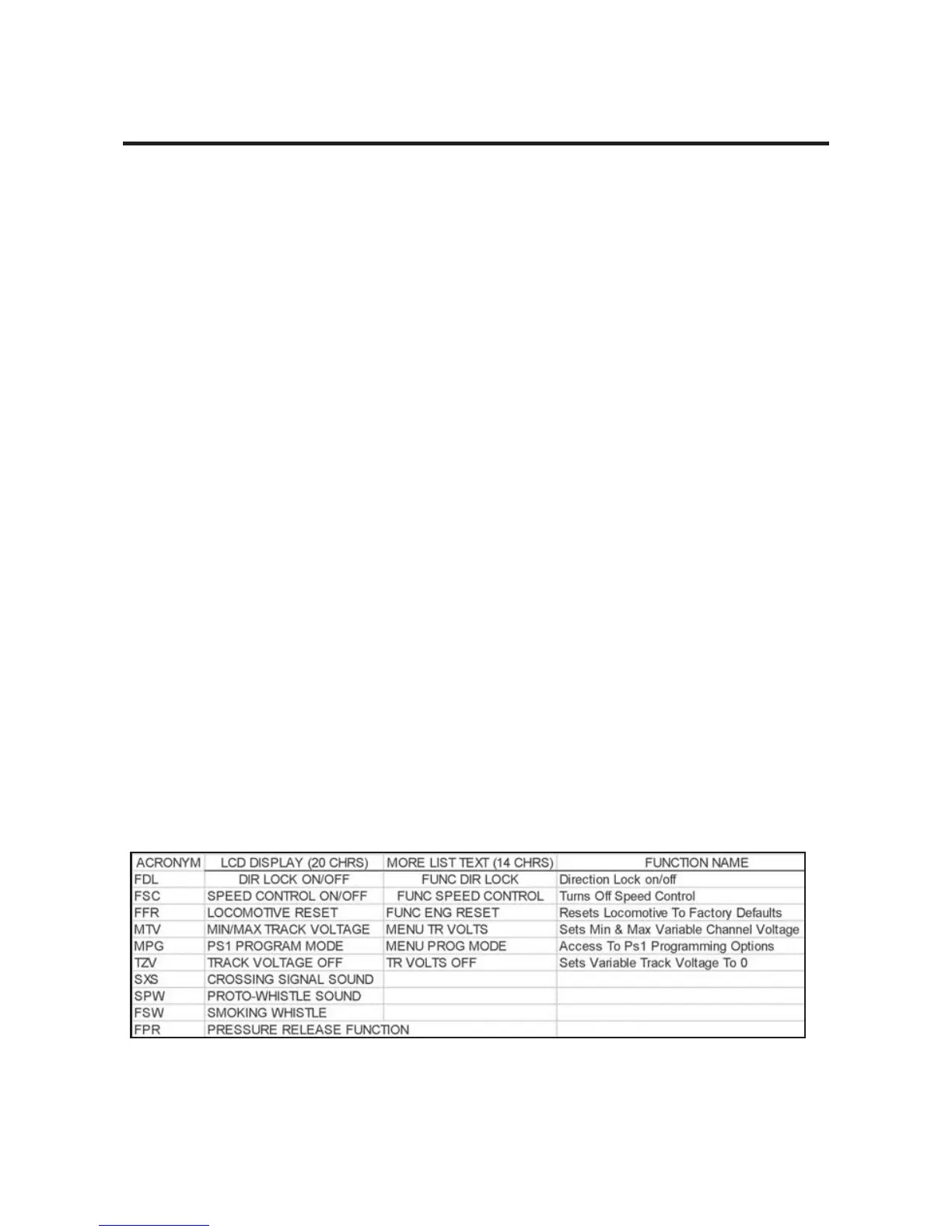
The following charts detail the meaning behind the 3-digit code visible above the soft-
key numbers S1 - S5 on the DCS Remote. The first chart details the codes found when
using the TR button. The second chart features the codes visible when operating a Ps2
engine with operating pantographs. The third chart includes all the features found in all
Ps2 engines. Each chart contains four columns. The first column lists the softkey Code.
The second column contains the 20 character description of the code that will be visible
in the DCS LCD screen when the softkey button is pressed. The third column contains
the 14 character description of the code that is visible when the MORE softkey button is
depressed on the DCS Remote (when operating Ps2 engines). When activated, the
MORE button reveals all of the active softkey functions for the given engine in a list.
The list can be reordered as detailed earlier in this manual. The final column contains a
more readable description of each softkey function.
DCS Remote Icon List
BATT - Low Remote Battery Indicator
(C) - Protocast is active
(D) - Doppler is Active
(L) - Engine is displayed is a Lash-Up
*(M) - External Microphone is active
(P) - Playing back a previously recorded playback session
(R) - Recording a playback session
(T) - Remote is tethered to TIU
(Z) - Z4K track is being controlled
*(M) This feature disables all functionality of the TIU EXCEPT the microphone.
DCS Command System User’s Guide



 To Next Page