DCS Command System User’s Guide
Menu Operations - Systems
TIU Setup
This menu is used to manage TIUs that
can be controlled via the DCS handheld.
TIUs are assigned addresses 1-5 (up to
five TIUs per handheld). The system
automatically assigns every TIU to address
1 when power to the TIU is first applied.
If adding additional TIUs, you must re-
address the current TIU if it is still listed
as TIU 1 to the next open TIU Address
Number. If you fail to re-address the
original TIU from TIU Address 1 before
hooking up and powering the new TIU, all
associations (AIUs and Locomotives) of
the original TIU will be lost. Follow the
Edit TIU Address directions below.
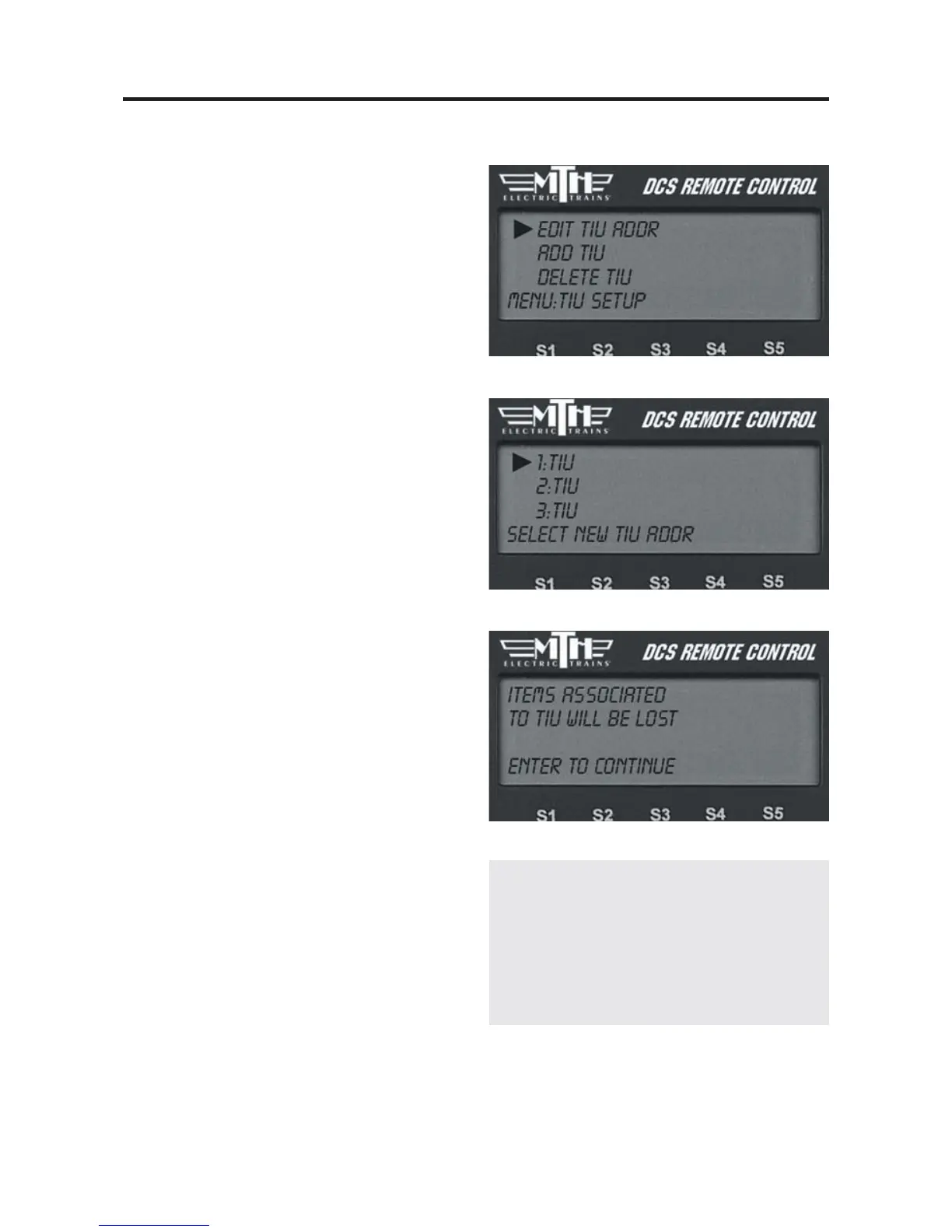
Edit TIU Address
1. Scroll and press to select the current
address of the TIU you want to re-
address.
2. The LCD will list the available TIU
addresses. Press the thumbwheel to select
the new address number
Delete TIU
1. Scroll to the address number of the
TIU you want to delete from your system
and press to select it.
2. The LCD will issue a warning that all
items associated with that TIU (including
tracks, AIUs, and accessories and switches
connected to those AIUs) will be lost.
Press the thumbwheel to confirm the
deletion.
72
Note: If for some reason you want to replace
one TIU with another, afteradding the new
TIU, readdress the TIU you want to replace to
the new TIU address. This will prevent you
from having to re-enter all accessories, etc., from
the beginning.



 To Next Page