DCS Command System User’s Guide
Quick Start: Command Mode
Accessing the Locomotive
When a Proto-Sound 2.0 engine is placed on a track con-
nected to a TIU, the DCS system will bring it up in com-
mand mode by default. Because DCS command opera-
tion differs in some fundamental ways from conventional
operation, please read this section in full before running
your trains in command mode.
With a single M.T.H. Proto-Sound 2.0 engine (and tender
if the engine has one) on the track and voltage applied to
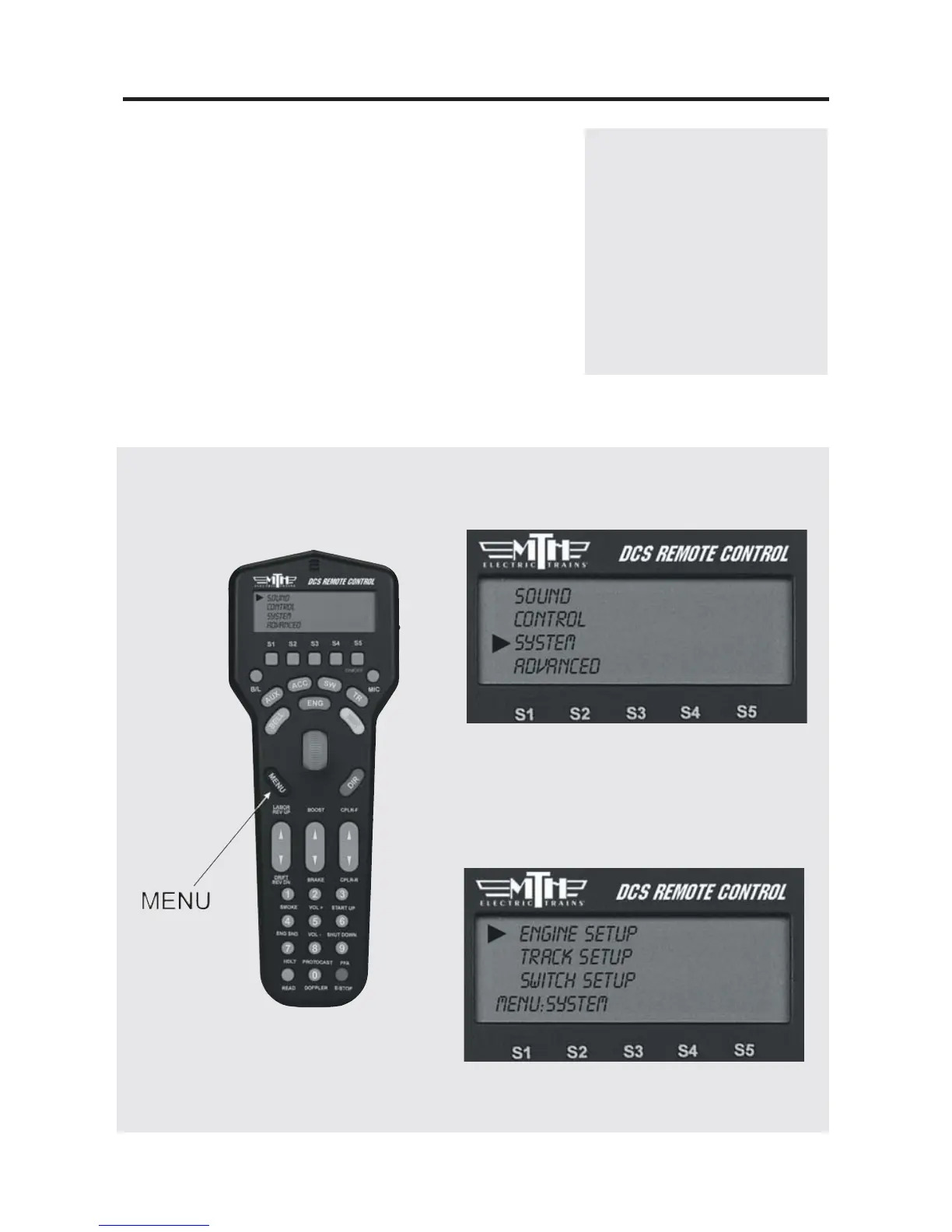
the track, press the Menu Button and complete the steps
diagrammed below.
17
NOTE: When you first power
up the track, your Proto-Sound
2.0 locomotive remains silent
and dark. This is normal; it is
in Command Mode and will
not start up until you tell it to.
The instructions below will tell
you how to access and operate
that locomotive.
Note: Pressing the S2 Softkey
under S/U provides a shortcut to the
Engine Setup Menu
1. Press the Gray MENU
button to bring up the four
main menus in the DCS system.
2. Using the thumbwheel, scroll down the
menu list until you arrive at System.
3. Press the thumbwheel to enter the
System Menu. Your screen should reveal
at the bottom that you are in the System
Menu.



 To Next Page