DCS Command System User’s Guide
Introduction To DCS
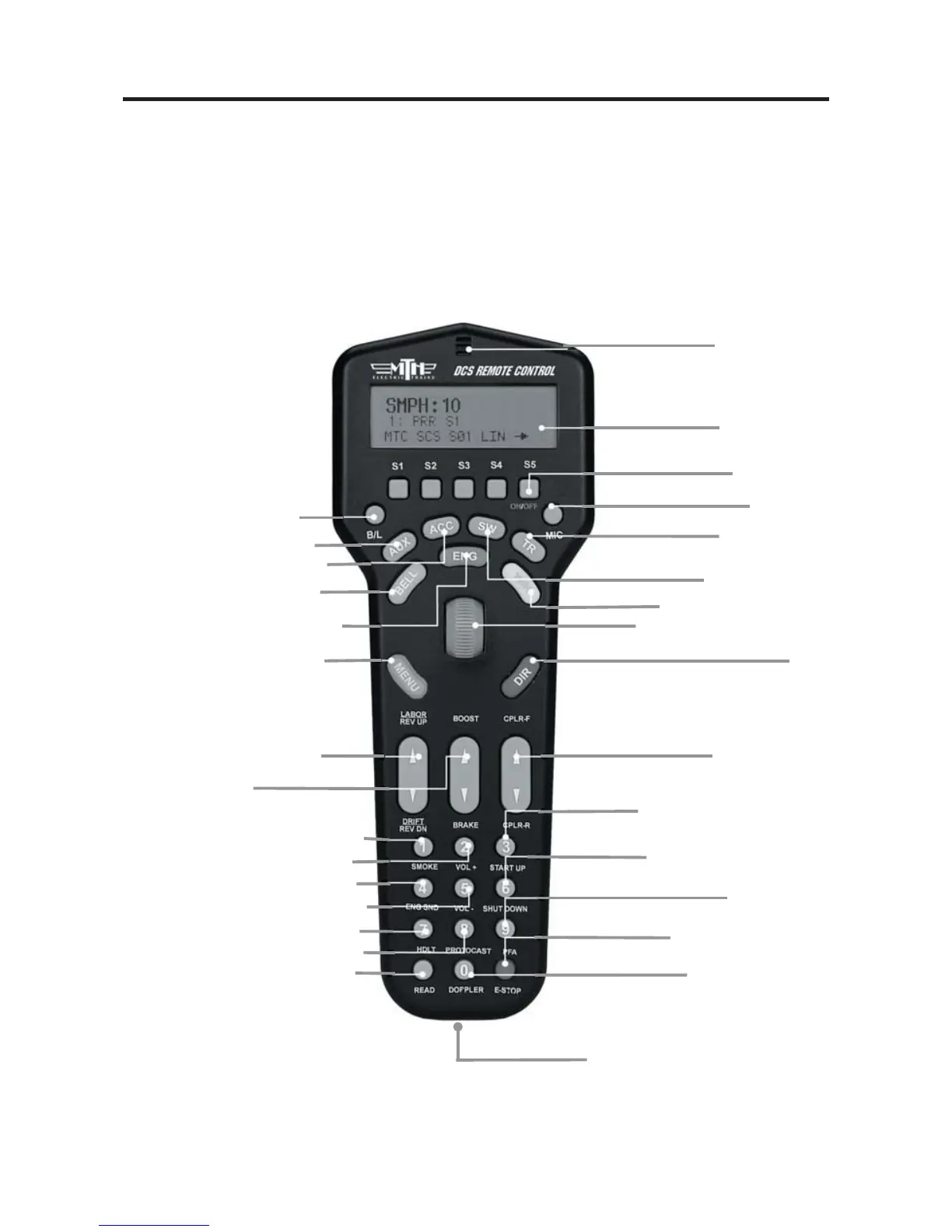
DCS Remote Control
This is the device you will use the most when controlling your trains. It communicates
with the TIU via a 900MHz signal in much the same manner as your cordless phone
communicates with its base. The remote does not talk directly to the locomotive or
accessory you are controlling.
7
B/L - Screen backlight on/off
AUX - Auxiliary menu
ACC - Accessory menu
BELL - Rings bell
ENG - Engine menu
(to select and control engines)
MENU - Access 4 main menus
Sound, Control, System, Advanced
LABOR/REV UP OR DRIFT/REV DN
Makes an engine sound like
it's working harder or easier
BOOST/BRAKE
Temporarily Raises or Lowers Speed
SMOKE - Turns smoke unit on & off
VOL+ - Globally increases all sounds
VOL- - Globally decreases all sounds
ENG SND - Silences engine sounds
HDLT - Turns headlights on & off
PROTOCAST - Activates Proto-Cast™
READ - Search for TIUs, AIUs and
Proto-Sound
®
2.0 Engines on the track
DOPPLER - Activates
Proto-Doppler™
E-STOP - Cuts power to
all tracks
PFA - Activates
Passenger/Freight Sounds
SHUT DOWN - Deactivates
all sound, smoke & lights
START UP - Activates sound,
smoke & lights
Programming Port - Tether
attaches between remote and TIU for
programming new software features
CPLR-F/CPLR-R
Fires front & rear couplers
THUMBWHEEL - Throttle &
selection (scroll & press) tool
DIR -
Changes locomotive direction
W/H - Blows whistle/horn
SW - Switch menu
TR - Track menu
(Access various tracks / blocks on your layout)
MIC - Turns
Proto-Dispatch™ on & off
MICROPHONE
LCD DISPLAY
SOFTKEYS -
Activate locomotive features



 To Next Page