DCS Command System User’s Guide
47
Menu Operations - Sound
Auto Coupler
You can now elect to have the coupler
slack sounds play automatically every time
an engine pulls away from a stop, or only
when you press the SCS soft key.
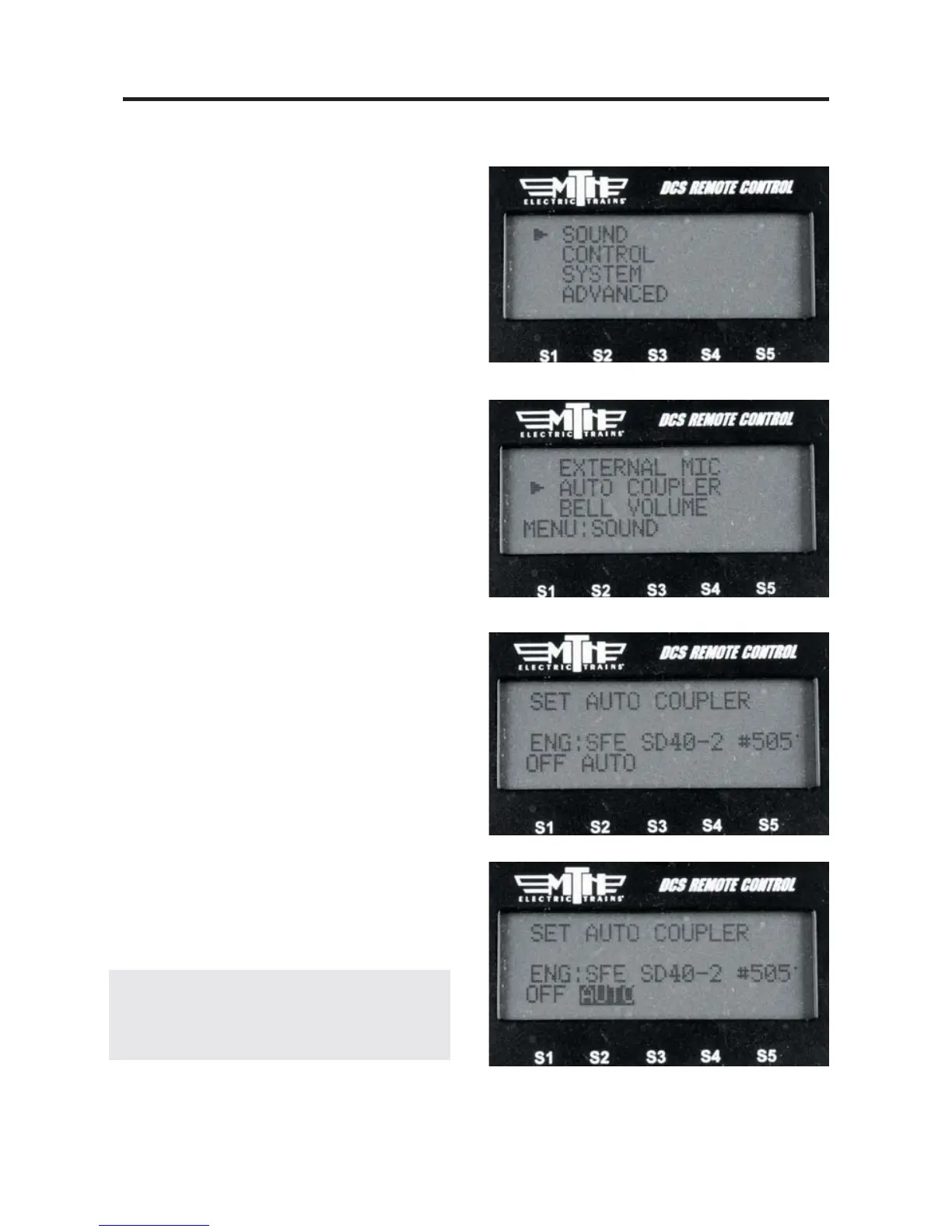
1. Press MENU
2. Select SOUND
3. Scroll to AUTO COUPLER and press
Select .
4. Select either OFF or AUTO. AUTO
will enable the feature for ALL engines in
the remote.
5. Press the ENG button and select a
DCS engine.
6. Ensure the engine has been start-up.
7. Scroll the thumbwheel up to get the
engine moving and as soon as it pulls away
it will play the Coupler Slack sound.
8. Once the engine goes back to 0sMPH
then pulls away at any speed the sound will
play again. It will work this way on every
DCS engine in your remote until you shut
it off.
9. To turn the feature Off, repeat steps
1-3 and press the OFF softkey.
NOTE : This setting is a global setting, so when
you make this setting it will affect all engines in
the DCS Remote.



 To Next Page