DCS Command System User’s Guide
One-Touch Locomotive Operation
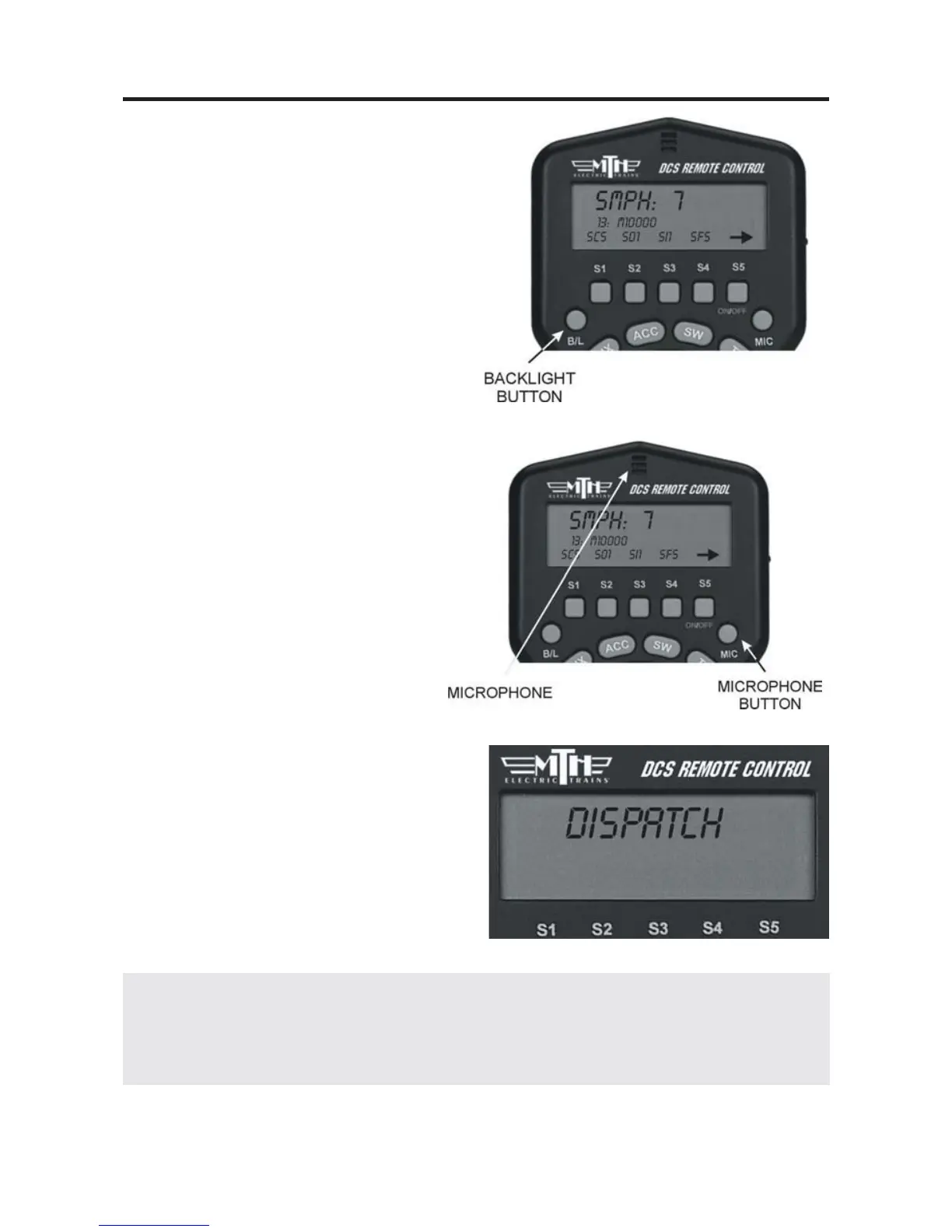
B/L:
Press this button to turn Backlight of
LCD screen ON & OFF. The back-
light is helpful for low light, “night-
time” operation, but it will reduce bat-
tery life, so you may want to turn it
off when operating in a well-lit room.
MIC:
Press and hold this button to turn
Proto-Dispatch on. Release the but-
ton to turn Proto-Dispatch off. The
remote has a microphone built in, so
you can hold the MIC button down
and speak into the top of the remote
to project your voice through the
engine’s speaker. Your voice will be
laid over the engine sounds to simu-
late a real announcement. When the
button is depressed, “Dispatch” will
appear on the LCD screen.
Alternately, you can plug a micro-
phone into the TIU’s “Proto-Dispatch
(Mic)” port and use that microphone.
35
DCS Tip: The handheld MIC broadcasts its signals over an AM frequency to incor-
porate a realistic static sound one might encounter with radios. If you want static free
voice recordings, you should plug a microphone into the TIU and select that option
for your voice-over recording clips.



 To Next Page