DCS Command System User’s Guide
One-Touch Locomotive Operation
The most frequently accessed features can be controlled via the One-Touch buttons on
the DCS remote handheld. These buttons will affect only the locomotive selected and
shown in the LCD. You can watch the LCD screen to see which engine you are address-
ing and what features you are turning off and on.
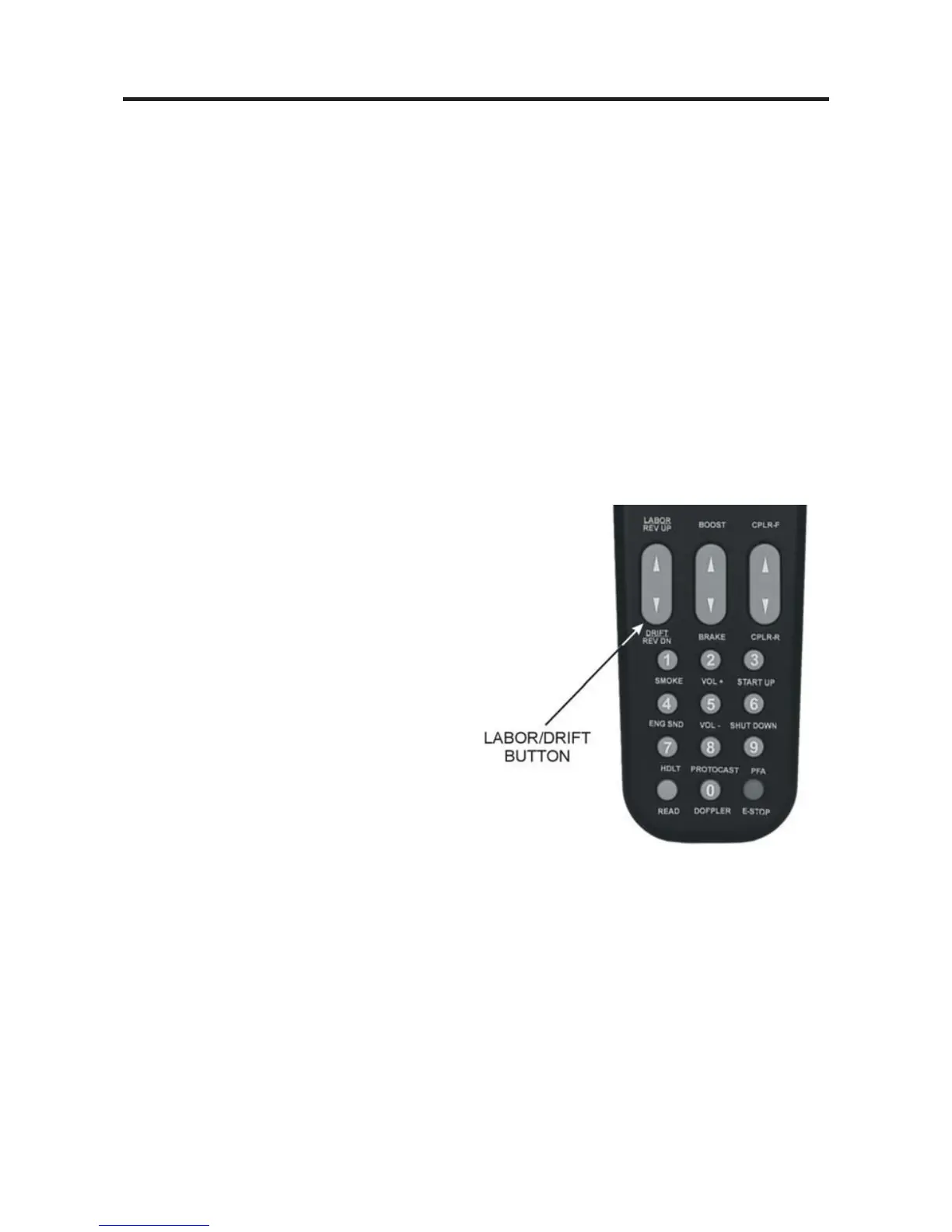
Many of the most commonly used One-Touch buttons are located on the lower half of
the remote:
LABOR REV UP / DRIFT REV DN:
Press the top end of the rocker switch to change engine sounds to labored chuff or high-
er engine revolution levels without changing speed. You will see an increase of smoke
output corresponding to the sounds of the engine working harder, and the LCD will
show Labored Chuff/Rev Up.
OR
Press the bottom end of the rocker switch
to change engine sounds to drift or lower
revolution levels without changing speed.
You will see a decrease of smoke output
corresponding to the sounds of the engine
working less hard and the LCD will show
Drift Chuff/Rev Down.
For diesel or electric engines, the change in
sound will become more pronounced with
each press of the switch until you reach the
system limit of eight REV levels. The
sound level will remain as you set it until
you press the opposite end of the rocker
switch to return the engine sounds step-by-
step to normal. The system automatically
resets the sound REV level to a protoypical level based on the engine’s speed.
For steam engines, as soon as you release the button, the sound will return to the normal
steam chuff setting.
25



 To Next Page