DCS Command System User’s Guide
Menu Operations - Sound
Doppler Loop
This feature allows you to set the Doppler effect to play every time the programmed
engine passes a certain point on your layout. M.T.H. sound engineers measured this for a
scientifically accurate Doppler pitch change: the growing and fading of the sounds are
exactly what a scale person would hear as a scale train passed by.
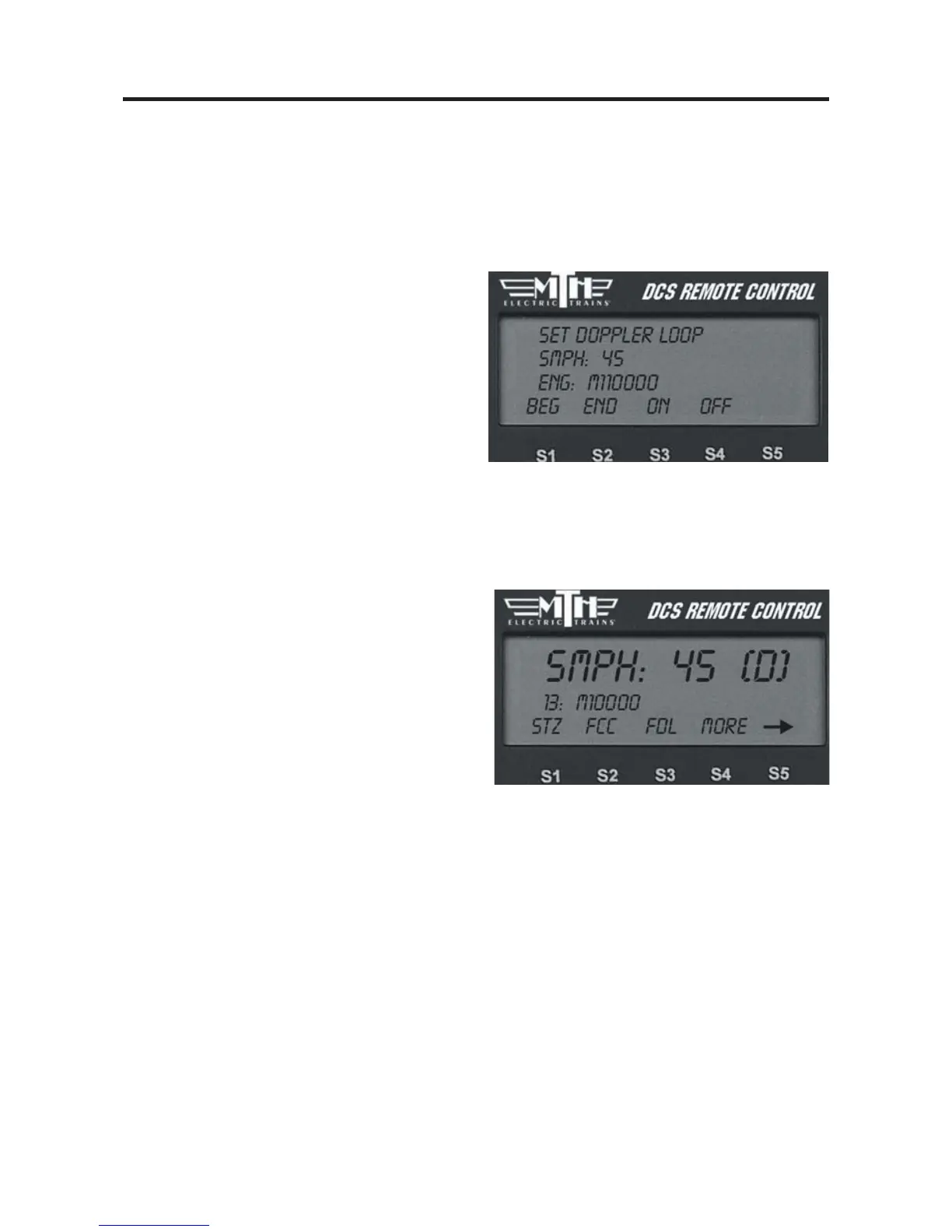
1. Place the engine at the location on the
layout where you want the sound to peak
during Doppler sound. Press the S1 key
under “Beg” to highlight it and press the
thumbwheel to tell the engine to begin
measuring its Doppler loop. Run the
engine around the loop.
2. Stop the engine at the exact same location on the layout where you pressed “Beg.”
Press the S2 key under “End” to highlight it, then press the thumbwheel to stop measur-
ing the loop.
3. To operate your Doppler Loop, make
sure the engine is where it was when you
pressed “Beg” and press the S3 key under
“On,” and run the engine like normal.
The sound effects will fade out as you pull
away from the peak spot on your layout
and will swell as you round the circle and
return to the peak spot. The locomotive
will continue to operate in consecutive
Doppler cycles until you press the S4 key
under “Off.” A (D) appears on the LCD
to indicate when Doppler is turned on.
48



 To Next Page