2 Product overview VJ-1624 OPERATION MANUAL
2-6
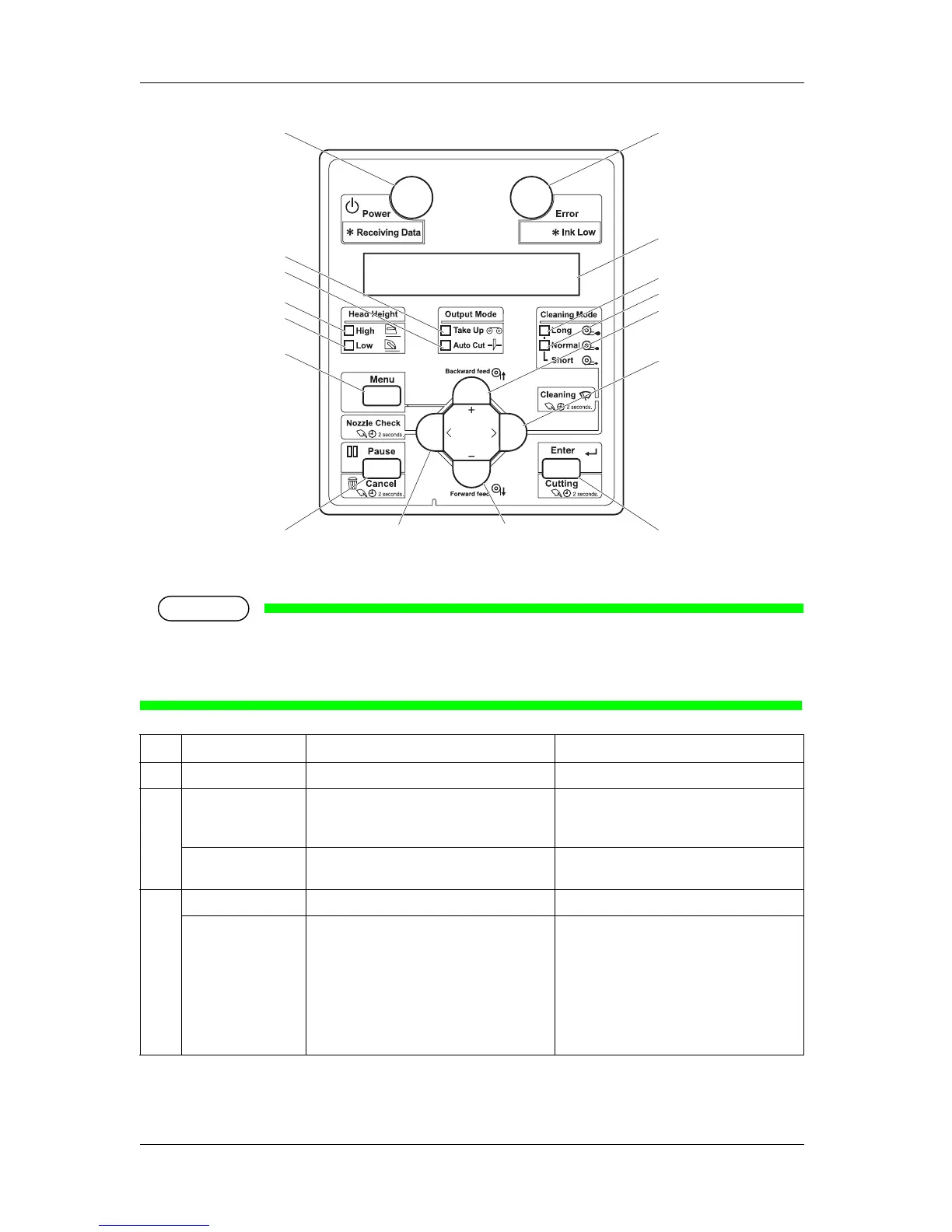
(1) Operation keys
NOTE
• The operation keys are assigned with different functions and names depending on printer status
(Normal or Setup menu display).
For details about printer status, refer to "2.3 Printer status".
No. Name Normal Setup menu display
1 [Menu] key Shifts to the Setup menu. Shifts from Setup menu display to Normal.
2 [Enter] key Restarts printing when the printing is
suspended.
• Select the menu to be set, and shifts to the
next hierarchy.
• The setting is determined and saved.
[Cutting] key Cuts the media when pressed for more than
two seconds.
—
3 [Pause] key Pauses printing. —
[Cancel] key • When printing:
When pressed for more than two seconds,
forcefully terminates printing and deletes
one file of the remaining data.
• When receiving or analyzing data:
When pressed for more than two seconds,
deletes the data already received and
analyzed.
• Returns to the previous menu hierarchy.
Changes made in the setting are discarded.
• Shifts from Setup menu display to Normal.
8, 9
3
15
17
16
6
5
11
12
1
13
14
10
27
4














 To Next Page